
qml主窗口背景梯度
qml主窗口背景梯度
提问于 2018-09-18 06:48:25
我有这样的想法。我想有一个梯度,而不是单色背景在myApp主窗口。
我测试了不同的代码方式,但没有成功。
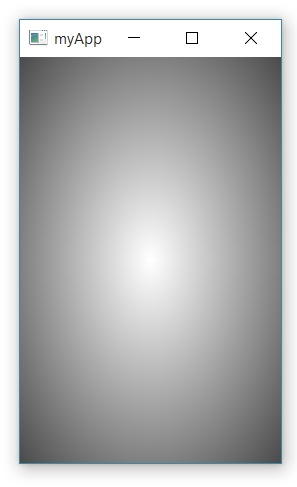
结果总是一样的。要么背景为纯白色,要么显示黑白渐变(见图)。
你能告诉我怎么做才对吗?我需要更深的东西。此外,也许在其他颜色。但这只显示了一切都是黑白的。
import QtQuick 2.9
import QtQuick.Controls 2.2
import QtGraphicalEffects 1.0

ApplicationWindow {
id: window
visible: true
width: 425
height: 850
title: qsTr("myApp")

/*
Item
{
    Gradient
    {
        GradientStop {position: 0.000;color: Qt.rgba(1, 0, 0, 1);}
        GradientStop {position: 0.167;color: Qt.rgba(1, 1, 0, 1);}
        GradientStop {position: 0.333;color: Qt.rgba(0, 1, 0, 1);}
        GradientStop {position: 0.500;color: Qt.rgba(0, 1, 1, 1);}
        GradientStop {position: 0.667;color: Qt.rgba(0, 0, 1, 1);}
        GradientStop {position: 0.833;color: Qt.rgba(1, 0, 1, 1);}
        GradientStop {position: 1.000;color: Qt.rgba(1, 0, 0, 1);}
    }
}

//totaly not works
Rectangle
{
    Gradient
    {
        GradientStop {position: 0.000;color: Qt.rgba(1, 0, 0, 1);}
        GradientStop {position: 0.167;color: Qt.rgba(1, 1, 0, 1);}
        GradientStop {position: 0.333;color: Qt.rgba(0, 1, 0, 1);}
        GradientStop {position: 0.500;color: Qt.rgba(0, 1, 1, 1);}
        GradientStop {position: 0.667;color: Qt.rgba(0, 0, 1, 1);}
        GradientStop {position: 0.833;color: Qt.rgba(1, 0, 1, 1);}
        GradientStop {position: 1.000;color: Qt.rgba(1, 0, 0, 1);}
    }
}


//totaly not works
Gradient
{
    GradientStop {position: 0.000;color: Qt.rgba(1, 0, 0, 1);}
    GradientStop {position: 0.167;color: Qt.rgba(1, 1, 0, 1);}
    GradientStop {position: 0.333;color: Qt.rgba(0, 1, 0, 1);}
    GradientStop {position: 0.500;color: Qt.rgba(0, 1, 1, 1);}
    GradientStop {position: 0.667;color: Qt.rgba(0, 0, 1, 1);}
    GradientStop {position: 0.833;color: Qt.rgba(1, 0, 1, 1);}
    GradientStop {position: 1.000;color: Qt.rgba(1, 0, 0, 1);}
}


//malfunction - still show only two colors - black nad white
RadialGradient
{
    anchors.fill: parent
    GradientStop {position: 0.000;color: Qt.rgba(1, 0, 0, 1);}
    GradientStop {position: 0.167;color: Qt.rgba(1, 1, 0, 1);}
    GradientStop {position: 0.333;color: Qt.rgba(0, 1, 0, 1);}
    GradientStop {position: 0.500;color: Qt.rgba(0, 1, 1, 1);}
    GradientStop {position: 0.667;color: Qt.rgba(0, 0, 1, 1);}
    GradientStop {position: 0.833;color: Qt.rgba(1, 0, 1, 1);}
    GradientStop {position: 1.000;color: Qt.rgba(1, 0, 0, 1);}
}


//malfunction - still show only two colors - black nad white
Rectangle
{
    anchors.fill: parent
    Gradient
    {
        GradientStop {position: 0.000;color: Qt.rgba(1, 0, 0, 1);}
        GradientStop {position: 0.167;color: Qt.rgba(1, 1, 0, 1);}
        GradientStop {position: 0.333;color: Qt.rgba(0, 1, 0, 1);}
        GradientStop {position: 0.500;color: Qt.rgba(0, 1, 1, 1);}
        GradientStop {position: 0.667;color: Qt.rgba(0, 0, 1, 1);}
        GradientStop {position: 0.833;color: Qt.rgba(1, 0, 1, 1);}
        GradientStop {position: 1.000;color: Qt.rgba(1, 0, 0, 1);}
    }
}


//Totaly not works
Item
{
    Gradient
    {
        GradientStop {position: 0.000;color: Qt.rgba(1, 0, 0, 1);}
        GradientStop {position: 0.167;color: Qt.rgba(1, 1, 0, 1);}
        GradientStop {position: 0.333;color: Qt.rgba(0, 1, 0, 1);}
        GradientStop {position: 0.500;color: Qt.rgba(0, 1, 1, 1);}
        GradientStop {position: 0.667;color: Qt.rgba(0, 0, 1, 1);}
        GradientStop {position: 0.833;color: Qt.rgba(1, 0, 1, 1);}
        GradientStop {position: 1.000;color: Qt.rgba(1, 0, 0, 1);}
    }
}

*/


Item
{
    anchors.fill: parent
    RadialGradient
    {
        anchors.fill: parent
        GradientStop {position: 0.000;color: Qt.rgba(1, 0, 0, 1);}
        GradientStop {position: 0.167;color: Qt.rgba(1, 1, 0, 1);}
        GradientStop {position: 0.333;color: Qt.rgba(0, 1, 0, 1);}
        GradientStop {position: 0.500;color: Qt.rgba(0, 1, 1, 1);}
        GradientStop {position: 0.667;color: Qt.rgba(0, 0, 1, 1);}
        GradientStop {position: 0.833;color: Qt.rgba(1, 0, 1, 1);}
        GradientStop {position: 1.000;color: Qt.rgba(1, 0, 0, 1);}
    }
}
}
回答 1
Stack Overflow用户
回答已采纳
发布于 2018-09-18 07:12:41
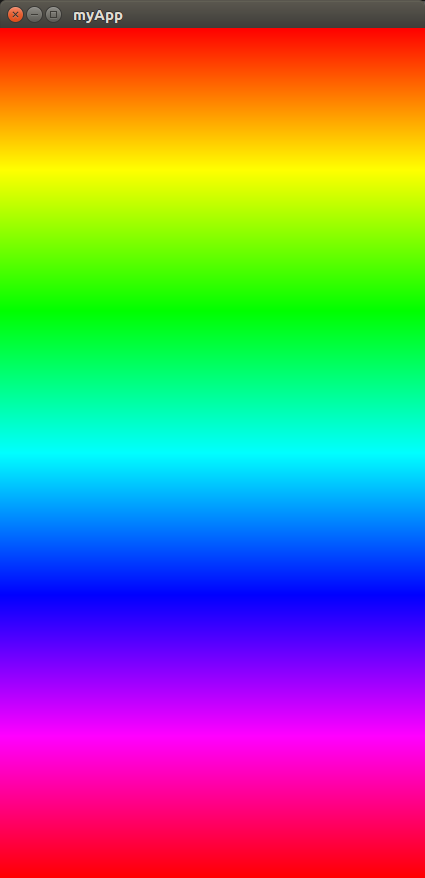
必须将渐变停止列表应用于可视项的gradient属性。
若要在Item中使用矩形,必须指定项的尺寸,默认项的高度和宽度为零。
import QtQuick 2.9
import QtQuick.Controls 2.2
import QtGraphicalEffects 1.0

ApplicationWindow {
id: window
visible: true
width: 425
height: 850
title: qsTr("myApp")


Rectangle
{
    anchors.fill: parent
    gradient: Gradient
    {
        GradientStop {position: 0.000;color: Qt.rgba(1, 0, 0, 1);}
        GradientStop {position: 0.167;color: Qt.rgba(1, 1, 0, 1);}
        GradientStop {position: 0.333;color: Qt.rgba(0, 1, 0, 1);}
        GradientStop {position: 0.500;color: Qt.rgba(0, 1, 1, 1);}
        GradientStop {position: 0.667;color: Qt.rgba(0, 0, 1, 1);}
        GradientStop {position: 0.833;color: Qt.rgba(1, 0, 1, 1);}
        GradientStop {position: 1.000;color: Qt.rgba(1, 0, 0, 1);}
    }
}
}
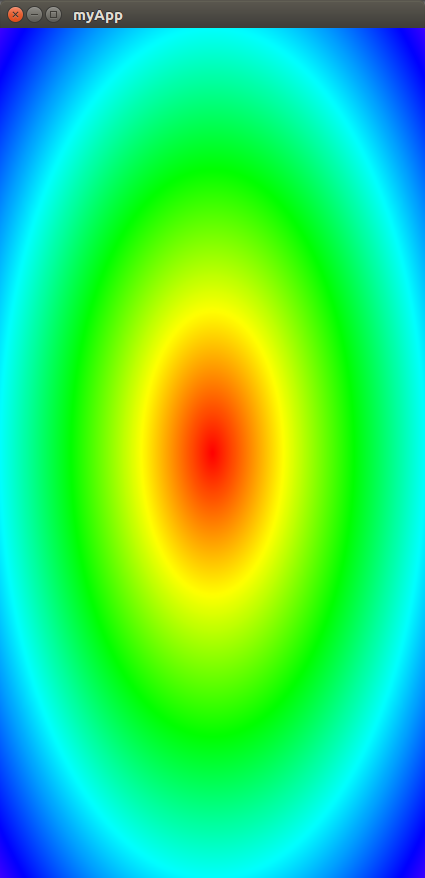
使用径向梯度
import QtQuick 2.9
import QtQuick.Controls 2.2
import QtGraphicalEffects 1.0

ApplicationWindow {
id: window
visible: true
width: 425
height: 850
title: qsTr("myApp")

Item
{
    anchors.fill: parent
     RadialGradient
    {
        anchors.fill: parent
        gradient: Gradient{
        GradientStop {position: 0.000;color: Qt.rgba(1, 0, 0, 1);}
        GradientStop {position: 0.167;color: Qt.rgba(1, 1, 0, 1);}
        GradientStop {position: 0.333;color: Qt.rgba(0, 1, 0, 1);}
        GradientStop {position: 0.500;color: Qt.rgba(0, 1, 1, 1);}
        GradientStop {position: 0.667;color: Qt.rgba(0, 0, 1, 1);}
        GradientStop {position: 0.833;color: Qt.rgba(1, 0, 1, 1);}
        GradientStop {position: 1.000;color: Qt.rgba(1, 0, 0, 1);}
        }
    }
}
}
页面原文内容由Stack Overflow提供。腾讯云小微IT领域专用引擎提供翻译支持
原文链接:
https://stackoverflow.com/questions/52380495
复制相关文章
相似问题
腾讯云开发者

Copyright © 2013 - 2026 Tencent Cloud. All Rights Reserved. 腾讯云 版权所有
深圳市腾讯计算机系统有限公司 ICP备案/许可证号:粤B2-20090059  粤公网安备44030502008569号
腾讯云计算(北京)有限责任公司 京ICP证150476号 | 京ICP备11018762号