
去除空白细胞
去除空白细胞
提问于 2018-09-15 09:44:41
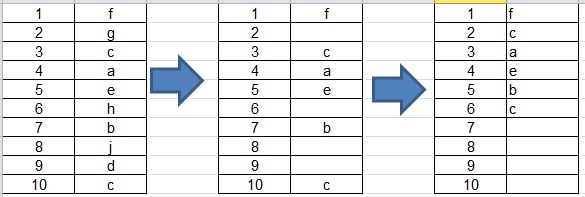
在A列中,我们的数字分别为1到10,B列中的字母a至j没有顺序--我们删除了4个字母--我不想更改A列,但是B列删除了她的空单元格,后面写的字母用空单元格删除行:
Sub DeleteEmptyRows()

'   Deletes the entire row within the selection if the ENTIRE row contains no data.

Dim i As Long
ActiveSheet.UsedRange.Select

With Application
    ' Turn off calculation and screenupdating to speed up the macro.
    .Calculation = xlCalculationManual
    .ScreenUpdating = False

    For i = Selection.Rows.Count To 2 Step -1
        If WorksheetFunction.CountA(Selection.Rows(i)) = 0 Then Selection.Rows(i).EntireRow.Delete
    Next i

    .Calculation = xlCalculationAutomatic
    .ScreenUpdating = True
End With

End Sub回答 2
Stack Overflow用户
回答已采纳
发布于 2018-09-16 15:16:26
此解决方案将遍历rangeAreas,复制该区域b列中的内容,删除空白,但结果返回b列,我要求将Z列作为辅助列
Sub Button1_Click()
    Dim RangeArea As Range, x

    For Each RangeArea In Columns("A").SpecialCells(xlCellTypeConstants, 1).Areas
        x = RangeArea.Rows.Count
        RangeArea.Offset(, 1).Copy [z1]
        Columns("Z:Z").SpecialCells(xlCellTypeBlanks).Delete Shift:=xlUp
        RangeArea.Offset(, 1).Value = Range("Z1:Z" & x).Value
        Range("Z:Z").Delete

    Next RangeArea

End SubStack Overflow用户
发布于 2018-09-15 10:00:46
我不明白你怎么从第一张到第二张,但是如果你从第二张开始,这会让你第三张。
Sub x()

On Error Resume Next 'avoid error if no blank cells
Columns("B").SpecialCells(xlCellTypeBlanks).Delete shift:=xlUp
On Error GoTo 0

End Sub页面原文内容由Stack Overflow提供。腾讯云小微IT领域专用引擎提供翻译支持
原文链接:
https://stackoverflow.com/questions/52343549
复制相关文章
相似问题
腾讯云开发者

Copyright © 2013 - 2026 Tencent Cloud. All Rights Reserved. 腾讯云 版权所有
深圳市腾讯计算机系统有限公司 ICP备案/许可证号:粤B2-20090059  粤公网安备44030502008569号
腾讯云计算(北京)有限责任公司 京ICP证150476号 | 京ICP备11018762号