
在TextInput中实现@TextInput
在TextInput中实现@TextInput
提问于 2018-09-15 07:05:30
我如何在react本机的TextInput中实现@native?
我尝试过这个反应-土生土长,但是它已经不再被维护了。有太多的造型问题和回调问题。
我想要的是在TextInput中显示自定义视图。就像这样。
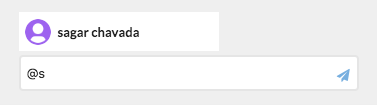
在点击列表后,我想显示如下:

到目前为止,我能够做到:
当我在TextInput中键入“@”时,会出现用户列表。
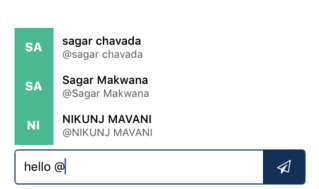
当我点击用户时,我得到了TextInput中的用户名

代码:
   renderSuggestionsRow() {
      return this.props.stackUsers.map((item, index) => {
         return (
            <TouchableOpacity key={`index-${index}`} onPress={() => this.onSuggestionTap(item.label)}>
               <View style={styles.suggestionsRowContainer}>
                  <View style={styles.userIconBox}>
                     <Text style={styles.usernameInitials}>{!!item.label && item.label.substring(0, 2).toUpperCase()}</Text>
                  </View>
                  <View style={styles.userDetailsBox}>
                     <Text style={styles.displayNameText}>{item.label}</Text>
                     <Text style={styles.usernameText}>@{item.label}</Text>
                  </View>
               </View>
            </TouchableOpacity>
         )
      });
   }

   onSuggestionTap(username) {
      this.setState({
         comment: this.state.comment.slice(0, this.state.comment.indexOf('@')) + '#'+username,
         active: false
      });
   }

   handleChatText(value) {
      if(value.includes('@')) {
         if(value.match(/@/g).length > 0) {
            this.setState({active: true});
         }
      } else {
         this.setState({active: false});
      }
      this.setState({comment: value});
   }
render() {
      const {comments} = this.state;
      return (
         <View style={styles.container}>
            {
               this.state.active ?
               <View style={{ marginLeft: 20}}>
                  {this.renderSuggestionsRow()}
               </View> : null
            }
            <View style={{ height: 55}}/>
            <View style={styles.inputContainer}>
               <TextInput
                  style={styles.inputChat}
                  onChangeText={(value) => this.handleChatText(value)}
               >
                  {comment}
               </TextInput>

               <TouchableOpacity style={styles.inputIcon} onPress={() => this.addComment()}>
                  <Icon type='FontAwesome' name='send-o' style={{fontSize: 16, color: '#FFF'}}/>
               </TouchableOpacity>
            </View>
         </View>
      );
}回答 1
Stack Overflow用户
发布于 2020-12-31 10:19:24
一个简单的解决方案是使用反应-原生-解析-文本。下面是一个示例:
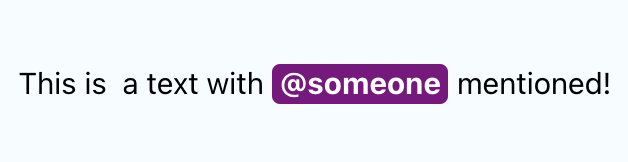
import * as React from "react";
import { Text, View, StyleSheet } from 'react-native';
import ParsedText from 'react-native-parsed-text';

const userNameRegEx = new RegExp(/@([\w\d.\-_]+)?/g);
export default class Example extends React.Component {

  handleNamePress = (name) => {
    alert("Pressed username " + name);
  }

  render() {
    return (
      <View style={styles.container}>
        <ParsedText
          style={styles.text}
          parse={
            [
              {pattern: userNameRegEx, style: styles.username, onPress: this.handleNamePress},
            ]
          }
          childrenProps={{allowFontScaling: false}}
        >
          This is  a text with @someone mentioned!
        </ParsedText>
      </View>
    );
  }
}

const styles = StyleSheet.create({
  container: {
    flex: 1,
    justifyContent: 'center',
    alignItems: 'center',
    backgroundColor: '#F5FCFF',
  },
  text: {
    color: 'black',
    fontSize: 15,
  },
  username: {
    color: 'white',
    fontWeight: 'bold',
    backgroundColor: "purple",
    paddingHorizontal: 4,
    paddingBottom: 2,
    borderRadius: 4,
  },
});
但是,这个库不支持呈现自定义视图。上面的例子是通过纯粹的样式来实现的。如果您需要一个自定义视图,您需要自己实现一些东西。很长时间以来,不可能呈现嵌入在文本组件中的任意组件。但是,现在afaik已经改变了,我们可以做这样的事情:
<Text>Hello I am an example <View style={{ height: 25, width: 25, backgroundColor: "blue"}}></View> with an arbitrary view!</Text>

检查这里的两个代码示例:https://snack.expo.io/@hannojg/restless-salsa
一个重要的注意事项:,您可以在TextInput中呈现ParsedText或您自己的自定义组件的输出,如下所示:
<TextInput
 ...
>
  <ParsedText
   ...
  >
    {inputValue}
  </ParsedText>
</TextInput>页面原文内容由Stack Overflow提供。腾讯云小微IT领域专用引擎提供翻译支持
原文链接:
https://stackoverflow.com/questions/52342466
复制相关文章
相似问题
腾讯云开发者

Copyright © 2013 - 2026 Tencent Cloud. All Rights Reserved. 腾讯云 版权所有
深圳市腾讯计算机系统有限公司 ICP备案/许可证号:粤B2-20090059  粤公网安备44030502008569号
腾讯云计算(北京)有限责任公司 京ICP证150476号 | 京ICP备11018762号