
使用SharedResources在.NET核心2.1中不工作的本地化
我和这个问题斗争了好几个小时..。我找不到它是什么..。
我只是想本地化_Layout.cshtml文件。IStringLocalizer和IHtmlLocalizer似乎都找不到资源文件。
我一直在跟踪和搜索:https://github.com/MormonJesus69420/SharedResourcesExample .Net核心数据注释-共享资源的本地化 https://stackoverflow.com/search?q=shared+resources+.net+core https://andrewlock.net/adding-localisation-to-an-asp-net-core-application/
我可能忽略了一些愚蠢的东西。
这是我的startup.cs:
using System;
using System.Collections.Generic;
using System.Linq;
using System.Threading.Tasks;
using Microsoft.AspNetCore.Builder;
using Microsoft.AspNetCore.Identity;
using Microsoft.EntityFrameworkCore;
using Microsoft.AspNetCore.Hosting;
using Microsoft.Extensions.Configuration;
using Microsoft.Extensions.DependencyInjection;
using EduPlaTools.Data;
using EduPlaTools.Models;
using EduPlaTools.Services;
using System.Globalization;
using Microsoft.Extensions.Options;
using Microsoft.AspNetCore.Localization;
using Microsoft.AspNetCore.Mvc.Razor;
using Pomelo.EntityFrameworkCore.MySql;
using Pomelo.EntityFrameworkCore.MySql.Infrastructure;
using Microsoft.AspNetCore.HttpOverrides;

namespace EduPlaTools
{
    public class Startup
    {
        public Startup(IConfiguration configuration)
        {
            Configuration = configuration;
        }

        public IConfiguration Configuration { get; }

        // This method gets called by the runtime. Use this method to add services to the container.
        public void ConfigureServices(IServiceCollection services)
        {

            // This is for string translation!
            // Adds Localization Services (StringLocalizer, HtmlLocalizer, etc.)
            // the opts.ResourcesPath = is the path in which the resources are found.
            // In our case the folder is named Resources!
            // There's specific and neutral resources.  (Specific en-US). (Neutral: es)
            /**
             * If no ResourcesPath is specified, the view's resources will be expected to be next to the views.
             * If ResourcesPath were set to "resources", then view resources would be expected to be ina  Resource directory,
             * in a path speicifc to their veiw (Resources/Views/Home/About.en.resx, for example).
             *
             * */
            services.AddLocalization(opts => opts.ResourcesPath = "Resources");

            // services.AddBContext
            // There are subtle differences between the original and the modified version.

            services.AddDbContextPool<ApplicationDbContext>(options =>
                options.UseMySql(Configuration.GetConnectionString("MySQLConnection"),
                mysqlOptions =>
                {
                    mysqlOptions.ServerVersion(new Version(8, 0, 12), ServerType.MySql); // replace with your Server Version and Type
                }
                ));
                //options.UseSqlServer(Configuration.GetConnectionString("DefaultConnection")));

            services.AddIdentity<ApplicationUser, IdentityRole>()
                .AddEntityFrameworkStores<ApplicationDbContext>()
                .AddDefaultTokenProviders();

            // Add application services.
            services.AddTransient<IEmailSender, EmailSender>();


            services.AddMvc()
                    .AddViewLocalization(LanguageViewLocationExpanderFormat.Suffix, options => options.ResourcesPath = "Resources")
                    .AddDataAnnotationsLocalization();

        }

        // This method gets called by the runtime. Use this method to configure the HTTP request pipeline.
        public void Configure(IApplicationBuilder app, IHostingEnvironment env)
        {
            // This may be dangerous and is not recommended
            using (var serviceScope = app.ApplicationServices.GetRequiredService<IServiceScopeFactory>()
                    .CreateScope())
            {
                serviceScope.ServiceProvider.GetService<ApplicationDbContext>()
                     .Database.Migrate();
            }

            app.UseForwardedHeaders(new ForwardedHeadersOptions
            {
                ForwardedHeaders = ForwardedHeaders.XForwardedFor | ForwardedHeaders.XForwardedProto
            });

            if (env.IsDevelopment())
            {
                app.UseBrowserLink();
                app.UseDeveloperExceptionPage();
                app.UseDatabaseErrorPage();
            }
            else
            {
                app.UseExceptionHandler("/Home/Error");
            }


            // These must line up with the ending of the .resx files.
            // Example: SharedResources.en.resx, SharedResources.es.rex

            // If you want to add specific, then do it like:
            // new CultureInfo("en-US")
            List<CultureInfo> supportedCultures = new List<CultureInfo>
            {
                new CultureInfo("es"),
                new CultureInfo("en"),
                new CultureInfo("es-ES"),
                new CultureInfo("en-US")
            };

            // Registers the localization, and changes the localization per request.
            app.UseRequestLocalization(new RequestLocalizationOptions
            {
                // We give the default support of Spanish.
                DefaultRequestCulture = new RequestCulture("es"),
                // Format numbers, dates, etc.
                SupportedCultures = supportedCultures,
                // The strings that we have localized
                SupportedUICultures = supportedCultures
            });

            // This will seed the databse:

            SeedDatabase.Initialize(app.ApplicationServices);

            app.UseStaticFiles();


            app.UseAuthentication();

            app.UseMvc(routes =>
            {
                routes.MapRoute(
                    name: "default",
                    template: "{controller=Home}/{action=Index}/{id?}");
            });
        }
    }
}
下面是我试图在_Layout.cshtml中调用它的方式:
@using  Microsoft.AspNetCore.Mvc.Localization

@inject IViewLocalizer Localizer
@inject IStringLocalizer<SharedResources> SharedLocalizer
@inject IHtmlLocalizer<SharedResources> _localizer;

@SharedLocalizer["Menu_Home"]
以下是目录结构:
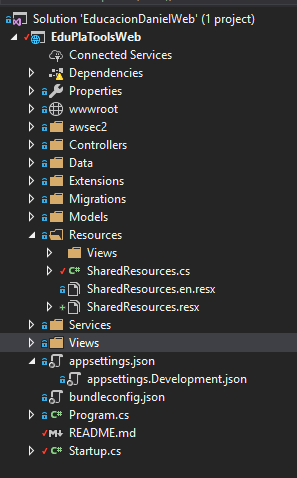
Here are the contents of SharedResources.cs:

using System;
using System.Collections.Generic;
using System.Linq;
using System.Threading.Tasks;

namespace EduPlaTools
{
    /**
     * This is a dummy class that is needed so Localization works.
     * Now in .NET Core Localization works as a service, and implementsw
     * naming conventions (AT the file level). Therefore, if the files do not
     * implement the correct name, there's going to be problems.
     *
     * See an example, here:
     * https://github.com/SteinTheRuler/ASP.NET-Core-Localization/blob/master/Resources/SharedResources.cs
     *
     * This is a workaround to create a Resource File that can be read by the entire
     * application. It's left in blank so the convention over configuration
     * picks it up.
     *
     * */
    public class SharedResources
    {
    }
}
以下是resx文件的内容:
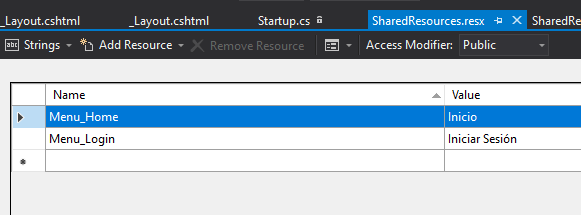
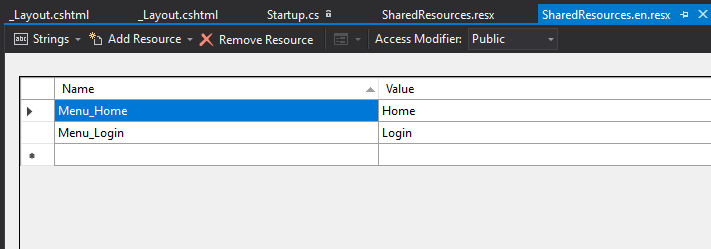
我也试过把它们重命名,但没有用。(尝试过Resources.es.rex,Resources.rex)
我试着设置断点来查看它的行为。当然,它没有找到资源文件。然后,通过回顾一个不存在的密钥,将其与摩门教徒回购进行比较。我将它与我的输出进行了比较,但摩门教的回购没有显示"SearchedLocation“(它是在后来的.NET核心版本中引入的吗?)
摩门教徒回购:

我的回购:

我知道这可能有点傻..。但是已经快4个小时了,我不能停下来,因为我有很多事情要做!
有什么想法吗?
回答 3
Stack Overflow用户
发布于 2018-09-14 19:12:25
如果要使用共享资源实现本地化,则必须创建自己的区域性定位器类:
public class CultureLocalizer
    {
        private readonly IStringLocalizer _localizer;
        public CultureLocalizer(IStringLocalizerFactory factory)
        {
            var type = typeof(ViewResource);
            var assemblyName = new AssemblyName(type.GetTypeInfo().Assembly.FullName);
            _localizer = factory.Create("ViewResource", assemblyName.Name);
        }

        // if we have formatted string we can provide arguments
        // e.g.: @Localizer.Text("Hello {0}", User.Name)
        public LocalizedString Text(string key, params string[] arguments)
        {
            return arguments == null
                ? _localizer[key]
                : _localizer[key, arguments];
        }
    }
然后注册它正在启动:
services.AddSingleton<CultureLocalizer>();并修改视图本地化设置:
services.AddMvc()
            .SetCompatibilityVersion(CompatibilityVersion.Version_2_1)
            .AddViewLocalization(o=>o.ResourcesPath = "Resources")
在您的视图中,您必须在使用它之前注入区域性定位器类。
这些是使用共享资源进行视图本地化的初始设置,您还需要为DataAnnotation、ModelBinding和标识错误消息配置本地化设置。
这些文章可以帮助启动:
使用ASP.NET Core2.1RazorPages开发多文化web应用程序:
应用程序
它包括一步一步使用共享资源进行本地化的教程,此外,本文还介绍了如何本地化标识错误消息:
消息
Stack Overflow用户
发布于 2018-10-24 17:26:35
我想补充一个答案,进一步发展拉兹的解决方案。以防万一有人想拥有单独的本地化视图。
回到Startup.cs,您有:
services.AddMvc()
            .SetCompatibilityVersion(CompatibilityVersion.Version_2_1)
            .AddViewLocalization(o=>o.ResourcesPath = "Resources")
从技术上讲,您指示MVC将"Resources“文件夹中的”资源“文件夹作为主要路径,然后按照约定查找本地化的资源文件。
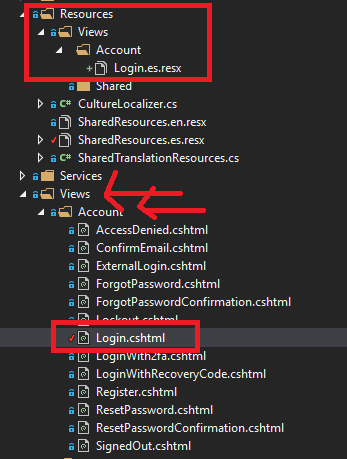
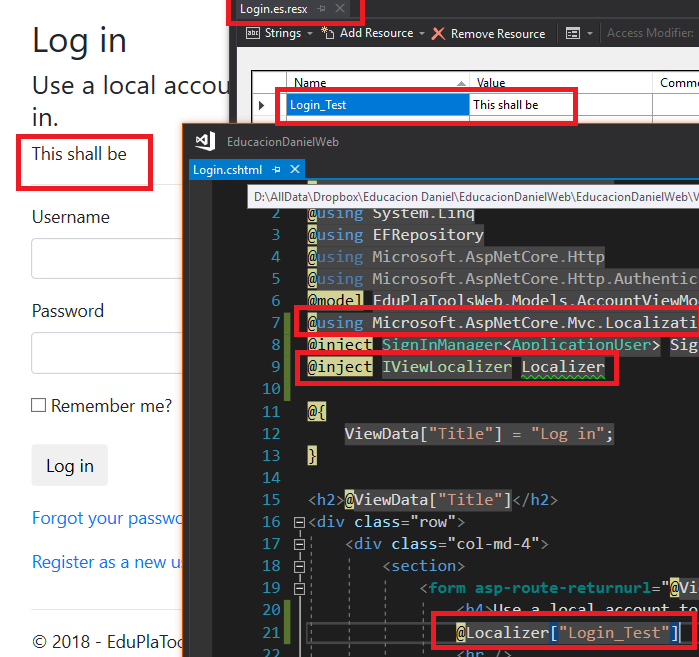
因此,如果您想本地化在Login.cshtml中找到的Views/Account/Login.chsmtl视图,您必须在:Resources/Views/Account/Login.en.resx中创建资源文件。
然后,您需要在视图中直接添加Login.cshtml或在_ViewImports.cshtml中添加以下内容,以便将其引用到所有视图:
@using Microsoft.AspNetCore.Mvc.Localization
@inject IViewLocalizer Localizer之后,在您的代码中可以这样做:Localizer["My_Resource_file_key"]
你会把它翻译过来的。
以下是一些插图:
Stack Overflow用户
发布于 2020-08-25 00:36:01
对先前答案的更新。由于.NET核心3 (https://github.com/dotnet/docs/issues/16964)最近发生了重大变化,只有当资源直接驻留在资源文件夹中时,才能接受答案。我已经创建了一个解决方案,以便在视图中使用共享资源(对于控制器、数据注释、服务,无论您需要什么.),都是如此。
首先,您需要为资源创建一个空类。这个必须生活在YourApp.Resources命名空间下。然后创建与类相同的资源(在我的示例中,名称空间Views.cs、MyApp.Resources.Shared和Views.resx)。
下面是加载共享资源的助手类:
public class SharedViewLocalizer
{
    private readonly IStringLocalizer _localizer;

    public SharedViewLocalizer(IStringLocalizerFactory factory)
    {
        var assemblyName = new AssemblyName(typeof(Resources.Shared.Views).GetTypeInfo().Assembly.FullName);
        localizer = factory.Create("Shared.Views", assemblyName.Name);
    }

    public string this[string key] => _localizer[key];

    public string this[string key, params object[] arguments] => _localizer[key, arguments];
}您必须在Startup.Configure中注册
services.AddSingleton<SharedViewLocalizer>();我想你用
services.AddLocalization(options => options.ResourcesPath = "Resources");若要设置默认资源位置,请执行以下操作。
然后,在您的观点中,您使用它如下:
@inject IViewLocalizer _localizer
@inject SharedViewLocalizer _sharedLocalizer

@_localizer["View spacific resource"] // Resource from Resources/Views/ControllerName/ViewName.resx
@_sharedLocalizer["Shared resource"] // Resource from Resources/Shared/Views.resx
@_sharedLocalizer["Also supports {0} number of arguments", "unlimited"]同样的原理也适用于DataAnnotations,我们可以在Startup.Configure中使用内置方法。
services.AddMvc()
    .AddDataAnnotationsLocalization(options =>
    {
        options.DataAnnotationLocalizerProvider = (type, factory) =>
        {
           var assemblyName = new AssemblyName(typeof(DataAnnotations).GetTypeInfo().Assembly.FullName);
           return factory.Create("Shared.DataAnnotations", assemblyName.Name
        };
    })
.AddViewLocalization();同样,我期望我的资源驻留在名称空间Resources.Shared中,并创建一个名为DataAnnotations的空类。
希望这有助于克服当前急剧变化的问题。
https://stackoverflow.com/questions/52336694
复制相似问题
腾讯云开发者

Copyright © 2013 - 2026 Tencent Cloud. All Rights Reserved. 腾讯云 版权所有
深圳市腾讯计算机系统有限公司 ICP备案/许可证号:粤B2-20090059  粤公网安备44030502008569号
腾讯云计算(北京)有限责任公司 京ICP证150476号 | 京ICP备11018762号