
使用fetch将跨源JSON数据发布到Express后端
使用fetch将跨源JSON数据发布到Express后端
提问于 2018-09-14 05:15:30
我试图使用Fetch从表单中发布一些JSON数据,并记录来自Express服务器的响应,这应该是一个简单的JSON响应,包含已发布的表单值,但我只在控制台中接收一个空对象。
JavaScript和JSFiddle链路可以从这个JSFiddle链路中执行。
如何从服务器接收填充的JSON对象响应?
<form id="myForm">
    <input type="text" placeholder="Enter First Name" name="firstName" />
    <input type="text" placeholder="Enter Last Name" name="lastName" />
    <input type="submit" value="SUBMIT" />
</form>
JavaScript
const form = document.getElementById("myForm");

form.addEventListener("submit", (e) => {

    e.preventDefault();

    fetch("http://localhost:5000/form-post", {
            method: "POST",
            mode: "cors",
            body: {
                firstName: e.target.firstName.value,
                lastName: e.target.lastName.value
            }
        })
        .then((res) => res.json())
        .then((data) => console.log(data));
});
快递服务器
const express = require("express");
const app = express();

const cors = (req, res, next) => {

    res.header("Access-Control-Allow-Origin", "*");
    res.header("Access-Control-Allow-Methods", "GET, PUT, PATCH, POST, DELETE");
    res.header("Access-Control-Allow-Headers", "Origin, Content-Type");

    next();
};

app.use(cors);
app.use(express.json());

app.post("/form-post", (req, res) => {

    res
        .status(200)
        .json({
            First_Name: req.body.firstName,
            Last_Name: req.body.lastName
        });

});

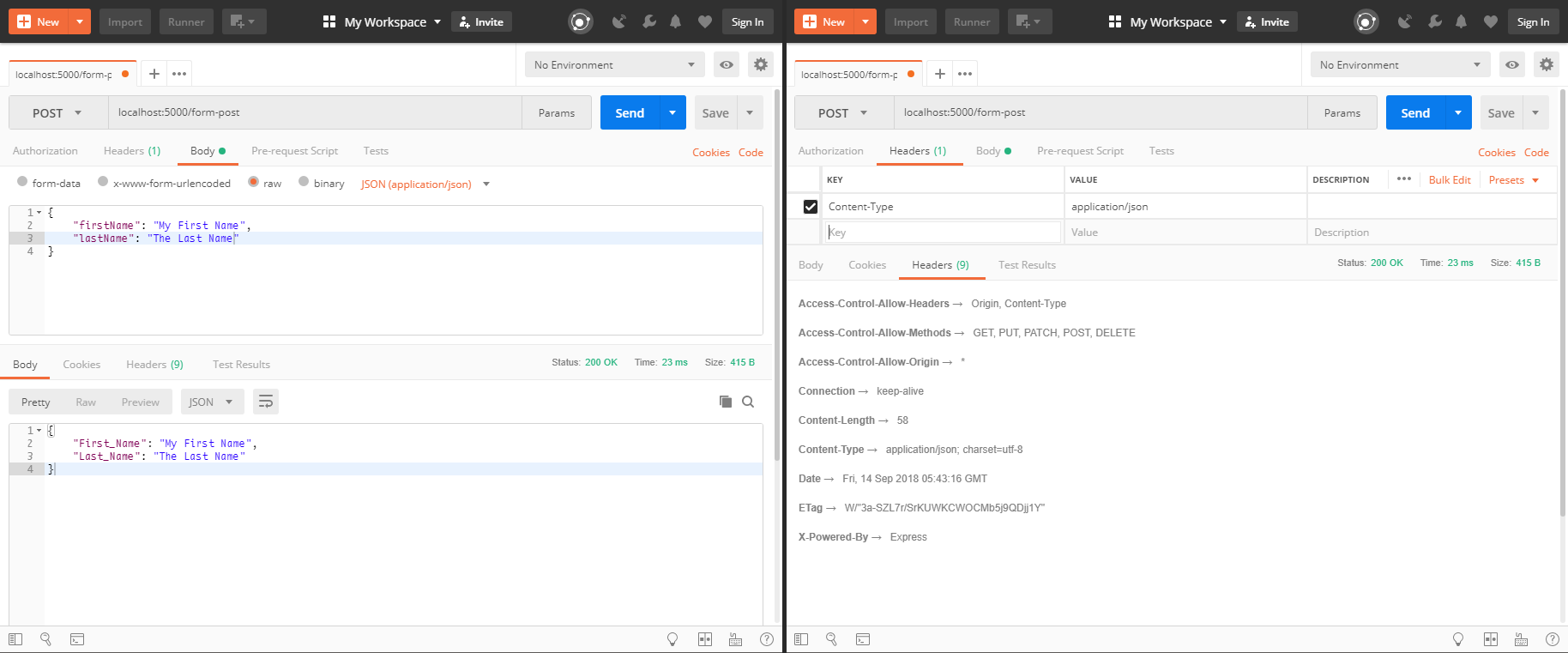
app.listen(5000, () => console.log("Server started on port 5000..."));编辑:--它在邮递员(附带的屏幕截图)中工作得很好,但它似乎不适用于Fetch。
回答 1
Stack Overflow用户
回答已采纳
发布于 2018-09-14 06:14:57
您不能POST一个普通的javascript对象。
但是,请使用Content-type列表检查RFC 1341中定义的所有可能的mime类型值。
根据MDN
试一试这段代码。
const form = document.getElementById("myForm");

form.addEventListener("submit", (e) => {
  e.preventDefault();

  var data = {
    firstName: e.target.firstName.value,
    lastName: e.target.lastName.value
  }

  fetch("http://localhost:5000/form-post", {
      method: "POST",
      mode: "cors",
      headers: {
        "Content-Type": "application/json; charset=utf-8",
      },
      body: JSON.stringify(data)
    })
    .then((res) => res.json())
    .then((data) => console.log(data));
});页面原文内容由Stack Overflow提供。腾讯云小微IT领域专用引擎提供翻译支持
原文链接:
https://stackoverflow.com/questions/52325363
复制相关文章
相似问题
腾讯云开发者

Copyright © 2013 - 2026 Tencent Cloud. All Rights Reserved. 腾讯云 版权所有
深圳市腾讯计算机系统有限公司 ICP备案/许可证号:粤B2-20090059  粤公网安备44030502008569号
腾讯云计算(北京)有限责任公司 京ICP证150476号 | 京ICP备11018762号