
“修复所有可自动修复的问题”没有尽可能多地修复vscode-eslint问题。
“修复所有可自动修复的问题”没有尽可能多地修复vscode-eslint问题。
提问于 2018-09-13 23:07:10
通常情况下,当我试图在Javascript文件上运行时,修复所有可自动修复的问题命令时,这个应用程序会进入一个不停地移动选项卡/空格的循环,但永远不会感到满意:
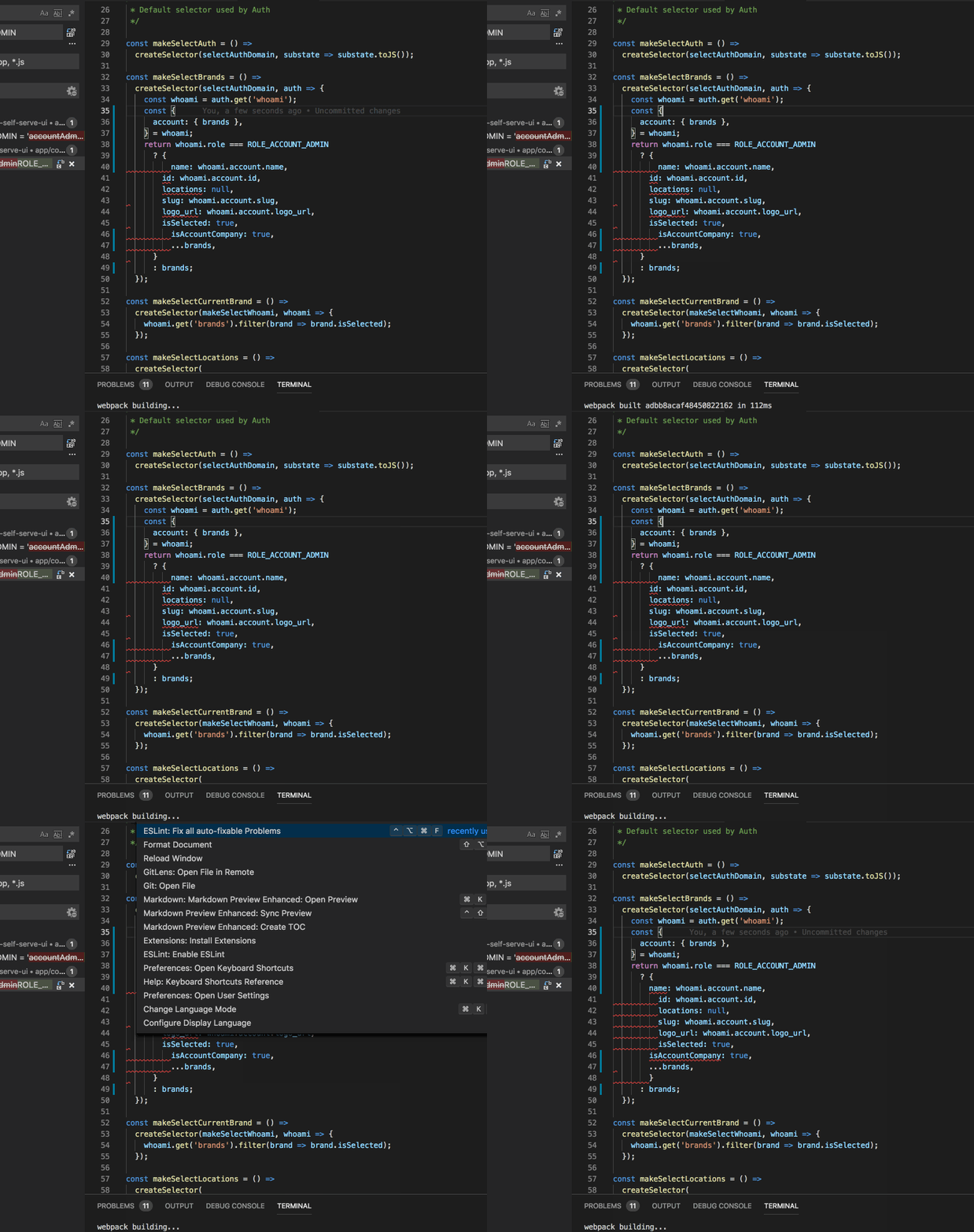
我的.eslintrc.js如下:
const fs = require('fs');

const prettierOptions = JSON.parse(fs.readFileSync('./.prettierrc', 'utf8'));

module.exports = {
  parser: 'babel-eslint',
  extends: ['airbnb', 'prettier', 'prettier/react'],
  plugins: ['prettier', 'redux-saga', 'react', 'jsx-a11y'],
  env: {
    browser: true,
    node: true,
    jest: true,
    es6: true,
  },
  parserOptions: {
    ecmaVersion: 6,
    sourceType: 'module',
    ecmaFeatures: {
      jsx: true,
    },
  },
  rules: {
    'prettier/prettier': ['error', prettierOptions],
    'arrow-body-style': [2, 'as-needed'],
    'class-methods-use-this': 0,
    'comma-dangle': [2, 'always-multiline'],
    'import/imports-first': 0,
    'import/newline-after-import': 0,
    'import/no-dynamic-require': 0,
    'import/no-extraneous-dependencies': 0,
    'import/no-named-as-default': 0,
    'import/no-unresolved': 2,
    'import/no-webpack-loader-syntax': 0,
    'import/prefer-default-export': 0,
    indent: [
      2,
      2,
      {
        SwitchCase: 1,
      },
    ],
    "jsx-a11y/anchor-is-valid": 0,
    'jsx-a11y/aria-props': 2,
    'jsx-a11y/heading-has-content': 0,
    'jsx-a11y/label-has-for': 2,
    'jsx-a11y/mouse-events-have-key-events': 2,
    'jsx-a11y/role-has-required-aria-props': 2,
    'jsx-a11y/role-supports-aria-props': 2,
    'max-len': 0,
    'newline-per-chained-call': 0,
    'no-confusing-arrow': 0,
    'no-console': 1,
    'no-use-before-define': 0,
    'prefer-template': 2,
    'react/jsx-closing-tag-location': 0,
    'react/forbid-prop-types': 0,
    'react/jsx-first-prop-new-line': [2, 'multiline'],
    'react/jsx-filename-extension': 0,
    'react/jsx-no-target-blank': 0,
    'react/require-default-props': 0,
    'react/require-extension': 0,
    'react/self-closing-comp': 0,
    'react/sort-comp': 0,
    'redux-saga/no-yield-in-race': 2,
    'redux-saga/yield-effects': 2,
    'require-yield': 0,
  },
  settings: {
    'import/resolver': {
      webpack: {
        config: './internals/webpack/webpack.prod.babel.js',
      },
    },
  },
};
有人能帮我解决这个问题吗?
回答 3
Stack Overflow用户
发布于 2018-11-08 21:11:07
UPD:
现在您只需选择vscode-eslint / prettier作为默认的格式化程序,它应该在一次传递中格式化文件:
ctrl+shift+p- 选择
Format document with... - 选择
Configure default foramtter - 选择您喜欢的格式化程序
老:
由于vscode格式API的限制,这是vscode-eslint扩展中的老问题。一个可能的解决方案是通过cli修复代码:
eslint --fixStack Overflow用户
发布于 2020-01-14 02:50:47
在Save上安装extension格式,然后在Save > Enter上按CMD+SHIFT+P类型的Toggle格式。
希望能帮上忙
Stack Overflow用户
发布于 2022-05-16 12:22:11
简单修复:在VS代码中打开setting.json文件并放置"editor.formatOnSave": true,。这将自动修复保存。
页面原文内容由Stack Overflow提供。腾讯云小微IT领域专用引擎提供翻译支持
原文链接:
https://stackoverflow.com/questions/52322892
复制相关文章
相似问题
腾讯云开发者

Copyright © 2013 - 2026 Tencent Cloud. All Rights Reserved. 腾讯云 版权所有
深圳市腾讯计算机系统有限公司 ICP备案/许可证号:粤B2-20090059  粤公网安备44030502008569号
腾讯云计算(北京)有限责任公司 京ICP证150476号 | 京ICP备11018762号