
如何使用Gradle和IntelliJ在Kotlin多平台项目中配置IntelliJ 5?
JUnit 4(工作)
IntelliJ IDEA 2018.2.3 (Community )中的Kotlin多平台模板依赖于build.gradle中的JUnit 4.12,用于项目的JVM部分:
plugins {
    id 'kotlin-platform-jvm' version '1.2.61'
}
repositories {
    mavenCentral()
}

dependencies {
    compile "org.jetbrains.kotlin:kotlin-stdlib-jdk8"
    expectedBy project(":TestMulti-common")
    testCompile "junit:junit:4.12"
    testCompile "org.jetbrains.kotlin:kotlin-test"
    testCompile "org.jetbrains.kotlin:kotlin-test-junit"
}

compileKotlin {
    kotlinOptions.jvmTarget = "1.8"
}
compileTestKotlin {
    kotlinOptions.jvmTarget = "1.8"
}
sourceCompatibility = "1.8"
使用此模板,我可以将测试添加到项目的公共部分,测试由IntelliJ识别:在源文件的边缘显示“run”图标,可以通过上下文菜单运行测试。
JUnit 5(IntelliJ中未正确识别的测试)
如何使用JUnit 5实现类似的设置?
值得注意的是,我使用的是Gradle 4.10 (一些旧的示例使用的是junit-platform-gradle-plugin哪个从第4.6级开始就被反对了)。关于如何设置这个问题的文档已经过时,而且很少:
- 如上所述,在IntelliJ中构建的默认项目模板不使用JUnit 5。
- JUnit team 提供示例,但不适用于Kotlin多平台。。
当我试图为项目基于JUnit 5级的示例的JVM部分设置基于JUnit 5级的示例时,我可以使用Gradle运行测试,但是IntelliJ似乎不认识我的测试。
plugins {
    id 'kotlin-platform-jvm' version '1.2.61'
}
repositories {
    mavenCentral()
}

dependencies {
    compile "org.jetbrains.kotlin:kotlin-stdlib-jdk8"
    expectedBy project(":TestMulti-common")

    testCompile "org.jetbrains.kotlin:kotlin-test"
    testCompile "org.jetbrains.kotlin:kotlin-test-junit5"

    testCompile('org.junit.jupiter:junit-jupiter-api:5.3.1')
    testCompile('org.junit.jupiter:junit-jupiter-params:5.3.1')
    testRuntime('org.junit.jupiter:junit-jupiter-engine:5.3.1')
}

test {
    useJUnitPlatform()
    testLogging {
        events "passed", "skipped", "failed"
    }
}

compileKotlin {
    kotlinOptions.jvmTarget = "1.8"
}
compileTestKotlin {
    kotlinOptions.jvmTarget = "1.8"
}
sourceCompatibility = "1.8"奇怪的是,在JVM项目上运行gradle test时,IntelliJ的测试结果有时会出现在测试结果中,但是当重新运行测试时,会显示“测试事件未收到”的消息。边距中的“Run”图标永远不会出现在源文件中,上下文菜单中的测试选项也不会出现。
其他人似乎也有类似的问题,但不清楚这些问题是相同的/相关的还是已经解决的,因为:
- Junit 5和Gradle 4.6检查任务显示“未收到测试事件”
- 测试视图中没有显示junit5测试。
- 在多平台项目的公共部分中,左侧没有“运行”图标用于测试。
- Kotlin多平台项目在IDEA中运行通用模块测试
许多不同的版本、过时的文档和类似的问题使得很难找到关于这个问题的更多信息。
回答 2
Stack Overflow用户
发布于 2019-09-25 12:05:30
这是IntelliJ中的一个bug,正如我在以下YouTrack问题中所描述的:IntelliJ不识别Kotlin多平台项目中的JUnit 5测试。
在最新版本中,这一点现在起作用了。我尝试使用Kotlin 1.3.71、IntelliJ插件1.3.71-release-IJ2019.3-1和JUnit 5.6.0。
Stack Overflow用户
发布于 2020-10-19 18:53:49
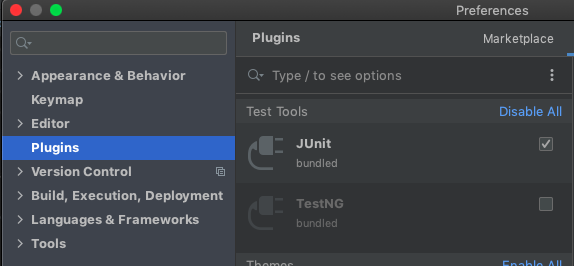
在我的例子中,IntelliJ IDEA升级禁用了JUnit插件,因此我需要再次启用它(需要重新启动):
https://stackoverflow.com/questions/52295319
复制相似问题
腾讯云开发者

Copyright © 2013 - 2026 Tencent Cloud. All Rights Reserved. 腾讯云 版权所有
深圳市腾讯计算机系统有限公司 ICP备案/许可证号:粤B2-20090059  粤公网安备44030502008569号
腾讯云计算(北京)有限责任公司 京ICP证150476号 | 京ICP备11018762号