
如何将多个数组的数据从Excel表单插入到数据库?
如何将多个数组的数据从Excel表单插入到数据库?
提问于 2018-09-12 07:05:30
我有一个手工构建的表单,它在Excel VolunteerForm中看起来大致如下所示:
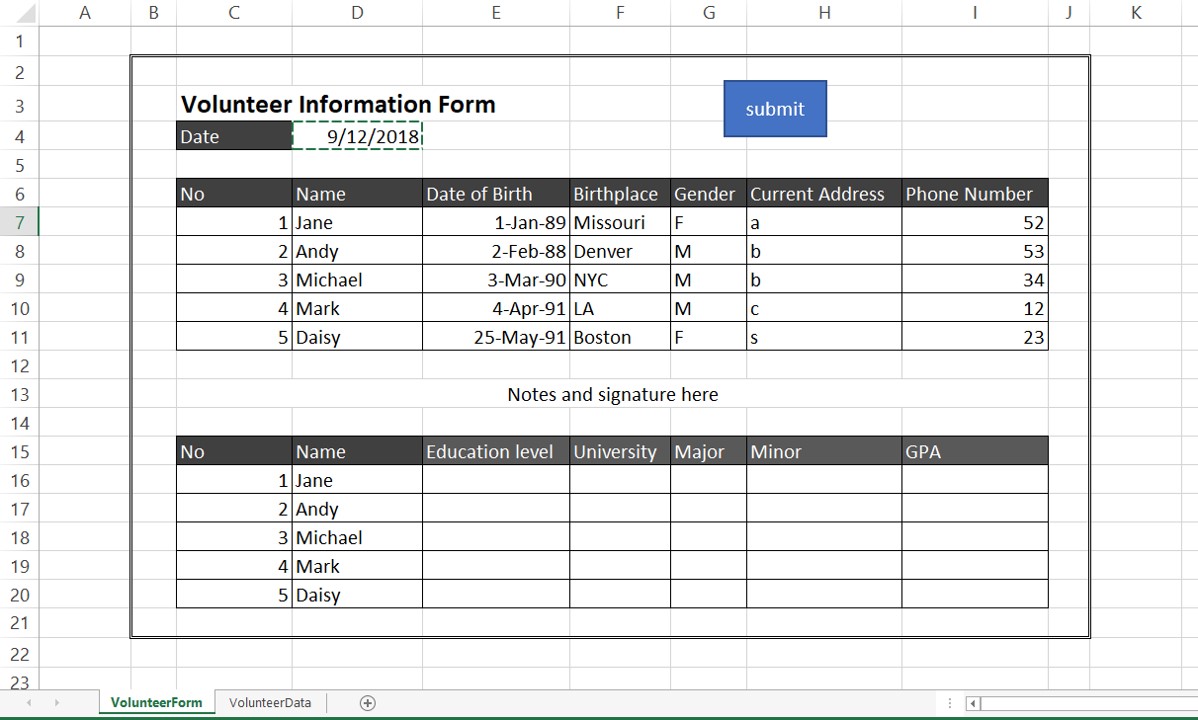
并将工作表VolunteerData中的数据库链接到表单:

我设法链接了信息的第一部分(数据库中的Col A到F),但没有链接到表单的下半部分。
这就是我到目前为止所做的工作(请注意,我构建了代码,但不知道如何修改它们以给出我想要的结果,因为运行代码会给出一个错误)。
这是我的密码:
Sub Submit_VolunteerForm()

   Dim lr As Long, ws As Worksheet
   Dim arr As Variant, i As Long

    With Worksheets("VolunteerForm")
       lr = .Cells(12, "D").End(xlUp).Row - 6
       ReDim arr(1 To lr, 1 To 6)
       For i = LBound(arr, 1) To UBound(arr, 1)
        arr(i, 1) = .Cells(4, "D").Value         ' Fixed Col = Date Form sent
        arr(i, 2) = .Cells(i + 6, "E").Value     ' Name
        arr(i, 3) = .Cells(i + 6, "F").Value     ' Dob
        arr(i, 4) = .Cells(i + 6, "G").Value     ' birthplace
        arr(i, 5) = .Cells(i + 6, "H").Value     ' address
        arr(i, 6) = .Cells(i + 6, "I").Value     ' phone #

     Next i
    End With

    With Worksheets("VolunteerData")
       lr = .Range("A" & .Rows.Count).End(xlUp).Row + 1
       .Cells(lr, "A").Resize(UBound(arr, 1), UBound(arr, 2)) = arr
    End With

  With Worksheets("VolunteerData")
      lr = .Range("G" & .Rows.Count).End(xlUp).Row + 1
      .Cells(lr, "G").Resize(UBound(arr, 1), UBound(arr, 2)) = arr
   End With

   With Worksheets("VolunteerForm")
      lr = .Cells(21, "D").End(xlUp).Row - 15
      ReDim arr(1 To lr, 1 To 6)
     For i = LBound(arr, 1) To UBound(arr, 1)
        arr(i, 1) = .Cells(i + 15, "J").Value
        arr(i, 2) = .Cells(i + 15, "K").Value
        arr(i, 3) = .Cells(i + 15, "L").Value
        arr(i, 4) = .Cells(i + 15, "M").Value
        arr(i, 5) = .Cells(i + 15, "N").Value

       Next i
    End With

  End Sub
谢谢!
回答 1
Stack Overflow用户
回答已采纳
发布于 2018-09-12 07:55:39
您应该使用userform/excel数据输入表单或Access数据库。
但是,假设窗体的行数总是相同,并且在顶部和底部表中排序相同,那么您可以使用以下方法:
Option Explicit
Public Sub TransferData()

    Dim lastRow As Long, nextRow As Long, dateFilled As Range
    Dim wsDest As Worksheet, wsSource As Worksheet
    Dim formData1 As Range, formData2 As Range

    Set wsDest = ThisWorkbook.Worksheets("VolunteerData")
    Set wsSource = ThisWorkbook.Worksheets("VolunteerForm")
    Set dateFilled = wsSource.Range("D4")
    Set formData1 = wsSource.Range("D7:I11")
    Set formData2 = wsSource.Range("E16:I20")
    Application.ScreenUpdating = False

    With wsDest
        lastRow = .Cells(.Rows.Count, "A").End(xlUp).Row
    End With

    nextRow = lastRow + 1

    With formData1
        wsDest.Range("A" & nextRow).Resize(.Rows.Count, 1).Value = dateFilled.Value
        wsDest.Range("B" & nextRow).Resize(.Rows.Count, .Columns.Count).Value = formData1.Value
        wsDest.Range("H" & nextRow).Resize(.Rows.Count, .Columns.Count - 1).Value = formData2.Value
    End With

    ''potential housekeeping tasks to clear form?
    formData1.Clear
    formData2.Clear
    formData2.Offset(, -1).Clear
    dateFilled.Clear

    Application.ScreenUpdating = True
End Sub页面原文内容由Stack Overflow提供。腾讯云小微IT领域专用引擎提供翻译支持
原文链接:
https://stackoverflow.com/questions/52289317
复制相关文章
相似问题
腾讯云开发者

Copyright © 2013 - 2026 Tencent Cloud. All Rights Reserved. 腾讯云 版权所有
深圳市腾讯计算机系统有限公司 ICP备案/许可证号:粤B2-20090059  粤公网安备44030502008569号
腾讯云计算(北京)有限责任公司 京ICP证150476号 | 京ICP备11018762号