
如何为我的自定义对象创建轮式选择器?
如何为我的自定义对象创建轮式选择器?
提问于 2018-09-11 15:24:17
我想让用户通过轮式选择器从ArrayList<MyObjectType>中选择一个元素,该轮式选择器看起来类似于用于在数据选择器中选择日期/月/年的轮选择器。虽然日期选择器显然有三个变量,但我只关心有一个变量。
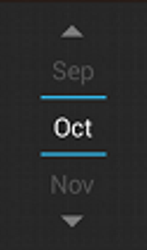
实现这样一个选择器最直接的方法是什么?
回答 4
Stack Overflow用户
回答已采纳
发布于 2018-09-19 13:24:01
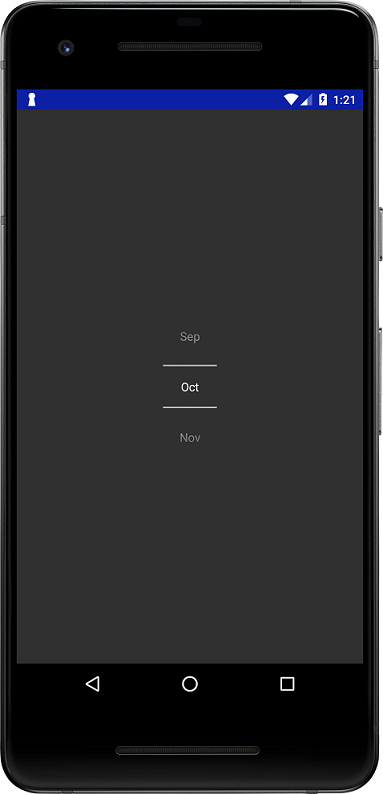
NumberPicker是在Android中提供的。这就是你要找的。
溶液
<NumberPicker
    android:id="@+id/numberPicker"
    android:layout_width="wrap_content"
    android:layout_height="wrap_content"/>
在爪哇
NumberPicker np = findViewById(R.id.numberPicker);
String[] months3char = get3CharMonths();
np.setMaxValue(months3char.length - 1); // important
np.setDisplayedValues(months3char); // custom values

private String[] get3CharMonths() {
    String[] months = new DateFormatSymbols().getMonths();
    String[] months3char = new String[months.length];
    for (int i = 0; i < months.length; i++) {
        String month = months[i];
        months3char[i] = month.length() < 3 ? month : month.substring(0, 3);
    }
    return months3char;
}
Stack Overflow用户
发布于 2018-09-14 11:12:32
试着用recyclerview这样做
Main2Activity
public class Main2Activity extends AppCompatActivity {


    Button btnShowPicker;

    PickerAdapter adapter;
    LinearLayoutManager linearLayoutManager;
    RecyclerView picRecyclerView;

    ArrayList<MyObjectType> arrayList = new ArrayList<>();

    @Override
    protected void onCreate(Bundle savedInstanceState) {
        super.onCreate(savedInstanceState);
        setContentView(R.layout.activity_main2);


        btnShowPicker = findViewById(R.id.btnShowPicker);

        btnShowPicker.setOnClickListener(new View.OnClickListener() {
            @Override
            public void onClick(View v) {
                showPicker();
            }
        });
    }

    private void showPicker() {

        Dialog pickerDialog = new Dialog(this);


        pickerDialog.setContentView(R.layout.dialog_layout);


        picRecyclerView = pickerDialog.findViewById(R.id.pickerRecyclerView);
        picRecyclerView = pickerDialog.findViewById(R.id.pickerRecyclerView);

        genArray();

        linearLayoutManager = new LinearLayoutManager(this);
        picRecyclerView.setLayoutManager(linearLayoutManager);
        picRecyclerView.setHasFixedSize(true);
        picRecyclerView.setLayoutManager(linearLayoutManager);


        adapter = new PickerAdapter(Main2Activity.this, arrayList);
        picRecyclerView.setAdapter(adapter);
        picRecyclerView.smoothScrollToPosition(3);


        picRecyclerView.addOnScrollListener(new RecyclerView.OnScrollListener() {

            @Override
            public void onScrolled(RecyclerView recyclerView, int dx, int dy) {
                super.onScrolled(recyclerView, dx, dy);

                int firstItem = linearLayoutManager.findFirstCompletelyVisibleItemPosition();
                int lastItem = linearLayoutManager.findLastCompletelyVisibleItemPosition();

                if (arrayList.size() == 1) {
                    adapter.setSelecteditem(0);
                } else if (lastItem == arrayList.size() - 1) {
                    adapter.setSelecteditem(arrayList.size() - 2);
                } else {
                    adapter.setSelecteditem(firstItem + 1);
                }


            }
        });


        pickerDialog.show();

    }

    private void genArray() {

        // add first dummy item to first position let user select first item
        arrayList.add(new MyObjectType("", 0));

        arrayList.add(new MyObjectType("Jan", 1));
        arrayList.add(new MyObjectType("Feb", 2));
        arrayList.add(new MyObjectType("Mar", 3));
        arrayList.add(new MyObjectType("Apr", 4));
        arrayList.add(new MyObjectType("May", 5));
        arrayList.add(new MyObjectType("Jun", 6));
        arrayList.add(new MyObjectType("Jul", 7));
        arrayList.add(new MyObjectType("Aug", 8));
        arrayList.add(new MyObjectType("Sep", 9));
        arrayList.add(new MyObjectType("Oct", 10));
        arrayList.add(new MyObjectType("Nov", 11));
        arrayList.add(new MyObjectType("Des", 12));
        // add first dummy item to last position let user select last item
        arrayList.add(new MyObjectType("", 0));
    }


}
layout.activity_main2
<?xml version="1.0" encoding="utf-8"?>
<LinearLayout xmlns:android="http://schemas.android.com/apk/res/android"
    xmlns:app="http://schemas.android.com/apk/res-auto"
    xmlns:tools="http://schemas.android.com/tools"
    android:layout_width="match_parent"
    android:layout_height="match_parent"
    android:gravity="center"
    tools:context=".Main2Activity">

    <Button
        android:layout_width="match_parent"
        android:text="Show Picker"
        android:id="@+id/btnShowPicker"
        android:layout_height="wrap_content" />


</LinearLayout>
PickerAdapter
public class PickerAdapter extends RecyclerView.Adapter<PickerAdapter.ViewHolder> {

    private Context context;
    private ArrayList<MyObjectType> arrayList= new ArrayList<>();

    private int selectedItem = -1;
    int pos=0;

    PickerAdapter(Context context, ArrayList<MyObjectType> arrayList) {
        this.context = context;
        this.arrayList = arrayList;
    }

    @NonNull
    @Override
    public PickerAdapter.ViewHolder onCreateViewHolder(@NonNull ViewGroup parent, int viewType) {
        View view= LayoutInflater.from(context).inflate(R.layout.custom_picker_layout,parent,false);
        return new ViewHolder(view);
    }

    @Override
    public void onBindViewHolder(@NonNull PickerAdapter.ViewHolder holder, int position) {

        holder.tvValue.setText(arrayList.get(position).getTitle());
        if (position == selectedItem) {
            Log.d("CenterPosition", "center" + position);
            holder.tvValue.setBackgroundResource(R.drawable.tv_bg);

        } else {
            holder.tvValue.setBackgroundColor(Color.BLACK);
        }
    }

    @Override
    public int getItemCount() {
        return arrayList.size();
    }

    public MyObjectType getSelectedItem() {
        return arrayList.get(selectedItem);
    }

    public class ViewHolder extends RecyclerView.ViewHolder {

        TextView tvValue;
        public ViewHolder(View itemView) {
            super(itemView);

            tvValue=itemView.findViewById(R.id.tvValue);

            tvValue.setOnClickListener(new View.OnClickListener() {
                @Override
                public void onClick(View v) {
                    Toast.makeText(context, "Clicked : "+arrayList.get(getAdapterPosition()).getTitle(), Toast.LENGTH_SHORT).show();
                }
            });
        }
    }
    public void setSelecteditem(int selecteditem) {
        Log.d("POSITION",String.valueOf(selecteditem));
        this.selectedItem = selecteditem;
        notifyDataSetChanged();
    }
}
layout.custom_picker_layout
<?xml version="1.0" encoding="utf-8"?>
<LinearLayout xmlns:android="http://schemas.android.com/apk/res/android"
    android:layout_width="match_parent"
    android:layout_height="wrap_content">

    <TextView
        android:id="@+id/tvValue"
        android:layout_width="match_parent"
        android:layout_height="wrap_content"
        android:gravity="center"
        android:background="@drawable/tv_bg"
        android:padding="10dp"
        android:textColor="#FFFFFF" />

</LinearLayout>
android:background="@drawable/tv_bg“
<?xml version="1.0" encoding="utf-8"?>
<layer-list xmlns:android="http://schemas.android.com/apk/res/android">
    <item>
        <shape android:shape="rectangle">
            <solid android:color="#08bfdf" />
        </shape>
    </item>
    <item android:bottom="2dp"  android:top="2dp" >

        <shape android:shape="rectangle">
            <solid android:color="#000000" />
        </shape>
    </item>
</layer-list>
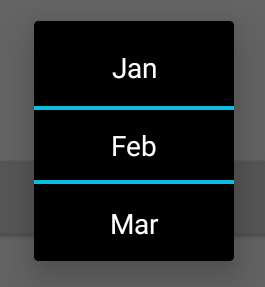
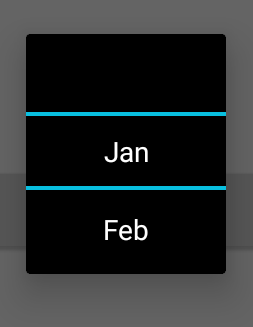
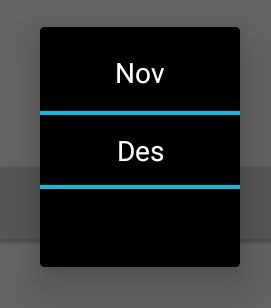
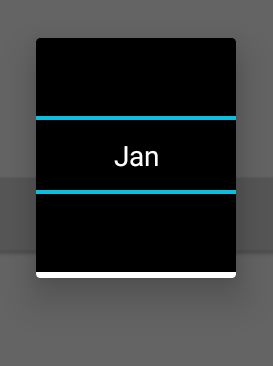
产出
正常选择
让用户选择第一项
让用户选择“最后一项”
如果列表只有一项
若要从自定义选择器中获取选定项,请使用
MyObjectType myObjectType=adapter.getSelectedItem();页面原文内容由Stack Overflow提供。腾讯云小微IT领域专用引擎提供翻译支持
原文链接:
https://stackoverflow.com/questions/52279349
复制相关文章
相似问题
腾讯云开发者

Copyright © 2013 - 2026 Tencent Cloud. All Rights Reserved. 腾讯云 版权所有
深圳市腾讯计算机系统有限公司 ICP备案/许可证号:粤B2-20090059  粤公网安备44030502008569号
腾讯云计算(北京)有限责任公司 京ICP证150476号 | 京ICP备11018762号