
QModelIndex :如何获取儿童的QModelIndex
我有一个带有QStandardItemModel的QML QStandardItemModel,并使用ItemSelectionModel来管理所选内容。ItemSelectionModel需要一个QModelIndex作为它的select函数。在我看来,怎样才能获得孩子们的QModelIndex?
这棵树是这样的:
- 档案1
- task 1- task 2
- 文件2
- 任务1
当我点击它时,我想选择task2 (我可以在委托中有一个MouseArea )(以便TreeView突出显示它),为了做到这一点,我必须用任务2的QModelIndex调用ItemSelectionModel.select。但是我不知道如何才能得到task2的QModelIndex。
QStandardItemModel是从QAbstractItemModel派生的,因此提供了一个索引函数:
virtual QModelIndex index(int row, int column, const QModelIndex & parent = QModelIndex()) const但是要使用这个函数,我需要知道父函数的索引。我怎样才能从视野中得到它呢?
回答 1
Stack Overflow用户
发布于 2018-09-10 16:49:43
要获得子对象,首先必须有父级,所以在您的方案中,您必须获得"file1“,为此您必须获得他的父级,而这个父级是TreeView的rootIndex,因此顺序是:rootIndex -> file1 -> task1。
main.cpp
#include <QGuiApplication>
#include <QQmlApplicationEngine>
#include <QQmlContext>
#include <QStandardItemModel>

int main(int argc, char *argv[])
{
    QCoreApplication::setAttribute(Qt::AA_EnableHighDpiScaling);

    QGuiApplication app(argc, argv);

    QStandardItemModel model;

    QStandardItem *item1 = new QStandardItem("file1");
    item1->appendRows({new QStandardItem("task1"), new QStandardItem("task2")});

    QStandardItem *item2 = new QStandardItem("file2");
    item2->appendRows({new QStandardItem("task1")});

    model.appendRow(item1);
    model.appendRow(item2);

    QQmlApplicationEngine engine;
    engine.rootContext()->setContextProperty("tree_model", &model);
    engine.load(QUrl(QStringLiteral("qrc:/main.qml")));
    if (engine.rootObjects().isEmpty())
        return -1;

    return app.exec();
}
main.qml
import QtQuick 2.9
import QtQuick.Window 2.2
import QtQuick.Controls 1.4
import QtQml.Models 2.11

Window {
    visible: true
    width: 640
    height: 480
    TreeView {
        id: treeView
        anchors.fill: parent
        model: tree_model
        selectionMode: SelectionMode.MultiSelection
        selection: ItemSelectionModel {
            id: ism
            model: tree_model
        }
        TableViewColumn {
            title: "Name"
            role: "display"
            width: 300
        }
        Component.onCompleted: {
            expandAll()

            var ix1 = tree_model.index(0, 0, treeView.rootIndex)
            var ix = tree_model.index(0, 0, ix1)
            ism.select(ix, ItemSelectionModel.Select)
        }
    }

    // https://forum.qt.io/topic/75395/qml-treeview-expand-method-not-working
    function expandAll() {
        for(var i=0; i < tree_model.rowCount(); i++) {
            var index = tree_model.index(i,0)
            if(!treeView.isExpanded(index)) {
                treeView.expand(index)
            }
        }
    }
}
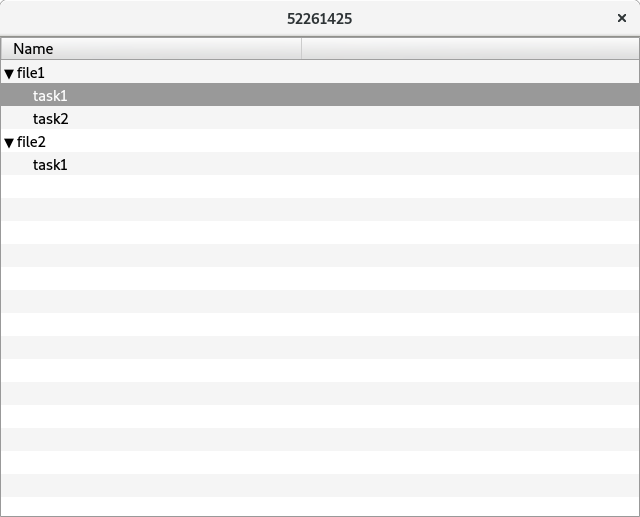
更新:
若要按下项的索引,必须使用styleData.index
import QtQuick 2.9
import QtQuick.Window 2.2
import QtQuick.Controls 1.4
import QtQml.Models 2.11

Window {
    visible: true
    width: 640
    height: 480
    TreeView {
        id: treeView
        anchors.fill: parent
        model: tree_model
        selectionMode: SelectionMode.MultiSelection
        selection: ItemSelectionModel {
            id: ism
            model: tree_model
        }
        TableViewColumn {
            title: "Name"
            role: "display"
            width: 300
        }
        itemDelegate: Item {
            Text {
                anchors.verticalCenter: parent.verticalCenter
                color: styleData.textColor
                elide: styleData.elideMode
                text: styleData.value

            }
            MouseArea{
                anchors.fill: parent
                onClicked: {
                    var ix = tree_model.index(0, 0, styleData.index)
                    ism.select(ix, ItemSelectionModel.Select)
                }
            }
        }
    }
}https://stackoverflow.com/questions/52261425
复制相似问题
腾讯云开发者

Copyright © 2013 - 2026 Tencent Cloud. All Rights Reserved. 腾讯云 版权所有
深圳市腾讯计算机系统有限公司 ICP备案/许可证号:粤B2-20090059  粤公网安备44030502008569号
腾讯云计算(北京)有限责任公司 京ICP证150476号 | 京ICP备11018762号