
使用ImageMagick计数PNG图像中的对象数
我正在试图计算图像中的对象数。
我有个测试图像
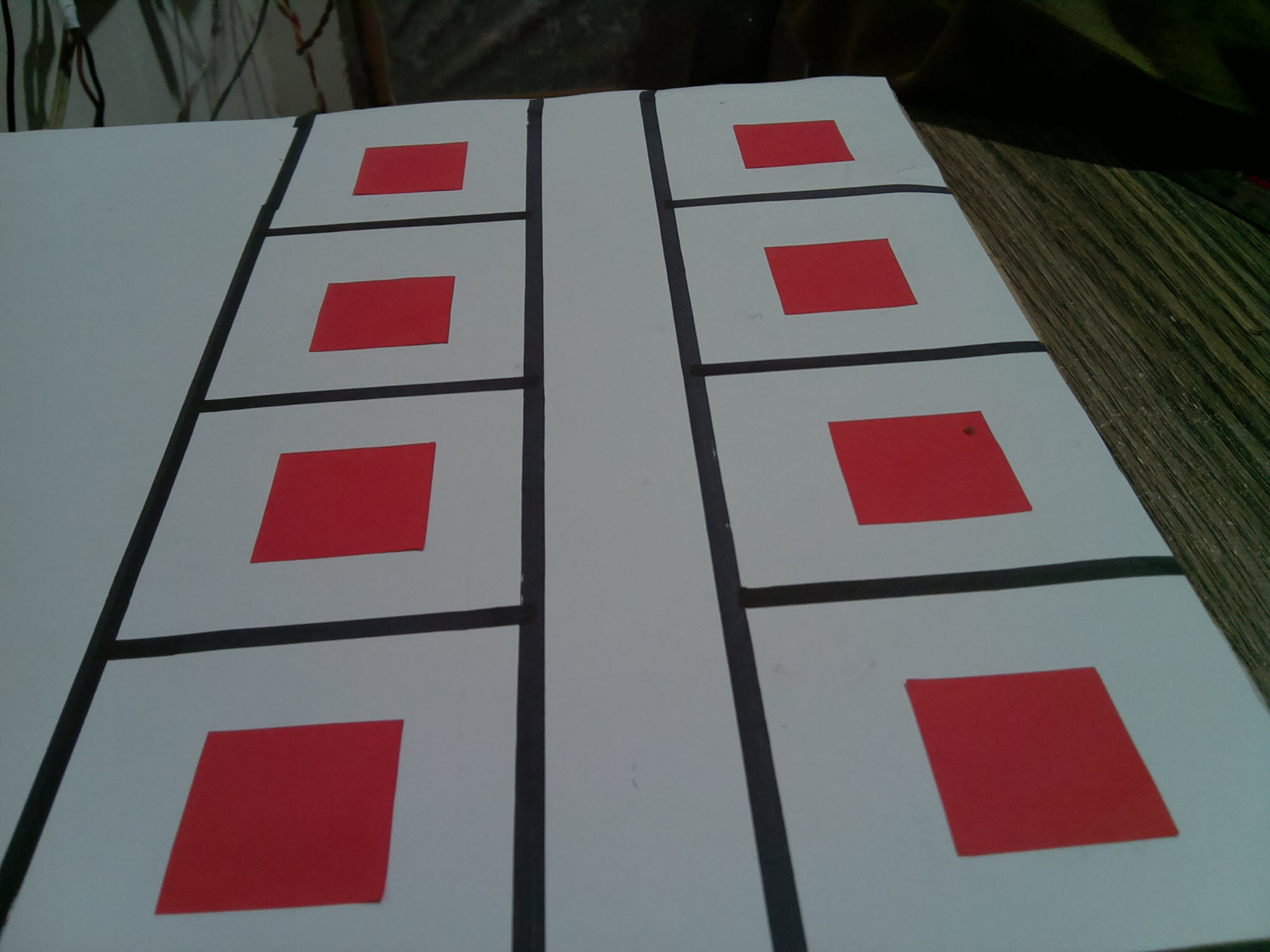
在使用php魔术函数之后,我可以将它转换成二进制图像。
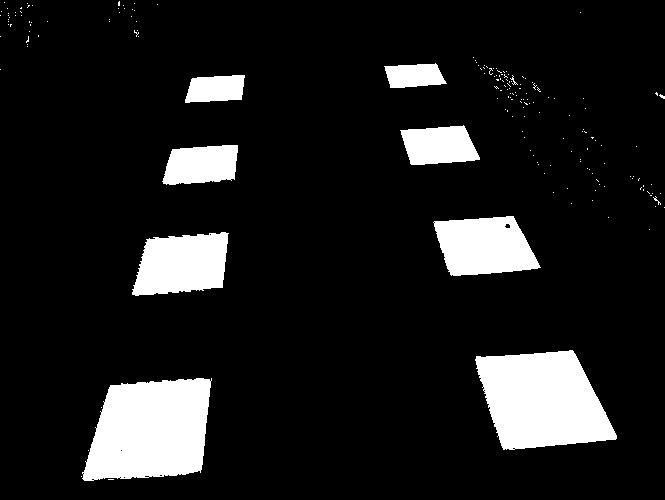
,我需要的是一个函数,它返回图像中白色对象的数量--在本例中为8 --我对图像不太了解,但是图像上有一个删除的帖子,其中使用以下命令
var_dump(
        exec("convert out.pbm -define connected-components:verbose=true  -define connected-components:area-threshold=50 \ -connected-components 4 -auto-level -depth 8 test.png")
);回答 2
Stack Overflow用户
发布于 2018-09-10 21:53:55
您的ImageMagick版本是什么?-连接组件至少需要6.8.9.10版本。把它拿出来,然后排上一长队。使用新行\可能会混淆PHP ()。
这样试一试,把你的区域门槛提高到150:
<?php
exec("convert out.pbm -define connected-components:verbose=true -define connected-components:area-threshold=150 -connected-components 4 -auto-level -depth 8 test.png 2>&1",$out,$returnval);
foreach($out as $text)
{echo "$text<br>";}
?>
然后,它应返回:
Objects (id: bounding-box centroid area mean-color):
  22: 665x500+0+0 332.0,241.1 295195 gray(0)
  7605: 125x101+86+380 150.6,431.3 10246 gray(255)
  6995: 139x105+476+350 541.7,401.0 10087 gray(255)
  5560: 94x62+133+233 182.0,265.4 4622 gray(255)
  5196: 106x61+434+217 483.3,246.8 4608 gray(255)
  3470: 76x42+162+145 201.4,164.9 2448 gray(255)
  3023: 76x40+401+126 438.7,145.5 2391 gray(255)
  1420: 58x28+186+75 215.5,88.7 1315 gray(255)
  992: 61x24+385+64 414.3,75.7 1146 gray(255)
  2: 33x18+0+0 12.9,6.6 391 gray(0)
如果您只想要没有图像的列表,可以将test.png替换为null:。
如果您希望输出是二进制的,而不是编码为id号的灰度,那么添加-define connected-components:mean=true:
<?php
exec("convert out.pbm -define connected-components:verbose=true -define connected-components:area-threshold=150 -define connected-components:mean-color=true -connected-components 4 -auto-level -depth 8 test.png 2>&1",$out,$returnval);
foreach($out as $text)
{echo "$text<br>";}
?>
如果您只想要计数和二进制输出,请尝试:
<?php
exec("convert image.jpg -define connected-components:verbose=true -define connected-components:area-threshold=150 -define connected-components:mean-color=true -connected-components 4 -auto-level -depth 8 test.png 2>&1 | grep "gray(255)" | wc -l | sed 's/^[ ]*//' ",$out,$returnval);
foreach($out as $text)
{echo "$text<br>";}
?>
应该返回8。
请参阅https://www.imagemagick.org/script/connected-components.php
Stack Overflow用户
发布于 2018-09-10 16:28:56
这似乎能满足你的需要:
<?php
$output=shell_exec("convert -size 1000x1000 xc:black -fill white -draw \"rectangle 10,10 900,900\" -define connected-components:verbose=true -connected-components 4 -auto-level -depth 8 test.png");
echo $output;
?>
一定要解析输出,如下所示:
Objects (id: bounding-box centroid area mean-color):
1: 891x891+10+10 455.0,455.0 793881 srgba(100%,100%,100%,1.08255)
0: 1000x1000+0+0 670.9,670.9 206119 srgba(0%,0%,0%,1.31795)
注意颜色(如果你想要白色物体)和区域-字段/列的标题/标签在第一行输出。因此,您应该注意到检测到了两个对象,第一个是白色和较小的,第二个是黑色的和整个图像的大小。
https://stackoverflow.com/questions/52259342
复制相似问题
腾讯云开发者

Copyright © 2013 - 2026 Tencent Cloud. All Rights Reserved. 腾讯云 版权所有
深圳市腾讯计算机系统有限公司 ICP备案/许可证号:粤B2-20090059  粤公网安备44030502008569号
腾讯云计算(北京)有限责任公司 京ICP证150476号 | 京ICP备11018762号