
Raspberry pi I2S微机电系统话筒右CHN单声道
我是使用Adafruit I2S微机电系统麦克风突破录音。参考https://learn.adafruit.com/adafruit-i2s-mems-microphone-breakout?view=all
当我在Mono配置中将Mic连接到RPI时,如下图所示,我可以使用记录命令和python代码记录音频
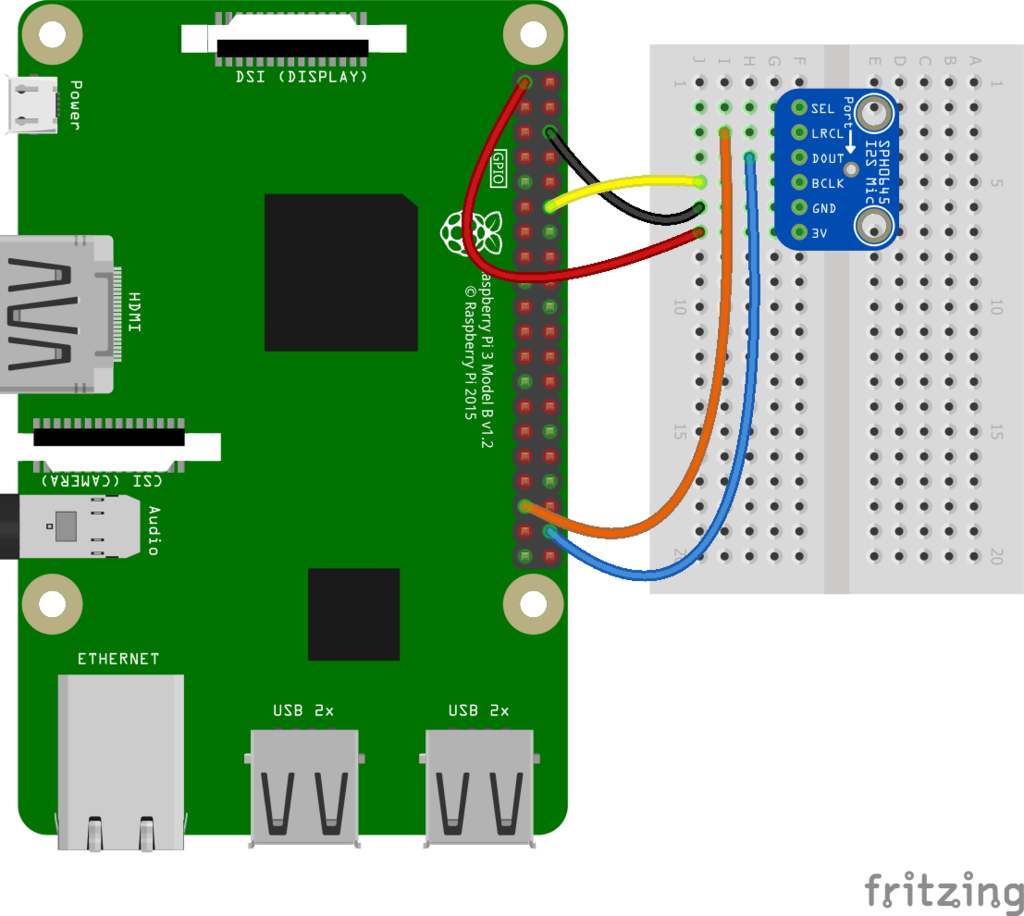
arecord -D dmic_sv -c2 -r 48000 -f S32_LE -t -V -v mono -v recording.wav
Python代码片段:
channels=1,rate=48000,frames_per_buffer=2400
def start_recording(self):
        try:
            self.logger.info("start_recording()> enter")
            # Use a stream with a callback in non-blocking mode
            self._stream = self._pa.open(format=pyaudio.paInt32,
                                            channels=self.channels,
                                            rate=self.rate,
                                            input=True,
                                            frames_per_buffer=self.frames_per_buffer,
                                            stream_callback=self.get_callback())
            self._stream.start_stream()
            self.logger.info("start_recording()> exit")
            return self
        except Exception, e:
            self.logger.error("start_recording()>", exc_info = True)
但是,如果我将通道选择引脚连接到逻辑高度,我可以使用记录命令记录音频,但可以使用python代码记录音频。是否需要在python代码中进行任何更改以记录正确的单声道音频?
回答 1
Stack Overflow用户
发布于 2018-11-27 05:40:39
我做了一些类似的事情,但使用了python-音响设备。这是我的存储库
编辑:这是需要澄清的特定录音类。
import threading
import queue
import numpy
import sounddevice as sd
import soundfile as sf

class AudioRecorder():

    def __init__(self):

        self.open = True
        self.file_name = 'name_of_file.wav'
        self.channels = 1
        self.q = queue.Queue()

        # Get samplerate
        device_info = sd.query_devices(2, 'input')
        self.samplerate = int(device_info['default_samplerate'])

    def callback(self, indata, frames, time, status):

        # This is called (from a separate thread) for each audio block.
        if status:
            print(status, file=sys.stderr)
        self.q.put(indata.copy())

    def record(self):
        with sf.SoundFile(self.file_name, mode='x', samplerate=self.samplerate, channels=self.channels) as file:
            with sd.InputStream(samplerate=self.samplerate, channels=self.channels, callback=self.callback):

                while(self.open == True):
file.write(self.q.get())编辑2:代码是Python,它使用与问题中显示的图像类似的I2S麦克风创建音频文件。当值self.open为真时,声音设备将把音频数据写入队列(def callback),然后将数据写入文件。您所要做的就是切换self.open以启动和停止录制。
https://stackoverflow.com/questions/52182560
复制相似问题
腾讯云开发者

Copyright © 2013 - 2026 Tencent Cloud. All Rights Reserved. 腾讯云 版权所有
深圳市腾讯计算机系统有限公司 ICP备案/许可证号:粤B2-20090059  粤公网安备44030502008569号
腾讯云计算(北京)有限责任公司 京ICP证150476号 | 京ICP备11018762号