
谷歌登录没有回应
我有两个登录选项,普通登录和谷歌登录。正常登录工作正常,但谷歌登录不是。
我点击谷歌登录按钮,我可以看到accounts.So,我点击帐户,但没有happen.Also,我不能看到防火墙上的用户数据。
我在仿真器或android上没有任何错误,我错过了一些东西,但是什么?
我正在跟踪本教程的谷歌登录方法。
更新错误日志
我发现错误日志finally.Problem是我每次都有构建签名(发布) apk,但是我在firebase.Just上添加了调试SHA1代码--我在模拟器上运行调试模式。
    EXCEPTION: main
        Process: com.app.surebettips, PID: 3806
        java.lang.RuntimeException: Failure delivering result ResultInfo{who=null, request=1, result=-1, data=Intent { (has extras) }} to activity {com.app.surebettips/com.app.surebettips.Login}: java.lang.IllegalArgumentException: Must specify an idToken or an accessToken.
            at android.app.ActivityThread.deliverResults(ActivityThread.java:3574)
            at android.app.ActivityThread.handleSendResult(ActivityThread.java:3617)
            at android.app.ActivityThread.access$1300(ActivityThread.java:151)
            at android.app.ActivityThread$H.handleMessage(ActivityThread.java:1352)
            at android.os.Handler.dispatchMessage(Handler.java:102)
            at android.os.Looper.loop(Looper.java:135)
            at android.app.ActivityThread.main(ActivityThread.java:5254)
            at java.lang.reflect.Method.invoke(Native Method)
            at java.lang.reflect.Method.invoke(Method.java:372)
            at com.android.internal.os.ZygoteInit$MethodAndArgsCaller.run(ZygoteInit.java:903)
            at com.android.internal.os.ZygoteInit.main(ZygoteInit.java:698)
         Caused by: java.lang.IllegalArgumentException: Must specify an idToken or an accessToken.
            at com.google.firebase.auth.GoogleAuthCredential.<init>(Unknown Source)
            at com.google.firebase.auth.GoogleAuthProvider.getCredential(Unknown Source)
            at

/****HERE***/
com.app.surebettips.Login.firebaseAuthWithGoogle(Login.java:467)
            at com.app.surebettips.Login.onActivityResult(Login.java:376)

/****HERE***/
            at android.app.Activity.dispatchActivityResult(Activity.java:6192)
            at android.app.ActivityThread.deliverResults(ActivityThread.java:3570)
            at android.app.ActivityThread.handleSendResult(ActivityThread.java:3617)
            at android.app.ActivityThread.access$1300(ActivityThread.java:151)
            at android.app.ActivityThread$H.handleMessage(ActivityThread.java:1352)
            at android.os.Handler.dispatchMessage(Handler.java:102)
            at android.os.Looper.loop(Looper.java:135)
            at android.app.ActivityThread.main(ActivityThread.java:5254)
            at java.lang.reflect.Method.invoke(Native Method)
            at java.lang.reflect.Method.invoke(Method.java:372)
            at com.android.internal.os.ZygoteInit$MethodAndArgsCaller.run(ZygoteInit.java:903)
            at com.android.internal.os.ZygoteInit.main(ZygoteInit.java:698)
    09-06 09:49:09.566 3806-3806/com.app.surebettips I/Process: Sending signal. PID: 3806 SIG: 9
行: 467
AuthCredential credential = GoogleAuthProvider.getCredential(account.getIdToken(), null);线路: 376
firebaseAuthWithGoogle(account);回答 3
Stack Overflow用户
发布于 2018-09-05 12:12:20
来自Google登录的空响应通常是由于一个不正确的SHA指纹,或者如果它没有在Google控制台中定义的话。在视频中,作者使用了一个古老的教程。下面是当前的版本:https://firebase.google.com/docs/auth/android/google-signin,它包含一个指向集成教程中的标准Google的链接:https://developers.google.com/identity/sign-in/android/sign-in
这是必要的,因为在本教程中还有另一个配置Google控制台的链接:https://developers.google.com/identity/sign-in/android/start-integrating,您需要在其中配置当前的API项目,通常它的名称是Google Developer或其他一些,如果您更改了它或在API控制台中创建了其他项目。
你需要在这里设置你的SHA-1指纹和包名。如果您将其设置为正确的项目(如果您有多个),Google登录将正确工作。
此外,您还在使用GoogleSignIn客户端,所以当您有意创建Sing时,也必须使用它。
private void signIn() {
    Intent signInIntent = mGoogleSignInClient.getSignInIntent();
    startActivityForResult(signInIntent, RC_SIGN_IN);
}因此,请查看本教程从谷歌,并实现它,如文档所述,一切都会很好。https://developers.google.com/identity/sign-in/android/start-integrating
Stack Overflow用户
发布于 2018-09-05 15:04:37
在onActivityResult回调中执行以下操作:
@Override
public void onActivityResult(int requestCode, int resultCode, Intent data) {
    super.onActivityResult(requestCode, resultCode, data);
    if (requestCode == RC_SIGN_IN) {
        try {
            Task<GoogleSignInAccount> task = GoogleSignIn.getSignedInAccountFromIntent(data);
            GoogleSignInAccount account = task.getResult(ApiException.class);
            // User is logged in on google platform
            Log.v(TAG, "Account token:" + account.getIdToken()); //NON-NLS
            // Signed in successfully, show authenticated UI.
        } catch (ApiException e) {
            // The ApiException status code indicates the detailed failure reason.
            // Please refer to the GoogleSignInStatusCodes class reference for more information.
            Log.w(TAG, "Google sign in failed", e); //NON-NLS

            String messageToDisplay = "Authentication failed.";
            switch (e.getStatusCode()) {
                case CommonStatusCodes.API_NOT_CONNECTED: //17
                    messageToDisplay += "The client attempted to clearPreferences a method from an API that failed to connect.";
                    break;

                case CommonStatusCodes.DEVELOPER_ERROR: //10
                    messageToDisplay += "The application is misconfigured.";
                    break;

                case CommonStatusCodes.ERROR: //13
                    messageToDisplay += "The operation failed with no more detailed information.";
                    break;

                case CommonStatusCodes.INTERNAL_ERROR: //8
                    messageToDisplay += "An internal error occurred.";
                    break;

                case CommonStatusCodes.INVALID_ACCOUNT: //8
                    messageToDisplay += "Invalid account name specified.";
                    break;

                case CommonStatusCodes.SIGN_IN_REQUIRED: //8
                    messageToDisplay += "Please Sign In to continue.";
                    break;
            }
        }
    }
}
这样你就能理解为什么你的登录不起作用了。
Stack Overflow用户
发布于 2022-11-03 08:03:09
谷歌登录。或社会登录.
完成代码后的必须从Google和Firebase控制台执行其他任务。
- 从你的电脑创建SHA-1键。
- 从Android的右侧找到Gradle选项->应用程序->签名报告。当它完成时,您将在日志区域获得SHA-1键。(看图)
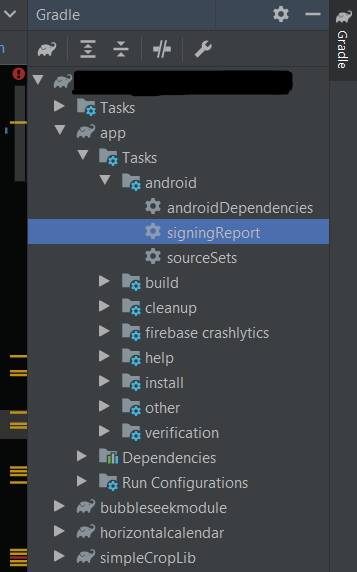
- add this key in Google firebase Console in App module
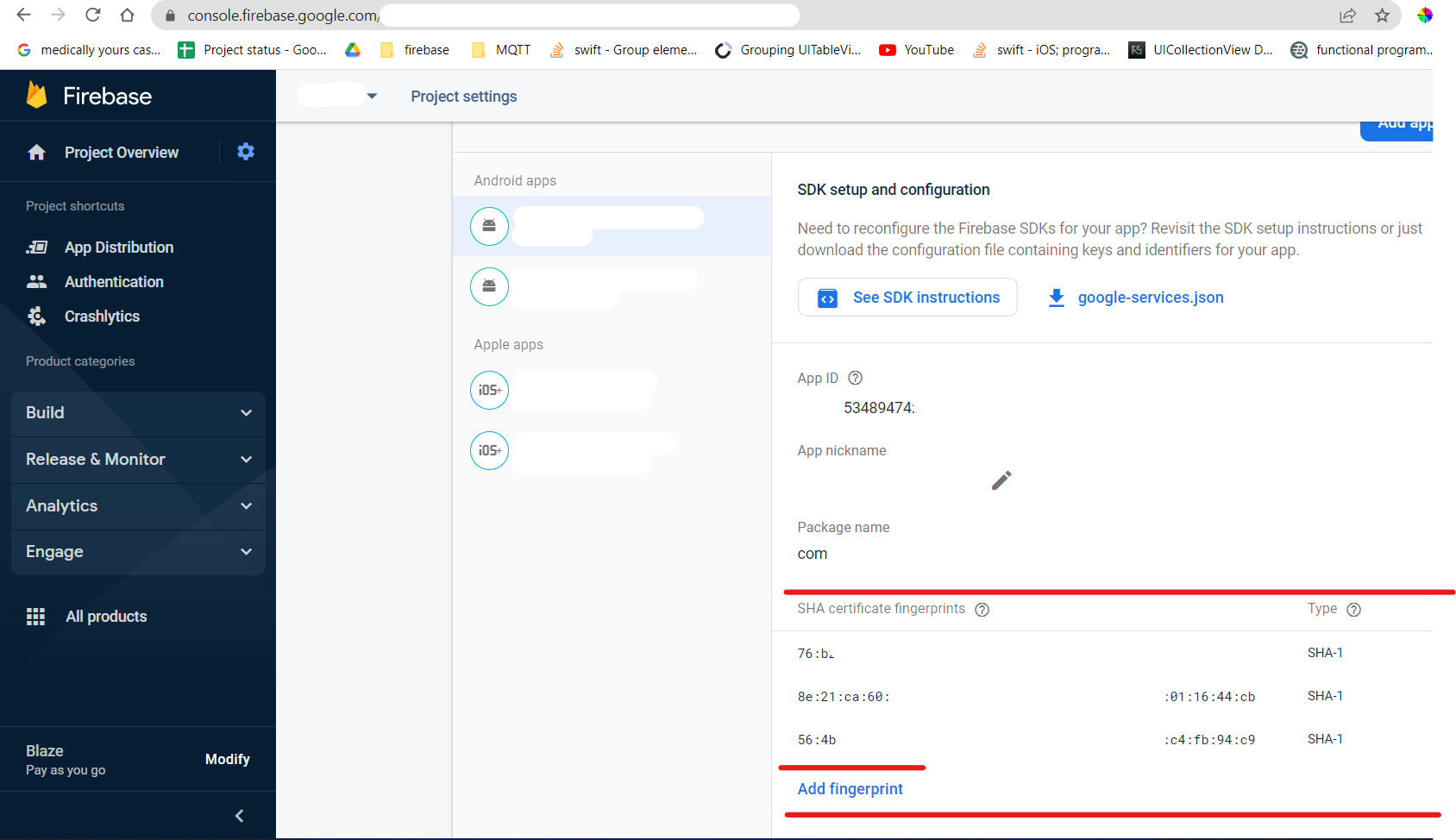
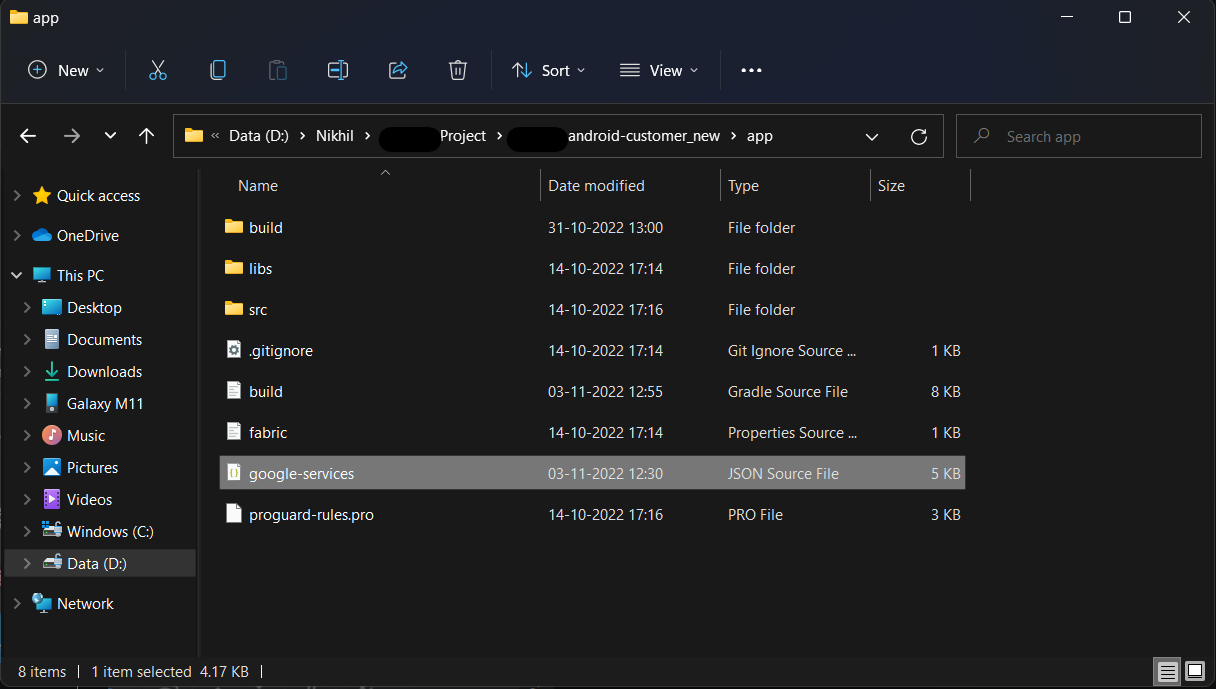
 -  after this module, download ***'google-services.json'*** and paste it

    into project -> app -> :here paste that file: ex:/ D:\Thor_PC\Androidroject\android-customer_new\app
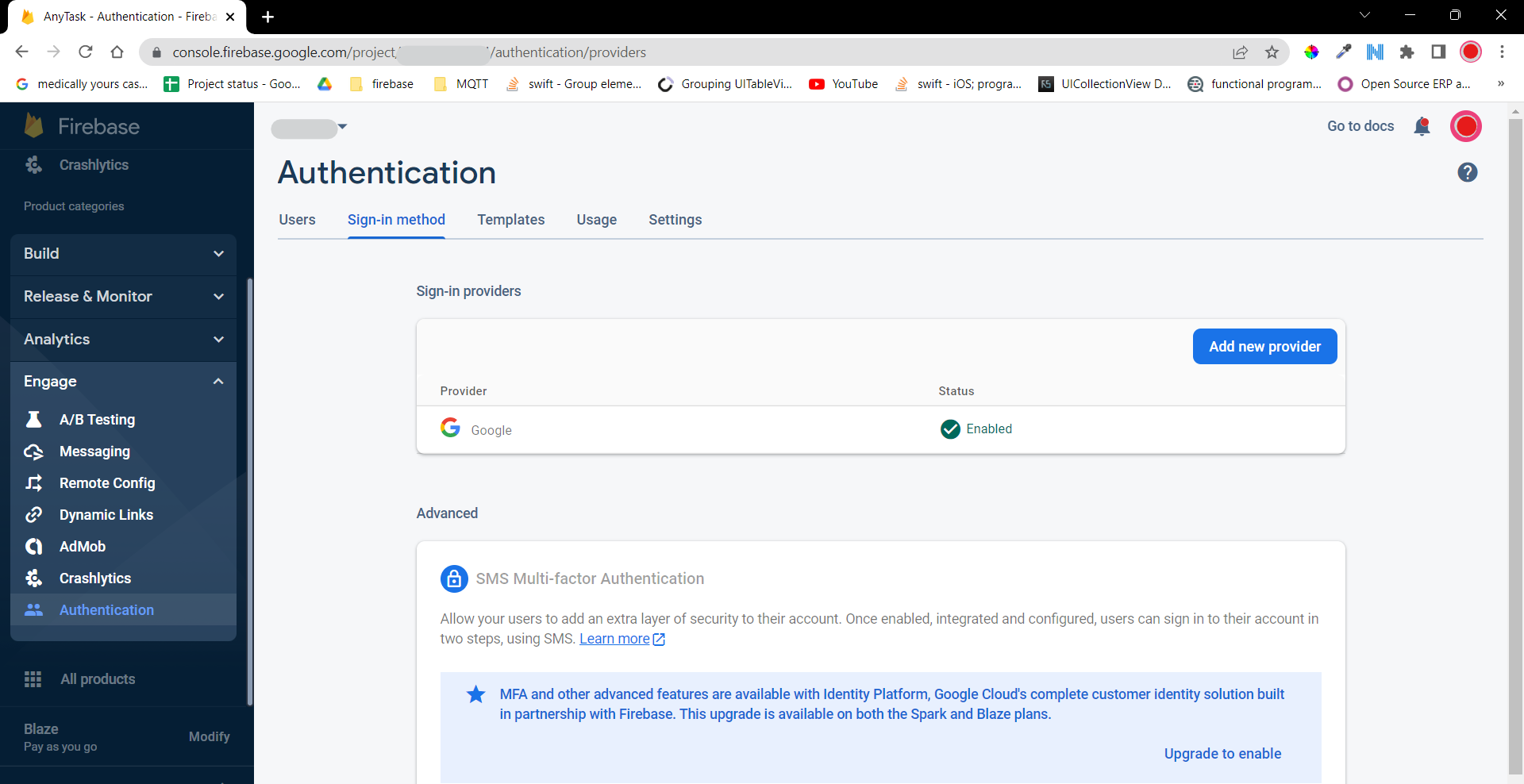
 -  and at the last option must check **Google Service is Enable or not** in Console.

 - Go to firebase console -> Engage (left side)  -> Authentication -> Sign-in Method.
☻♥ Done Keep Code.https://stackoverflow.com/questions/52180636
复制相似问题
腾讯云开发者

Copyright © 2013 - 2026 Tencent Cloud. All Rights Reserved. 腾讯云 版权所有
深圳市腾讯计算机系统有限公司 ICP备案/许可证号:粤B2-20090059  粤公网安备44030502008569号
腾讯云计算(北京)有限责任公司 京ICP证150476号 | 京ICP备11018762号