
利用WinGDI旋转高压直流电源
利用WinGDI旋转高压直流电源
提问于 2018-08-30 14:28:59
这篇文章代码很密集,所以忽略第一个块。它只是作为一个参考,以了解函数最初是如何工作的。
目前,我正试图在hdcText上执行以下代码中的-270度或90度旋转:
    void CImageWindow::Show()
        {
            BITMAP bm;
            PAINTSTRUCT ps;
            //Start Drawing Segment
            int iWidth = m_rLocation.right - m_rLocation.left;
            int iHeight = m_rLocation.bottom - m_rLocation.top;

            //Drawing plane for this window
            HDC hdcScreen = BeginPaint(m_hWindow, &ps);
            HBITMAP hWorking = CreateCompatibleBitmap(hdcScreen, iWidth,iHeight);
            SelectObject(hdcScreen, hWorking);
            SetStretchBltMode(hdcScreen, HALFTONE);
            SetBrushOrgEx(hdcScreen,0,0,0);

            //Background
            HDC hdcMem = CreateCompatibleDC(hdcScreen);
            HBITMAP hBmp = (HBITMAP)LoadImage(m_hInstance, m_sTexture.c_str(), IMAGE_BITMAP,0,0,LR_LOADFROMFILE);
            SelectObject(hdcMem, hBmp);
            GetObject(hBmp, sizeof(bm), &bm);
            StretchBlt(hdcScreen,0,0, iWidth, iHeight, hdcMem, 0,0,bm.bmWidth,bm.bmHeight, SRCCOPY);

            //Text
            HDC hdcText = CreateCompatibleDC(hdcScreen);
            HBITMAP hbmpText = CreateCompatibleBitmap(hdcText, iWidth,iHeight);
            SelectObject(hdcText, hbmpText);
            RECT rTextLoc;
            rTextLoc.top = iHeight/4;
            rTextLoc.bottom = 3 * iHeight / 4;
            rTextLoc.left = iWidth / 4;
            rTextLoc.right =3 * iWidth / 4;
            SetTextColor(hdcText, RGB(255,255,255));
            SetBkMode(hdcText, TRANSPARENT);
            HFONT hfFont = CreateFont((iHeight/2) - 2, 0,0,0,0,0,0,0,0,0,0,0,0,"Tahoma"); //-2 to ensure it can fit in the rectangle
            SelectObject(hdcText, hfFont);
            DrawText(hdcText, m_sIdentifier.c_str(), -1, &rTextLoc, DT_CENTER | DT_SINGLELINE | DT_VCENTER);
            StretchBlt(hdcScreen, 0,0,iWidth,iHeight, hdcText, 0,0,iWidth,iHeight, SRCINVERT);

            if(m_bFlipped)
                StretchBlt(hdcScreen, iWidth,iHeight,-iWidth,-iHeight, hdcScreen, 0,0,iWidth,iHeight, SRCCOPY);

             DeleteObject(hWorking);
             DeleteObject(hBmp);
             DeleteObject(hbmpText);

             DeleteObject(hfFont);

             DeleteObject(hdcMem);
             DeleteObject(hdcText);

             EndPaint( m_hWindow, &ps );

        }
我试图做以下工作来解决这个问题。
- 使用XForm旋转HDC。
这对hdcText的位置没有任何影响。我不知道为什么,而且信息也不多。
注意:我使用过XForm值,所以即使这些值不正确,我也不认为这是问题所在。
    void CImageWindow::Show()
        {
            BITMAP bm;
            PAINTSTRUCT ps;
            //Start Drawing Segment
            int iWidth = m_rLocation.right - m_rLocation.left;
            int iHeight = m_rLocation.bottom - m_rLocation.top;

            //Drawing plane for this window
            HDC hdcScreen = BeginPaint(m_hWindow, &ps);
            HBITMAP hWorking = CreateCompatibleBitmap(hdcScreen, iWidth,iHeight);
            SelectObject(hdcScreen, hWorking);
            SetStretchBltMode(hdcScreen, HALFTONE);
            SetBrushOrgEx(hdcScreen,0,0,0);

            //Background
            HDC hdcMem = CreateCompatibleDC(hdcScreen);
            HBITMAP hBmp = (HBITMAP)LoadImage(m_hInstance, m_sTexture.c_str(), IMAGE_BITMAP,0,0,LR_LOADFROMFILE);
            SelectObject(hdcMem, hBmp);
            GetObject(hBmp, sizeof(bm), &bm);
            StretchBlt(hdcScreen,0,0, iWidth, iHeight, hdcMem, 0,0,bm.bmWidth,bm.bmHeight, SRCCOPY);

            //Text
            HDC hdcText = CreateCompatibleDC(hdcScreen);
            //Added
            SetGraphicsMode(hdcText, GM_ADVANCED);
            SetMapMode(hdcText, MM_TEXT);

            HBITMAP hbmpText = CreateCompatibleBitmap(hdcText, iWidth,iHeight);
            SelectObject(hdcText, hbmpText);

            RECT rTextLoc;
            rTextLoc.top = iHeight/4;
            rTextLoc.bottom = 3 * iHeight / 4;
            rTextLoc.left = iWidth / 4;
            rTextLoc.right =3 * iWidth / 4;
            SetTextColor(hdcText, RGB(255,255,255));
            SetBkMode(hdcText, TRANSPARENT);

            lf.lfWeight = FW_NORMAL;
            lstrcpy(lf.lfFaceName, _T("Tahoma"));
            float iAngle = 2700;
            //float fAngle = -static_cast<float>(iAngle) * static_cast<float>(M_PI) / 180.0f;

            rTextLoc.top = iHeight/4;
            rTextLoc.bottom = 3 * iHeight / 4;
            rTextLoc.left = iWidth / 4;
            rTextLoc.right =3 * iWidth / 4;

            HFONT hFont = CreateFont((iHeight/2) - 2, 0,0,0,0,0,0,0,0,0,0,0,0,"Tahoma"); //-2 to ensure it can fit in the rectangle

            long y = (rTextLoc.bottom - rTextLoc.top) / 2;
            long x = (rTextLoc.right - rTextLoc.left) / 2;
            XFORM xForm;
            float iAngle = 270;
            float fAngle = -static_cast<float>(iAngle) * static_cast<float>(M_PI) / 180.0f;
xForm.eM11 = (FLOAT) cos(fAngle);
            xForm.eM12 = (FLOAT) sin(fAngle);
            xForm.eM21 = (FLOAT) -sin(fAngle);
            xForm.eM22 = (FLOAT) cos(fAngle);
            xForm.eDx  = (FLOAT) (x * (1 - cos(fAngle))) + (sin(fAngle) * y);
            xForm.eDy  = (FLOAT) (-sin(fAngle) * x) + (y * (1 - cos(fAngle)));


                xForm.eDx += (FLOAT) ((rTextLoc.bottom - rTextLoc.top) / 2) - ((rTextLoc.right - rTextLoc.left) / 2);
                xForm.eDy += (FLOAT) ((rTextLoc.bottom - rTextLoc.top) / 2) - ((rTextLoc.right - rTextLoc.left) / 2);

            SetWorldTransform(hdcScreen, &xForm);
            SetGraphicsMode(hdcText, GM_COMPATIBLE);

            SelectObject(hdcText, hFont);
            DrawText(hdcText, m_sIdentifier.c_str(), -1, &rTextLoc, DT_CENTER | DT_SINGLELINE | DT_VCENTER);
            StretchBlt(hdcScreen, 0,0,iWidth,iHeight, hdcText, 0,0,iWidth,iHeight, SRCINVERT);
            ReleaseDC(m_hWindow, hdcText);

            if(m_bFlipped)
                StretchBlt(hdcScreen, iWidth,iHeight,-iWidth,-iHeight, hdcScreen, 0,0,iWidth,iHeight, SRCCOPY);

             DeleteObject(hWorking);
             DeleteObject(hBmp);
             DeleteObject(hbmpText);

             DeleteObject(hFont);

             DeleteObject(hdcMem);
             DeleteObject(hdcText);

             EndPaint( m_hWindow, &ps );

}- 使用LOGFONT旋转。我已经设置了lfEscapement和lfOrientation的值。文本正在移动,但仅在转义向量上。期望的结果是在一个设置的点上进行旋转。
任何帮助都是非常感谢的。
回答 1
Stack Overflow用户
回答已采纳
发布于 2018-08-30 21:12:38
根据注释,您显然希望在打印出来的字符串中旋转单个字符,而不更改字符串本身的基线角度。
要做到这一点,您需要将lfEscapement保持在0,并且只更改字体的lfOrientation。要创建lfEscapement和lfOrientation具有不同值的字体,需要设置“高级”图形模式,因此顺序如下:
SetGraphicsMode(yourDC, GM_ADVANCED);
HFONT font = CreateFont(20, 0, 0, 1800, FW_NORMAL, 0, 0, 0, FF_SWISS,
                        OUT_OUTLINE_PRECIS, CLIP_CHARACTER_PRECIS, CLEARTYPE_QUALITY,
                        ANSI_CHARSET, L"Arial");

auto old_font = SelectObject(yourDC, font);

TextOutW(yourDC, 50, 50, L"Your Text");
你的结果应该是这样:
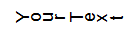
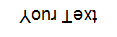
当然,如果要将文本颠倒(如注释中的链接所示),则需要将lfOrientation更改为1800,以获得如下结果:
顺便提一句,对于一些中间的角度来说,角化可能会变得相当古怪。例如,在130度旋转时:
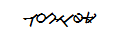
平心而论,这是相当严重的事。
页面原文内容由Stack Overflow提供。腾讯云小微IT领域专用引擎提供翻译支持
原文链接:
https://stackoverflow.com/questions/52099519
复制相关文章
相似问题
腾讯云开发者

Copyright © 2013 - 2026 Tencent Cloud. All Rights Reserved. 腾讯云 版权所有
深圳市腾讯计算机系统有限公司 ICP备案/许可证号:粤B2-20090059  粤公网安备44030502008569号
腾讯云计算(北京)有限责任公司 京ICP证150476号 | 京ICP备11018762号