
如何制作基于文本的界面(TUI/TLI)来监视OpenFOAM解决程序日志文件?
我正在一个集群上运行OpenFOAM模拟,它们需要几天时间才能完成。我正在寻找一种方法来监控这个过程,并获得一些有意义的见解。现在,我可以做的是使用
watch tail -n 15 log.log在这里中,我还找到了一个不错的grep脚本:
set logscale y
set title "Residuals"
set ylabel 'Residual'
set xlabel 'Iteration'
plot "< cat log.log | grep 'Solving for Ux'    | cut -d' ' -f9 | tr -d ','" title 'Ux'                  with lines,\
     "< cat log.log | grep 'Solving for Uy'    | cut -d' ' -f9 | tr -d ','" title 'Uy'                  with lines,\
     "< cat log.log | grep 'Solving for Uz'    | cut -d' ' -f9 | tr -d ','" title 'Uz'                  with lines,\
     "< cat log.log | grep 'Solving for omega' | cut -d' ' -f9 | tr -d ','" title 'omega'               with lines,\
     "< cat log.log | grep 'Solving for k'     | cut -d' ' -f9 | tr -d ','" title 'k'                   with lines,\
     "< cat log.log | grep 'Solving for p'     | cut -d' ' -f9 | tr -d ','" title 'p'                   with lines,\
     "< cat log.log | grep 'Courant Number'    | cut -d' ' -f9 | tr -d ','" title 'Courant Number mean' with lines,\
     "< cat log.log | grep 'Courant Number'    | cut -d' ' -f6 | tr -d ','" title 'Courant Number max'  with lines
pause 1
reread它从log.log文件中提取信息,如果我在顶部的某个地方添加set term dumb,它可以在终端中绘制。然而,情节很拥挤,很难看,要花很长时间才能显示出来,然后按顺序打印到终端,而不是更新前一个。
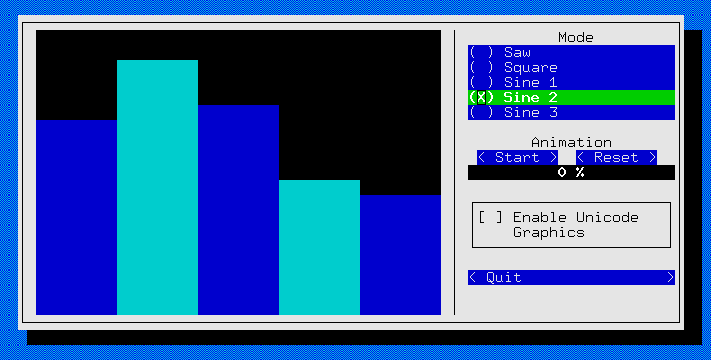
在互联网上我看到一些很好的python库,如npyscreen/picotui,ncurses/ Urwid,Asciimatics,Urwid,Prompt .用于创建TUI/TLI。我想知道您是否可以帮助我创建一个基于文本的界面,以显示基本信息和选定值随时间变化的图表。我想要几个面板。其中一个选择变量,例如Courant Number mean,在另一个面板上显示变量与步骤时间的关系。以及其他实时显示所有变量的最新值。我心里想的应该是示例
P.S.,因为我发了这个帖子:
回答 1
Stack Overflow用户
发布于 2018-09-03 14:44:07
正如在上面的注释中所描述的,我为您做了一些示例代码。它基于Redis,我建议您在集群管理器节点上运行Redis,该节点可能靠近集群的节点,并且总是向上运行,因此是统计收集服务的一个很好的候选。
示例代码是用Python编写的虚拟作业,也是用bash编写的监视例程,但是作业可以很容易地用C/C++编写,而监视例程在Perl中-- Redis有各种各样的绑定--不要挂在语言上。
即使您不能阅读Python,也很容易理解。有3个线程并行运行。一个只是用经过的总处理时间来更新string中的Redis。另外两个更新了时间序列数据的Redis lists --一个是合成的三角波,一个是5赫兹,另一个是1Hz。
我使用了一个不需要记录历史记录的Redis字符串和一个需要历史记录的Redis列表。还有其他数据结构可用。
在下面的代码中,只有3行有趣的代码:
# Connect to Redis server by IP address/name
r = redis.Redis(host='localhost', port=6379, db=0)

# Set a Redis string called 'processTime' to value `processsTime`
r.set('processTime', processTime)

# Push a value to left end of Redis list
r.lpush(RedisKeyName, value)
下面是被监控的虚拟工作。开始读上面写的东西
######
# Main
######
以下是代码:
#!/usr/local/bin/python3

import redis
import _thread
import time
import os
import random

################################################################################
# Separate thread periodically updating the 'processTime' in Redis
################################################################################
def processTimeThread():
   """Calculate time since we started and update every so often in Redis"""
   start = time.time()
   while True:
      processTime = int(time.time() - start)
      r.set('processTime', processTime)
      time.sleep(0.2)

################################################################################
# Separate thread generating a times series and storing in Redis with the given
# name and update rate
################################################################################
def generateSeriesThread(RedisKeyName, interval):
   """Generate a saw-tooth time series and log to Redis"""
   # Delete any values from previous runs
   r.delete(RedisKeyName)
   value = 0
   inc = 1
   while True:
      # Generate next value and store in Redis
      value = value + inc
      r.lpush(RedisKeyName, value)
      if value == 0:
         inc = 1
      if value == 10:
         inc = -1
      time.sleep(interval)

################################################################################
# Main
################################################################################

# Connect to Redis on local host - but could just as easily be on another machine
r = redis.Redis(host='localhost', port=6379, db=0)

# Get start time of job in RFC2822 format
startTime=time.strftime("%a, %d %b %Y %H:%M:%S +0000", time.gmtime())
# ... and set Redis string "startTime"
r.set('startTime',startTime)

# Get process id (pid)
pid=os.getpid()
# ... and set Redis string "pid""
r.set('pid',pid)

# Start some threads generating data
_thread.start_new_thread( processTimeThread, () )
_thread.start_new_thread( generateSeriesThread, ('seriesA', 0.2) )
_thread.start_new_thread( generateSeriesThread, ('seriesB', 1) )

# Hang around (with threads still running) till user presses a key
key = input("Press Return/Enter to stop.")然后,我用bash编写了一个监视脚本,该脚本连接到Redis,获取这些值并显示在TUI (文本用户界面)的终端上。您可以同样使用Python、Perl或PHP,也可以同样地编写图形界面或基于web的接口。
#!/bin/bash

################################################################################
# drawGraph
################################################################################
drawGraph(){
   top=$1 ; shift
   data=( "$@" )
   for ((row=0;row<10;row++)) ; do
      ((y=10-row))
      ((screeny=top+row))
      line=""
      for ((col=0;col<30;col++)) ; do
         char=" "
         declare -i v
         v=${data[col]}
         [ $v -eq $y ] && char="X"
         line="${line}${char}"
      done
      printf "$(tput cup $screeny 0)%s" "${line}"
   done
}

# Save screen and clear and make cursor invisible
tput smcup
tput clear
tput civis

# Trap exit
trap 'exit 1' INT TERM
trap 'tput rmcup; tput clear' EXIT

while :; do
   # Get processid from Redis and display
   pid=$(redis-cli <<< "get pid")
   printf "$(tput cup 0 0)ProcessId: $pid"

   # Get process start time from Redis and display
   startTime=$(redis-cli <<< "get startTime")
   printf "$(tput cup 1 0)Start Time: $startTime"

   # Get process running time from Redis and display
   processTime=$(redis-cli <<< "get processTime")
   printf "$(tput cup 2 0)Running Time: $(tput el)$processTime"

   # Display seriesA last few values
   seriesA=( $(redis-cli <<< "lrange seriesA 0 30") )
   printf "$(tput cup 5 0)seriesA latest values: $(tput el)"
   printf "%d " "${seriesA[@]}"

   # Display seriesB last few values
   seriesB=( $(redis-cli <<< "lrange seriesB 0 30") )
   printf "$(tput cup 6 0)seriesB latest values: $(tput el)"
   printf "%d " "${seriesB[@]}"

   drawGraph 8  "${seriesA[@]}"
   drawGraph 19 "${seriesB[@]}"

   # Put cursor at bottom of screen and tell user how to quit
   printf "$(tput cup 30 0)Hit Ctrl-C to quit"
done希望您可以很容易地从Redis获取数据结构。这将在集群节点上的作业中获取processTime变量集:
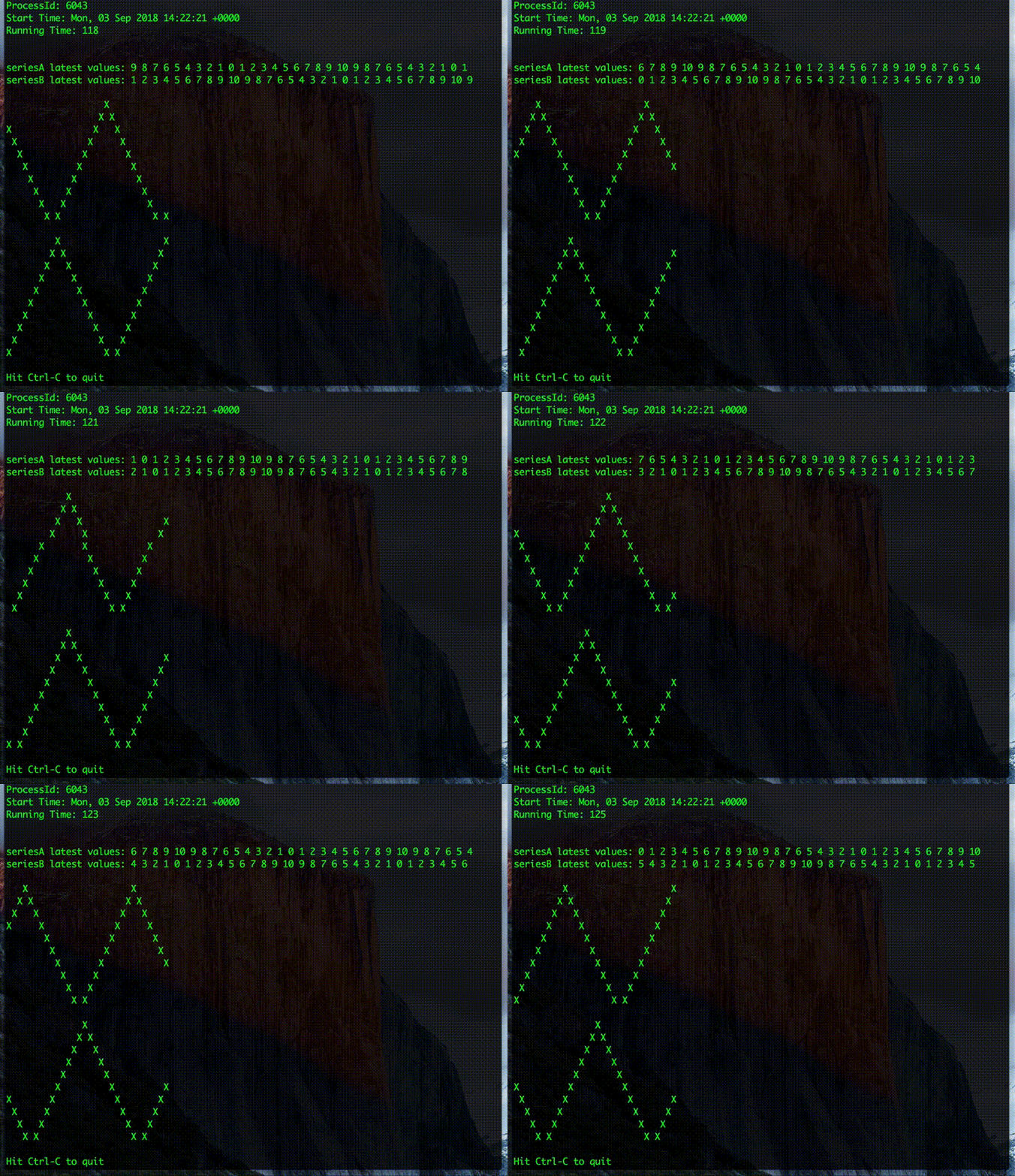
processTime=$(redis-cli <<< "get processTime")TUI看起来如下:
https://stackoverflow.com/questions/52074716
复制相似问题
腾讯云开发者

Copyright © 2013 - 2026 Tencent Cloud. All Rights Reserved. 腾讯云 版权所有
深圳市腾讯计算机系统有限公司 ICP备案/许可证号:粤B2-20090059  粤公网安备44030502008569号
腾讯云计算(北京)有限责任公司 京ICP证150476号 | 京ICP备11018762号