
如何通过QWidget调整在QGraphicScene中添加的QGraphicsProxy的大小?
如何通过QWidget调整在QGraphicScene中添加的QGraphicsProxy的大小?
提问于 2018-08-26 08:24:13
我已经通过一个QGraphicScene向图形场景( QGraphicsProxyWidget )添加了一个小部件。要移动并选择添加了QGraphicsRectItem句柄的小部件。为了调整小部件的大小,向小部件添加了QSizegrip。但是,当我调整小部件的大小超过QGraphicsRect项的大小时,右下角就落后于.How以克服这个问题?当我调整小部件的大小时,应该调整小部件的大小,反之亦然--反之亦然。如何做到这一点?任何其他想法都欢迎。这是代码
     auto *dial= new QDial();                                        // The widget
     auto *handle = new QGraphicsRectItem(QRect(0, 0, 120, 120));    // Created to move and select on scene
     auto *proxy = new QGraphicsProxyWidget(handle);                 // Adding the widget through the proxy

     dial->setGeometry(0, 0, 100, 100);
     dial->move(10, 10);

     proxy->setWidget(dial);

     QSizeGrip * sizeGrip = new QSizeGrip(dial);
     QHBoxLayout *layout = new QHBoxLayout(dial);
     layout->setContentsMargins(0, 0, 0, 0);
     layout->addWidget(sizeGrip, 0, Qt::AlignRight | Qt::AlignBottom);

     handle->setPen(QPen(Qt::transparent));
     handle->setBrush(Qt::gray);
     handle->setFlags(QGraphicsItem::ItemIsMovable |
     QGraphicsItem::ItemIsSelectable);

     Scene->addItem(handle); // adding to scene
以下是输出:
Before Resize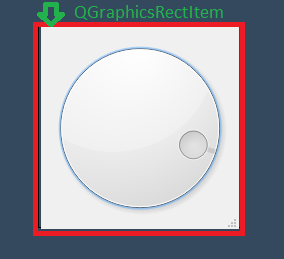
调整后
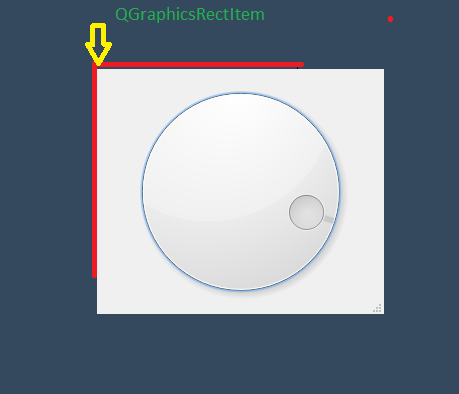
回答 1
Stack Overflow用户
回答已采纳
发布于 2018-08-26 13:39:40
原因
作为句柄使用的QGraphicsRectItem不知道QDial的大小变化,因此它不会通过调整自身大小来响应。
限制
QWidget及其子类不提供类似于开箱即用的sizeChanged信号。
解决方案
考虑到原因和给定的限制,我的解决办法如下:
- 在QDial的子程序中,比如Dial,添加一个新的信号
void sizeChanged(); - 重新实现拨号的
resizeEvent如下:
在dial.cpp中
void Dial::resizeEvent(QResizeEvent *event)
{
    QDial::resizeEvent(event);

    sizeChanged();
}- 将
auto *dial= new QDial();更改为auto *dial= new Dial(); - 在
Scene->addItem(handle); // adding to scene之后添加以下代码
在示例代码所在的地方
connect(dial, &Dial::sizeChanged, [dial, handle](){
        handle->setRect(dial->geometry().adjusted(-10, -10, 10, 10));
});注意:也可以使用eventFilter而不是子类QDial来解决。但是,从您的另一个问题中,我知道您已经是QDial子类了,这就是为什么我认为建议的解决方案更适合您。
结果
这是提议的解决办法的结果:
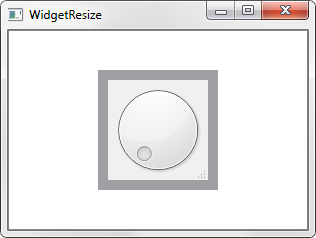
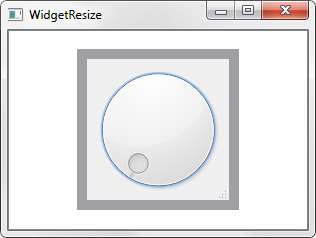
页面原文内容由Stack Overflow提供。腾讯云小微IT领域专用引擎提供翻译支持
原文链接:
https://stackoverflow.com/questions/52024492
复制相关文章
相似问题
腾讯云开发者

Copyright © 2013 - 2026 Tencent Cloud. All Rights Reserved. 腾讯云 版权所有
深圳市腾讯计算机系统有限公司 ICP备案/许可证号:粤B2-20090059  粤公网安备44030502008569号
腾讯云计算(北京)有限责任公司 京ICP证150476号 | 京ICP备11018762号