
从应用程序到SQL的Azure连接
我正在尝试将我的webapp应用程序连接到我的Server。我目前有两种资源:
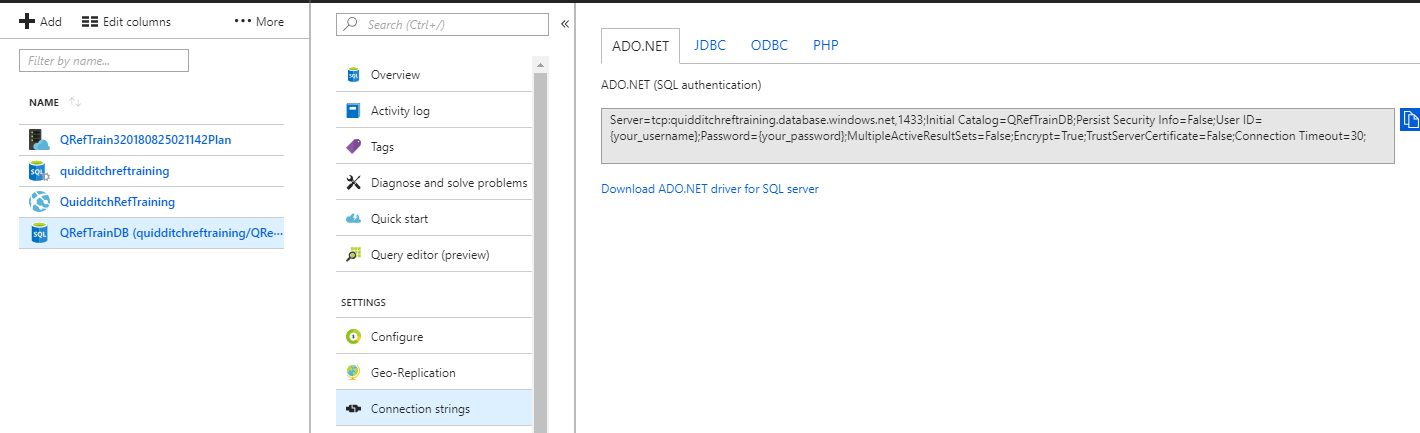
然后,我输入具有正确凭证的连接字符串到我的app参数:
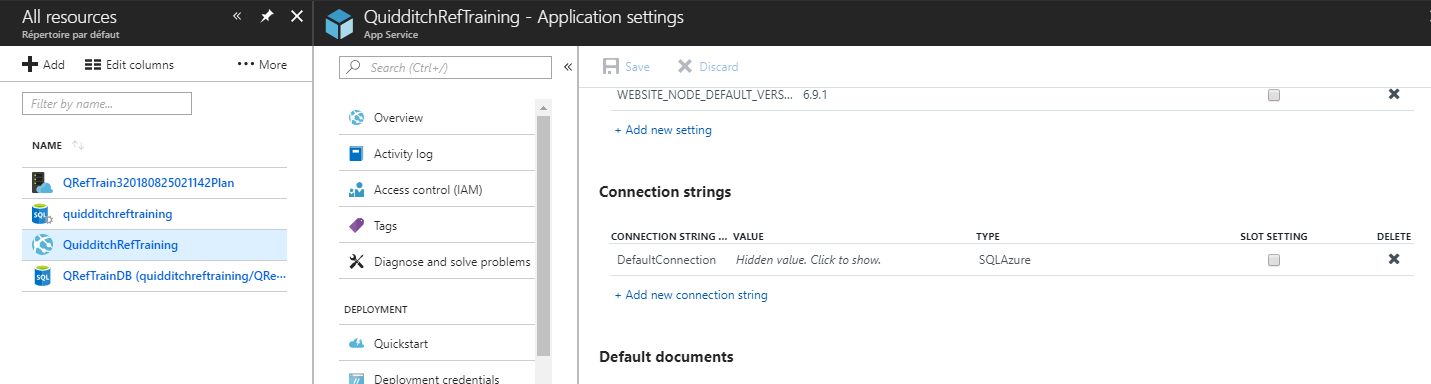
我知道这个连接字符串正在工作,因为我也在Visual中使用它,并且我能够连接到我的数据库。
然后,当启动应用程序并创建一个用户时,我会得到以下错误:
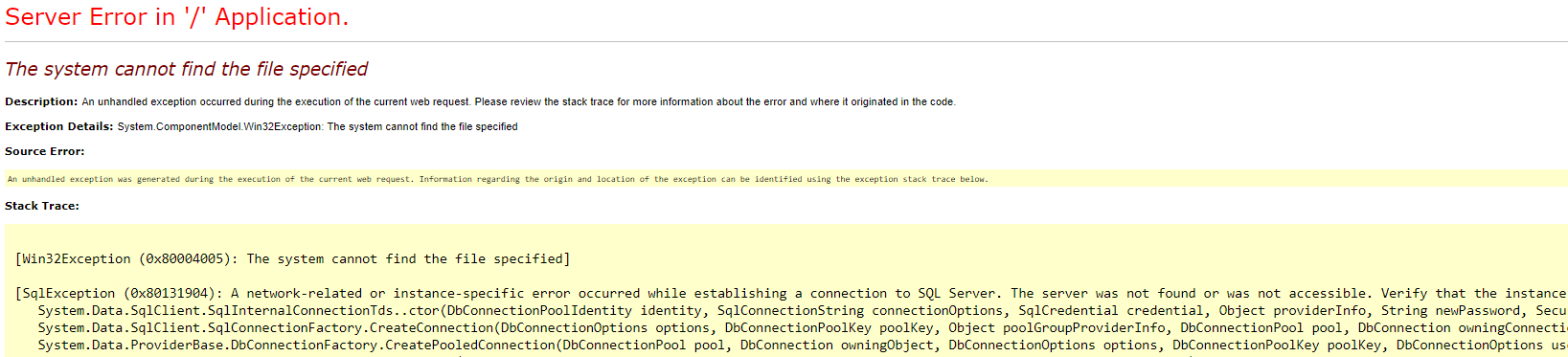
完全错误是:
SqlException (0x80131904):在建立到Server的连接时发生了与网络相关的或特定于实例的错误。找不到或无法访问服务器。验证实例名是否正确,以及SQL是否配置为允许远程连接。(提供程序: SQL网络接口,错误: 52 -无法找到本地数据库运行时安装。验证是否正确安装了,并且启用了本地数据库运行时功能。)
我正在使用实体框架( Entity )创建代码优先数据库,而我的数据库中目前绝对没有任何内容。你知道错过的一步吗?
谢谢!
编辑:这是我的web.config,从我阅读的内容来看,app配置应该覆盖连接字符串
<?xml version="1.0" encoding="utf-8"?>
<configuration>
<configSections>
<section name="entityFramework" type="System.Data.Entity.Internal.ConfigFile.EntityFrameworkSection, EntityFramework, Version=6.0.0.0, Culture=neutral, PublicKeyToken=b77a5c561934e089" requirePermission="false" />
<!-- For more information on Entity Framework configuration, visit http://go.microsoft.com/fwlink/?LinkID=237468 -->
</configSections>
<appSettings>
<add key="webpages:Version" value="3.0.0.0" />
<add key="webpages:Enabled" value="false" />
<add key="ClientValidationEnabled" value="true" />
<add key="UnobtrusiveJavaScriptEnabled" value="true" />
</appSettings>
<!--
For a description of web.config changes see http://go.microsoft.com/fwlink/?LinkId=235367.
The following attributes can be set on the <httpRuntime> tag.
<system.Web>
<httpRuntime targetFramework="4.6" />
</system.Web>
-->
<system.web>
<compilation debug="true" targetFramework="4.6" />
<customErrors mode="Off"/>
<httpRuntime targetFramework="4.5.2" />
<httpModules>
<add name="ApplicationInsightsWebTracking" type="Microsoft.ApplicationInsights.Web.ApplicationInsightsHttpModule, Microsoft.AI.Web" />
</httpModules>
<authentication mode="Forms">
<forms loginUrl="Login/Index" />
</authentication>
</system.web>
<runtime>
<assemblyBinding xmlns="urn:schemas-microsoft-com:asm.v1">
<dependentAssembly>
<assemblyIdentity name="Newtonsoft.Json" culture="neutral" publicKeyToken="30ad4fe6b2a6aeed" />
<bindingRedirect oldVersion="0.0.0.0-11.0.0.0" newVersion="11.0.0.0" />
</dependentAssembly>
<dependentAssembly>
<assemblyIdentity name="System.Web.Optimization" publicKeyToken="31bf3856ad364e35" />
<bindingRedirect oldVersion="1.0.0.0-1.1.0.0" newVersion="1.1.0.0" />
</dependentAssembly>
<dependentAssembly>
<assemblyIdentity name="WebGrease" publicKeyToken="31bf3856ad364e35" />
<bindingRedirect oldVersion="0.0.0.0-1.6.5135.21930" newVersion="1.6.5135.21930" />
</dependentAssembly>
<dependentAssembly>
<assemblyIdentity name="Antlr3.Runtime" publicKeyToken="eb42632606e9261f" culture="neutral" />
<bindingRedirect oldVersion="0.0.0.0-3.5.0.2" newVersion="3.5.0.2" />
</dependentAssembly>
<dependentAssembly>
<assemblyIdentity name="System.Web.Helpers" publicKeyToken="31bf3856ad364e35" />
<bindingRedirect oldVersion="1.0.0.0-3.0.0.0" newVersion="3.0.0.0" />
</dependentAssembly>
<dependentAssembly>
<assemblyIdentity name="System.Web.WebPages" publicKeyToken="31bf3856ad364e35" />
<bindingRedirect oldVersion="1.0.0.0-3.0.0.0" newVersion="3.0.0.0" />
</dependentAssembly>
<dependentAssembly>
<assemblyIdentity name="System.Web.Mvc" publicKeyToken="31bf3856ad364e35" />
<bindingRedirect oldVersion="1.0.0.0-5.2.6.0" newVersion="5.2.6.0" />
</dependentAssembly>
<dependentAssembly>
<assemblyIdentity name="System.Diagnostics.DiagnosticSource" publicKeyToken="cc7b13ffcd2ddd51" culture="neutral" />
<bindingRedirect oldVersion="0.0.0.0-4.0.3.0" newVersion="4.0.3.0" />
</dependentAssembly>
<dependentAssembly>
<assemblyIdentity name="Microsoft.AspNet.TelemetryCorrelation" publicKeyToken="31bf3856ad364e35" culture="neutral" />
<bindingRedirect oldVersion="0.0.0.0-1.0.3.0" newVersion="1.0.3.0" />
</dependentAssembly>
</assemblyBinding>
</runtime>
<system.webServer>
<validation validateIntegratedModeConfiguration="false" />
<modules>
<remove name="TelemetryCorrelationHttpModule" />
<add name="TelemetryCorrelationHttpModule" type="Microsoft.AspNet.TelemetryCorrelation.TelemetryCorrelationHttpModule, Microsoft.AspNet.TelemetryCorrelation" preCondition="integratedMode,managedHandler" />
<remove name="ApplicationInsightsWebTracking" />
<add name="ApplicationInsightsWebTracking" type="Microsoft.ApplicationInsights.Web.ApplicationInsightsHttpModule, Microsoft.AI.Web" preCondition="managedHandler" />
</modules>
</system.webServer>
<entityFramework>
<defaultConnectionFactory type="System.Data.Entity.Infrastructure.LocalDbConnectionFactory, EntityFramework">
<parameters>
<parameter value="mssqllocaldb" />
</parameters>
</defaultConnectionFactory>
<providers>
<provider invariantName="System.Data.SqlClient" type="System.Data.Entity.SqlServer.SqlProviderServices, EntityFramework.SqlServer" />
</providers>
</entityFramework>
<system.codedom>
<compilers>
<compiler language="c#;cs;csharp" extension=".cs" type="Microsoft.CodeDom.Providers.DotNetCompilerPlatform.CSharpCodeProvider, Microsoft.CodeDom.Providers.DotNetCompilerPlatform, Version=2.0.0.0, Culture=neutral, PublicKeyToken=31bf3856ad364e35" warningLevel="4" compilerOptions="/langversion:6 /nowarn:1659;1699;1701" />
<compiler language="vb;vbs;visualbasic;vbscript" extension=".vb" type="Microsoft.CodeDom.Providers.DotNetCompilerPlatform.VBCodeProvider, Microsoft.CodeDom.Providers.DotNetCompilerPlatform, Version=2.0.0.0, Culture=neutral, PublicKeyToken=31bf3856ad364e35" warningLevel="4" compilerOptions="/langversion:14 /nowarn:41008 /define:_MYTYPE=\"Web\" /optionInfer+" />
</compilers>
</system.codedom>
</configuration>回答 1
Stack Overflow用户
发布于 2018-08-25 21:21:58
您的配置当前使用的是LocalDb,而不是SqlServer提供程序。DefaultConnectionFactory是在没有提供连接字符串的情况下使用的,因此本质上它试图使用LocalDb,这显然不是您想要的--您希望它使用特定的SQL数据库。
您应该在EF配置中注入System.Data.Entity.SqlServer.SqlProviderServices提供程序。
<entityFramework>
    <defaultConnectionFactory type="System.Data.Entity.Infrastructure.LocalDbConnectionFactory, EntityFramework">
      <parameters>
        <parameter value="v11.0" />
      </parameters>
    </defaultConnectionFactory>
    <providers>
      <provider invariantName="System.Data.SqlClient" type="System.Data.Entity.SqlServer.SqlProviderServices, EntityFramework.SqlServer" />
    </providers>
  </entityFramework>
并指定一个连接字符串:
<connectionStrings>
    <add name="DbConnectionString"
     providerName="System.Data.SqlClient"
     connectionString="Data Source=xxx.database.windows.net;Initial Catalog=xyz;Integrated Security=False;User ID=xyz;Password=pass;Connect Timeout=60;Encrypt=False;TrustServerCertificate=False" />
</connectionStrings>然后,您可以在Azure中覆盖DbConnectionString连接字符串。
请遵照本教程:
https://softwarejuancarlos.com/2014/08/02/azure-sql-server-entity-framework-connection/
https://stackoverflow.com/questions/52020958
复制相似问题
腾讯云开发者

Copyright © 2013 - 2026 Tencent Cloud. All Rights Reserved. 腾讯云 版权所有
深圳市腾讯计算机系统有限公司 ICP备案/许可证号:粤B2-20090059  粤公网安备44030502008569号
腾讯云计算(北京)有限责任公司 京ICP证150476号 | 京ICP备11018762号