
线程1:运行在SIGABRT;0_abort_with_payload SWIFT4.1上的信号
当我在我的iPhone6上运行我的应用程序时,我会收到这个错误,但是在模拟器上运行。在模拟器中,当我从AppDelegate转到RouteTableViewController时,我在AlarmAddEditViewController上得到线程1: SIGABRT错误。我添加了一个部分,让我选择一个路由,所以当选择行时,routeSegue将被执行,然后是当我在AppDelegate上得到错误时。我找不出为什么添加到AlarmAddEditViewController中会扰乱代码。
这是在iPhone上运行它的结果:
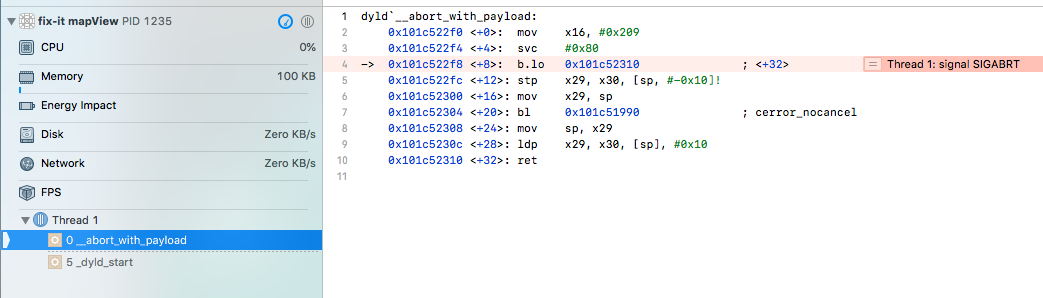
这是在模拟器中运行的:

这是我的AlarmAddEditViewController代码:
import UIKit
import Foundation
import MediaPlayer

class AlarmAddEditViewController: UIViewController, UITableViewDelegate, UITableViewDataSource{

    @IBOutlet weak var datePicker: UIDatePicker!
    @IBOutlet weak var tableView: UITableView!

    var alarmScheduler: AlarmSchedulerDelegate = Scheduler()
    var alarmModel: Alarms = Alarms()
    var segueInfo: SegueInfo!
    var snoozeEnabled: Bool = false
    var enabled: Bool!

    override func viewDidLoad() {
        super.viewDidLoad()
    }

    override func viewWillAppear(_ animated: Bool) {
        alarmModel=Alarms()
        tableView.reloadData()
        snoozeEnabled = segueInfo.snoozeEnabled
        super.viewWillAppear(animated)
    }

    override func didReceiveMemoryWarning() {
        super.didReceiveMemoryWarning()
    }

    @IBAction func saveEditAlarm(_ sender: AnyObject) {
        let date = Scheduler.correctSecondComponent(date: datePicker.date)
        let index = segueInfo.curCellIndex
        var tempAlarm = Alarm()
        tempAlarm.date = date
        tempAlarm.label = segueInfo.label
        tempAlarm.enabled = true
        tempAlarm.routeLabel = segueInfo.routeLabel
        tempAlarm.mediaLabel = segueInfo.mediaLabel
        tempAlarm.mediaID = segueInfo.mediaID
        tempAlarm.snoozeEnabled = snoozeEnabled
        tempAlarm.repeatWeekdays = segueInfo.repeatWeekdays
        tempAlarm.uuid = UUID().uuidString
        tempAlarm.onSnooze = false
        if segueInfo.isEditMode {
            alarmModel.alarms[index] = tempAlarm
        }
        else {
            alarmModel.alarms.append(tempAlarm)
        }
        self.performSegue(withIdentifier: Id.saveSegueIdentifier, sender: self)
    }


    func numberOfSections(in tableView: UITableView) -> Int {
        // Return the number of sections.
        if segueInfo.isEditMode {
            return 2
        }
        else {
            return 1
        }
    }

    func tableView(_ tableView: UITableView, numberOfRowsInSection section: Int) -> Int {
        if section == 0 {
            return 5
        }
        else {
            return 1
        }
    }


    func tableView(_ tableView: UITableView, cellForRowAt indexPath: IndexPath) -> UITableViewCell {

        var cell = tableView.dequeueReusableCell(withIdentifier: Id.settingIdentifier)
        if(cell == nil) {
            cell = UITableViewCell(style: UITableViewCellStyle.value1, reuseIdentifier: Id.settingIdentifier)
        }
        if indexPath.section == 0 {

            if indexPath.row == 0 {

                cell!.textLabel!.text = "Repeat"
                cell!.detailTextLabel!.text = WeekdaysViewController.repeatText(weekdays: segueInfo.repeatWeekdays)
                cell!.accessoryType = UITableViewCellAccessoryType.disclosureIndicator
            }
            else if indexPath.row == 1 {
                cell!.textLabel!.text = "Label"
                cell!.detailTextLabel!.text = segueInfo.label
                cell!.accessoryType = UITableViewCellAccessoryType.disclosureIndicator
            }
            else if indexPath.row == 2 {
                cell!.textLabel!.text = "Sound"
                cell!.detailTextLabel!.text = segueInfo.mediaLabel
                cell!.accessoryType = UITableViewCellAccessoryType.disclosureIndicator
            }
            else if indexPath.row == 3 {
                cell!.textLabel!.text = "Route"
                cell!.detailTextLabel!.text = segueInfo.routeLabel
                cell!.accessoryType = UITableViewCellAccessoryType.disclosureIndicator
            }
//            else if indexPath.row == 3 {
            else if indexPath.row == 4 {

                cell!.textLabel!.text = "Snooze"
                let sw = UISwitch(frame: CGRect())
                sw.addTarget(self, action: #selector(AlarmAddEditViewController.snoozeSwitchTapped(_:)), for: UIControlEvents.touchUpInside)

                if snoozeEnabled {
                    sw.setOn(true, animated: false)
                }

                cell!.accessoryView = sw
            }
        }
        else if indexPath.section == 1 {
            cell = UITableViewCell(
                style: UITableViewCellStyle.default, reuseIdentifier: Id.settingIdentifier)
            cell!.textLabel!.text = "Delete Alarm"
            cell!.textLabel!.textAlignment = .center
            cell!.textLabel!.textColor = UIColor.red
        }

        return cell!
    }


    func tableView(_ tableView: UITableView, didSelectRowAt indexPath: IndexPath) {
        let cell = tableView.cellForRow(at: indexPath)
        if indexPath.section == 0 {
            switch indexPath.row{
            case 0:
                performSegue(withIdentifier: Id.weekdaysSegueIdentifier, sender: self)
                cell?.setSelected(true, animated: false)
                cell?.setSelected(false, animated: false)
            case 1:
                performSegue(withIdentifier: Id.labelSegueIdentifier, sender: self)
                cell?.setSelected(true, animated: false)
                cell?.setSelected(false, animated: false)
            case 2:
                performSegue(withIdentifier: Id.soundSegueIdentifier, sender: self)
                cell?.setSelected(true, animated: false)
                cell?.setSelected(false, animated: false)
            case 3:
                performSegue(withIdentifier: Id.routeSegueIdentifier, sender: self)
                cell?.setSelected(true, animated: false)
                cell?.setSelected(false, animated: false)
            default:
                break
            }
        }
        else if indexPath.section == 1 {
            //delete alarm
            alarmModel.alarms.remove(at: segueInfo.curCellIndex)
            performSegue(withIdentifier: Id.saveSegueIdentifier, sender: self)
        }

    }

    @IBAction func snoozeSwitchTapped (_ sender: UISwitch) {
        snoozeEnabled = sender.isOn
    }


    // MARK: - Navigation

    // In a storyboard-based application, you will often want to do a little preparation before navigation
    override func prepare(for segue: UIStoryboardSegue, sender: Any?) {
        // Get the new view controller using segue.destinationViewController.
        // Pass the selected object to the new view controller.
        if segue.identifier == Id.saveSegueIdentifier {
            let dist = segue.destination as! MainAlarmViewController
            let cells = dist.tableView.visibleCells
            for cell in cells {
                let sw = cell.accessoryView as! UISwitch
                if sw.tag > segueInfo.curCellIndex
                {
                    sw.tag -= 1
                }
            }
            alarmScheduler.reSchedule()
        }
        else if segue.identifier == Id.soundSegueIdentifier {
            //TODO
            let dist = segue.destination as! MediaViewController
            dist.mediaID = segueInfo.mediaID
            dist.mediaLabel = segueInfo.mediaLabel
        }
        else if segue.identifier == Id.labelSegueIdentifier {
            let dist = segue.destination as! LabelEditViewController
            dist.label = segueInfo.label
        }
        else if segue.identifier == Id.weekdaysSegueIdentifier {
            let dist = segue.destination as! WeekdaysViewController
            dist.weekdays = segueInfo.repeatWeekdays
        }
        else if segue.identifier == Id.routeSegueIdentifier {
            let dist = segue.destination as! RouteTableViewController
            dist.routeLabel = segueInfo.routeLabel

        }
    }

    @IBAction func unwindFromLabelEditView(_ segue: UIStoryboardSegue) {
        let src = segue.source as! LabelEditViewController
        segueInfo.label = src.label
    }

    @IBAction func unwindFromWeekdaysView(_ segue: UIStoryboardSegue) {
        let src = segue.source as! WeekdaysViewController
        segueInfo.repeatWeekdays = src.weekdays
    }

    @IBAction func unwindFromMediaView(_ segue: UIStoryboardSegue) {
        let src = segue.source as! MediaViewController
        segueInfo.mediaLabel = src.mediaLabel
        segueInfo.mediaID = src.mediaID
    }
    @IBAction func unwindFromRouteView(_ segue: UIStoryboardSegue) {
        let src = segue.source as! RouteTableViewController
        segueInfo.routeLabel = src.routeLabel
//        segueInfo.routeId = src.routeId

    }


}
这是RouteTableViewController的代码:
import UIKit

class RouteTableViewController: UITableViewController {

    var numberOfRoutes = NewMapViewController.userRoutesNameArray.count

    var routeLabel: String!
    var routeId: String!

    override func viewDidLoad() {
        super.viewDidLoad()

    }
//    override func viewWillDisappear(_ animated: Bool) {
//        performSegue(withIdentifier: Id.soundUnwindIdentifier, sender: self)
//    }

    override func tableView(_ tableView: UITableView, willDisplayHeaderView view: UIView, forSection section: Int) {
        guard let header = view as? UITableViewHeaderFooterView else { return }
        header.textLabel?.textColor =  UIColor.gray
        header.textLabel?.font = UIFont.boldSystemFont(ofSize: 10)
        header.textLabel?.frame = header.frame
        header.textLabel?.textAlignment = .left
    }


    // MARK: - Table view data source

    //DECIDE HOW MANY SECTIONS
    override func numberOfSections(in tableView: UITableView) -> Int {
        // #warning Incomplete implementation, return the number of sections
        return 1
    }

    //DA CAPIRE DECIDES HOW MANY ROWS ARE IN EACH SECTION
    override func tableView(_ tableView: UITableView, numberOfRowsInSection section: Int) -> Int {
        // Return the number of rows in the section.
        if section == 0 {
            return 1
        }
        else if section == 1 {
            return numberOfRoutes
        }
        else if section == 2 {
            return 1
        }
        else {
            return 1
        }
    }

    //SET THE TITLE FOR EACH SECTION BASED ON PROGRESS NUMBER
    override func tableView(_ tableView: UITableView, titleForHeaderInSection section: Int) -> String? {  if section == 1 {
        return "ROTTE DISPONIBILI"
    }

    else {
        return "AVAILABLE ROUTES"
        }
    }

    //SET HEIGHT FOR HEADER IN SECTION
    override func tableView(_ tableView: UITableView, heightForHeaderInSection section: Int) -> CGFloat {
        return 40.0
    }

    override func tableView(_ tableView: UITableView, cellForRowAt indexPath: IndexPath) -> UITableViewCell {
        var cell = tableView.dequeueReusableCell(withIdentifier: Id.routeIdentifier)
        if(cell == nil) {
            cell = UITableViewCell(
                style: UITableViewCellStyle.default, reuseIdentifier: Id.routeIdentifier)
        }
        if indexPath.section == 0 {
            if indexPath.row == 0 {
                cell!.textLabel!.text = "Your Routes are:"
            } else if indexPath.row == 1 {
                cell!.textLabel!.text = "\(NewMapViewController.userRoutesNameArray[0])"
            } else if indexPath.row == 2 {
                cell!.textLabel!.text = "\(NewMapViewController.userRoutesNameArray[1])"
            } else if indexPath.row == 3 {
                cell!.textLabel!.text = "\(NewMapViewController.userRoutesNameArray[2])"
            }
//         if indexPath.section == 1 {
//            cell!.textLabel!.text = "Route is"
//            cell!.accessoryType = UITableViewCellAccessoryType.disclosureIndicator
//        }
//        else if indexPath.section == 2 {
//            if indexPath.row == 0 {
//                cell!.textLabel!.text = "Pick a theme"
//                cell!.accessoryType = UITableViewCellAccessoryType.disclosureIndicator
//            }
//        }
//        else if indexPath.section == 3 {
//            if indexPath.row == 0 {
//                cell!.textLabel!.text = "Burlone"
//            }
//            else if indexPath.row == 1 {
//                cell!.textLabel!.text = "Zen"
//            }
//
            if cell!.textLabel!.text == routeLabel {
                cell!.accessoryType = UITableViewCellAccessoryType.checkmark
            }
        }

        return cell!
    }

    override func tableView(_ tableView: UITableView, didSelectRowAt indexPath: IndexPath) {
//        routeLabel = textField.text!
        performSegue(withIdentifier: Id.routeUnwindIdentifier, sender: self)
    }
}
更新:
在将DataSource的出口连接到tableView并在iPhone上运行它时,将得到控制台输出:

这是我的AppDelegate:
import UIKit
import CoreData
import Foundation
import AudioToolbox
import AVFoundation
import Firebase

@UIApplicationMain
class AppDelegate: UIResponder, UIApplicationDelegate,AVAudioPlayerDelegate, AlarmApplicationDelegate {

    var window: UIWindow?
    var audioPlayer: AVAudioPlayer?
    let alarmScheduler: AlarmSchedulerDelegate = Scheduler()
    var alarmModel: Alarms = Alarms()


    func application(_ application: UIApplication, didFinishLaunchingWithOptions launchOptions: [UIApplicationLaunchOptionsKey: Any]?) -> Bool {

        var error: NSError?
        do {
            try AVAudioSession.sharedInstance().setCategory(AVAudioSessionCategoryPlayback)
        } catch let error1 as NSError{
            error = error1
            print("could not set session. err:\(error!.localizedDescription)")
        }
        do {
            try AVAudioSession.sharedInstance().setActive(true)
        } catch let error1 as NSError{
            error = error1
            print("could not active session. err:\(error!.localizedDescription)")
        }
        window?.tintColor = UIColor.blue
        FirebaseApp.configure()
        return true
    }

    //receive local notification when app in foreground
    func application(_ application: UIApplication, didReceive notification: UILocalNotification) {

        //show an alert window
        let storageController = UIAlertController(title: "Check route for alerts?", message: nil, preferredStyle: .alert)
        var isSnooze: Bool = false
        var soundName: String = ""
        var routeName: String = ""
        var index: Int = -1
        if let userInfo = notification.userInfo {
            isSnooze = userInfo["snooze"] as! Bool
            soundName = userInfo["soundName"] as! String
            routeName = userInfo["routeName"] as! String
            index = userInfo["index"] as! Int
        }

        playSound(soundName)
        //schedule notification for snooze
        if isSnooze {
            let snoozeOption = UIAlertAction(title: "Snooze", style: .default) {
                (action:UIAlertAction)->Void in self.audioPlayer?.stop()
                self.alarmScheduler.setNotificationForSnooze(snoozeMinute: 9, soundName: soundName, routeName: routeName, index: index)
            }
            storageController.addAction(snoozeOption)
        }
        let stopOption = UIAlertAction(title: "OK", style: .default) {
            (action:UIAlertAction)->Void in self.audioPlayer?.stop()
            AudioServicesRemoveSystemSoundCompletion(kSystemSoundID_Vibrate)
            self.alarmModel = Alarms()
            self.alarmModel.alarms[index].onSnooze = false
            //change UI
            var mainVC = self.window?.visibleViewController as? MainAlarmViewController
//            var mainVC = self.window?.visibleViewController as? NewMapViewController
            if mainVC == nil {
                let storyboard = UIStoryboard(name: "Main", bundle: nil)
                mainVC = storyboard.instantiateViewController(withIdentifier: "Alarm") as? MainAlarmViewController
//                mainVC = storyboard.instantiateViewController(withIdentifier: "Alarm") as? NewMapViewController
            }
            mainVC!.changeSwitchButtonState(index: index)
//            MainAlarmViewController?.changeSwitchButtonState(index: index)
        }

        storageController.addAction(stopOption)
        window?.visibleViewController?.navigationController?.present(storageController, animated: true, completion: nil)
    }

    //snooze notification handler when app in background
    func application(_ application: UIApplication, handleActionWithIdentifier identifier: String?, for notification: UILocalNotification, completionHandler: @escaping () -> Void) {
        var index: Int = -1
        var soundName: String = ""
        var routeName: String = ""
        if let userInfo = notification.userInfo {
            soundName = userInfo["soundName"] as! String
            routeName = userInfo["routeName"] as!String
            index = userInfo["index"] as! Int
        }
        self.alarmModel = Alarms()
        self.alarmModel.alarms[index].onSnooze = false
        if identifier == Id.snoozeIdentifier {
            alarmScheduler.setNotificationForSnooze(snoozeMinute: 9, soundName: soundName, routeName: routeName,  index: index)
            self.alarmModel.alarms[index].onSnooze = true
        }
        completionHandler()
    }

    //AlarmApplicationDelegate protocol
    func playSound(_ soundName: String) {

        //vibrate phone first
        AudioServicesPlaySystemSound(SystemSoundID(kSystemSoundID_Vibrate))
        //set vibrate callback
        AudioServicesAddSystemSoundCompletion(SystemSoundID(kSystemSoundID_Vibrate),nil,
                                              nil,
                                              { (_:SystemSoundID, _:UnsafeMutableRawPointer?) -> Void in
                                                AudioServicesPlaySystemSound(SystemSoundID(kSystemSoundID_Vibrate))
        },
                                              nil)
        let url = URL(fileURLWithPath: Bundle.main.path(forResource: soundName, ofType: "mp3")!)

        var error: NSError?

        do {
            audioPlayer = try AVAudioPlayer(contentsOf: url)
        } catch let error1 as NSError {
            error = error1
            audioPlayer = nil
        }

        if let err = error {
            print("audioPlayer error \(err.localizedDescription)")
            return
        } else {
            audioPlayer!.delegate = self
            audioPlayer!.prepareToPlay()
        }

        //negative number means loop infinity
        audioPlayer!.numberOfLoops = -1
        audioPlayer!.play()
    }

    //AVAudioPlayerDelegate protocol
    func audioPlayerDidFinishPlaying(_ player: AVAudioPlayer, successfully flag: Bool) {

    }

    func audioPlayerDecodeErrorDidOccur(_ player: AVAudioPlayer, error: Error?) {

    }


    func applicationWillResignActive(_ application: UIApplication) {
        // Sent when the application is about to move from active to inactive state. This can occur for certain types of temporary interruptions (such as an incoming phone call or SMS message) or when the user quits the application and it begins the transition to the background state.
        // Use this method to pause ongoing tasks, disable timers, and invalidate graphics rendering callbacks. Games should use this method to pause the game.
    }

    func applicationDidEnterBackground(_ application: UIApplication) {
        // Use this method to release shared resources, save user data, invalidate timers, and store enough application state information to restore your application to its current state in case it is terminated later.
        // If your application supports background execution, this method is called instead of applicationWillTerminate: when the user quits.
    }

    func applicationWillEnterForeground(_ application: UIApplication) {
        // Called as part of the transition from the background to the active state; here you can undo many of the changes made on entering the background.
    }

    func applicationDidBecomeActive(_ application: UIApplication) {
        // Restart any tasks that were paused (or not yet started) while the application was inactive. If the application was previously in the background, optionally refresh the user interface.
        //        audioPlayer?.play()
        alarmScheduler.checkNotification()
    }

    func applicationWillTerminate(_ application: UIApplication) {
        // Called when the application is about to terminate. Save data if appropriate. See also applicationDidEnterBackground:.
    }

    // MARK: - Core Data stack

    lazy var persistentContainer: NSPersistentContainer = {
        /*
         The persistent container for the application. This implementation
         creates and returns a container, having loaded the store for the
         application to it. This property is optional since there are legitimate
         error conditions that could cause the creation of the store to fail.
         */
        let container = NSPersistentContainer(name: "fix-it mapView")
        container.loadPersistentStores(completionHandler: { (storeDescription, error) in
            if let error = error as NSError? {
                // Replace this implementation with code to handle the error appropriately.
                // fatalError() causes the application to generate a crash log and terminate. You should not use this function in a shipping application, although it may be useful during development.

                /*
                 Typical reasons for an error here include:
                 * The parent directory does not exist, cannot be created, or disallows writing.
                 * The persistent store is not accessible, due to permissions or data protection when the device is locked.
                 * The device is out of space.
                 * The store could not be migrated to the current model version.
                 Check the error message to determine what the actual problem was.
                 */
                fatalError("Unresolved error \(error), \(error.userInfo)")
            }
        })
        return container
    }()

    // MARK: - Core Data Saving support

    func saveContext () {
        let context = persistentContainer.viewContext
        if context.hasChanges {
            do {
                try context.save()
            } catch {
                // Replace this implementation with code to handle the error appropriately.
                // fatalError() causes the application to generate a crash log and terminate. You should not use this function in a shipping application, although it may be useful during development.
                let nserror = error as NSError
                fatalError("Unresolved error \(nserror), \(nserror.userInfo)")
            }
        }
    }

}回答 1
Stack Overflow用户
发布于 2018-08-23 12:23:42
模拟器中的问题是RouteTableViewController不是tableViewControlle,所以我解决了这个问题,现在routeSegue正常工作。现在,它也运行在iPhone上。谢谢帮助@ Shauket Sheikh。
https://stackoverflow.com/questions/51976708
复制相似问题
腾讯云开发者

Copyright © 2013 - 2026 Tencent Cloud. All Rights Reserved. 腾讯云 版权所有
深圳市腾讯计算机系统有限公司 ICP备案/许可证号:粤B2-20090059  粤公网安备44030502008569号
腾讯云计算(北京)有限责任公司 京ICP证150476号 | 京ICP备11018762号