
如何使powershell在按下选项卡后显示建议列表?
在我公司的计算机中,当我在powershell中键入某项内容后按下选项卡时,它将显示一个建议列表,我可以使用箭头键在列表中选择项目。例如,当我键入"fin“然后按tab键时,这就是结果:
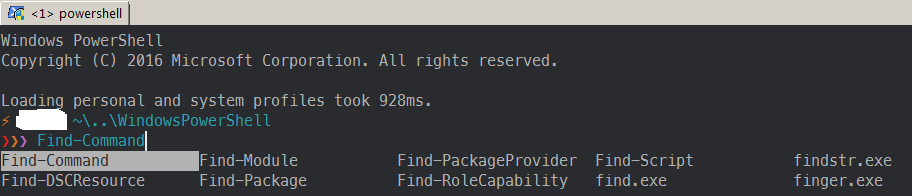
如何配置powershell以显示该列表?我尝试将powershell配置文件复制到我的笔记本电脑并导入必要的模块,但它的工作方式与图片不一样(外壳只显示与我键入的内容匹配的第一件东西,对于上面的示例,当我键入fin并按下选项卡时,它会显示fin,而不是列表)
下面是简介:
function Test-Administrator {
    $user = [Security.Principal.WindowsIdentity]::GetCurrent();
    (New-Object Security.Principal.WindowsPrincipal $user).IsInRole([Security.Principal.WindowsBuiltinRole]::Administrator)
}

Import-Module posh-git
Import-Module oh-my-posh
Set-Theme Sorin

Import-Module Get-ChildItemColor

Set-Alias l Get-ChildItemColor -option AllScope
Set-Alias ls Get-ChildItemColorFormatWide -option AllScope

function cddash {
    if ($args[0] -eq '-') {
        $pwd = $OLDPWD;
    } else {
        $pwd = $args[0];
    }
    $tmp = pwd;

    if ($pwd) {
        Set-Location $pwd;
    }
    Set-Variable -Name OLDPWD -Value $tmp -Scope global;
}

Set-Alias -Name cd -value cddash -Option AllScope


# Chocolatey profile
$ChocolateyProfile = "$env:ChocolateyInstall\helpers\chocolateyProfile.psm1"
if (Test-Path($ChocolateyProfile)) {
   Import-Module "$ChocolateyProfile"
}回答 2
Stack Overflow用户
发布于 2018-08-22 06:21:49
你在屏幕截图中运行的不仅仅是PowerShell。我是ConEmu。所以,您可能是在运行ConEmu,使用的是posh和oh和PsReadline模块。
Psreadline提供了您正在讨论的菜单功能。
一旦满足了所有的先决条件并安装了PsReadLine,您可以修改键处理程序(如果需要),因此菜单选项被分配给选项卡。默认情况下,它被分配给Ctrl + Space。
将其绑定到选项卡:
import-module PsReadLine
Set-PSReadLineKeyHandler -Key Tab -Function MenuCompleteStack Overflow用户
发布于 2020-11-10 13:19:23
如果您在powershell中安装了近地天体
只需运行nvim $PROFILE,然后导入模块来设置键选项卡函数MenuComplete (推荐)或完成
Import-Module PSReadline Set-PSReadLineKeyHandler -Key Tab -Function MenuComplete
或
Import-Module PSReadline Set-PSReadLineKeyHandler -Key Tab -Function Complete
https://stackoverflow.com/questions/51959477
复制相似问题
腾讯云开发者

Copyright © 2013 - 2026 Tencent Cloud. All Rights Reserved. 腾讯云 版权所有
深圳市腾讯计算机系统有限公司 ICP备案/许可证号:粤B2-20090059  粤公网安备44030502008569号
腾讯云计算(北京)有限责任公司 京ICP证150476号 | 京ICP备11018762号