
线程错误Windows10 IoT核
线程错误Windows10 IoT核
提问于 2018-08-21 06:32:30
我是一个新的Windows 10 IoT。
我将制作一个应用程序作为白板应用与DragonBoard 410 c。
我把按钮连接到GPIO。
并按以下方式编码,但错误发生了。
private void InitGPIO()
{
    var gpio = GpioController.GetDefault();

    if(gpio == null)
    {

        var dialog2 = new MessageDialog("Please Check GPIO");
        dialog2.ShowAsync();

        return;
    }
    BTN_UP = gpio.OpenPin(BTN_UP_NUMBER);

    BTN_UP.SetDriveMode(GpioPinDriveMode.Input);

    BTN_UP.DebounceTimeout = TimeSpan.FromMilliseconds(50);
    BTN_UP.ValueChanged += btn_up_pushed;

    var dialog = new MessageDialog("GPIO Ready");
    dialog.ShowAsync();
}

private void btn_up_pushed(GpioPin sender, GpioPinValueChangedEventArgs e)
{
    int but_width = 0;
    int but_height = 0;

    but_width = (int)cutButton.Width;
    but_height = (int)cutButton.Height;
}
当我按下名为btn_up_pushed()的按钮时。但是错误发生在下面的图片中。

请帮帮我!
回答 1
Stack Overflow用户
回答已采纳
发布于 2018-08-21 08:33:46
获得以下异常是因为您访问了UI元素(cutButton是按钮,对吗?)在非UI线程中。
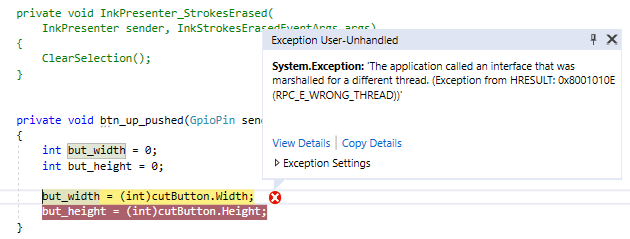
您需要将线程从当前正在执行的线程封送到UI线程。
Windows.UI.Core.CoreDispatcher可以适应这种情况。下面是一个示例:
using Windows.ApplicationModel.Core;

    private async void btn_up_pushed(GpioPin sender, GpioPinValueChangedEventArgs e)
    {
        int but_width = 0;
        int but_height = 0;

        await CoreApplication.MainView.CoreWindow.Dispatcher.RunAsync(CoreDispatcherPriority.Normal, () => {
            but_width = (int)cutButton.Width;
            but_height = (int)cutButton.Height;
        });
}参考文献:"CoreDispatcher.RunAsync“
页面原文内容由Stack Overflow提供。腾讯云小微IT领域专用引擎提供翻译支持
原文链接:
https://stackoverflow.com/questions/51942858
复制相关文章
相似问题
腾讯云开发者

Copyright © 2013 - 2026 Tencent Cloud. All Rights Reserved. 腾讯云 版权所有
深圳市腾讯计算机系统有限公司 ICP备案/许可证号:粤B2-20090059  粤公网安备44030502008569号
腾讯云计算(北京)有限责任公司 京ICP证150476号 | 京ICP备11018762号