
Laravel & Vue.js.我不能修正我的代码
Laravel & Vue.js.我不能修正我的代码
提问于 2018-08-20 00:26:34
我正在开发一个应用程序来管理一些Cvs。
我所有的资源功能都很完美地工作(创建和编辑新的Cvs等等)
但是在我的Vue.js部分,它是关于在展示视图中显示每个简历的细节,使用Axios从数据库中获取数据,或者使用表单发布。
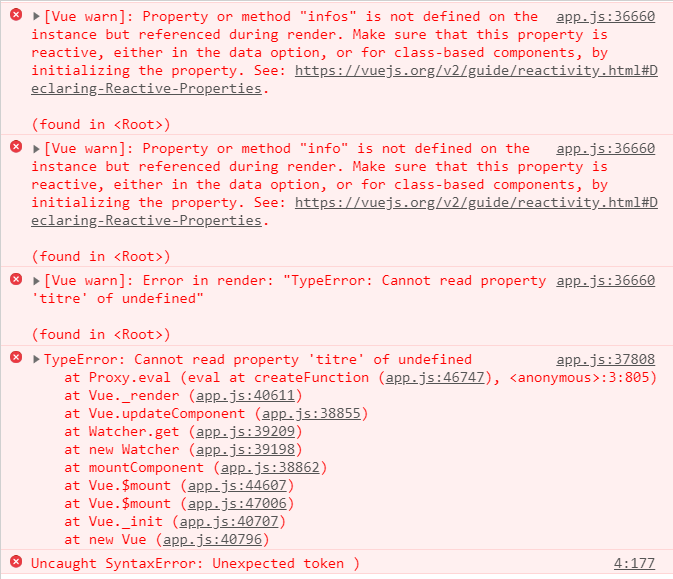
我的控制台显示了一个关于我的变量的反应性问题:infos和info。
以下是我的show.blade.php代码:
@extends('layouts.app')
@section('content')
<div class ="container" id="app">
<div class="container" id="app">
 <div class ="row">
      <div class="col-md-12">

    <div class="panel-panel-primary">
        <div class="panel-heading">
             <div class="row">
                 <div class="col-md-18"> <h3 class="panel-title"> Experience </h3></div>
                 <div class="col-md-2 text-right">
                      <button class="btn btn-success" > Ajouter</button>
                </div>
             </div>
        </div>

    <div class="panel-body" >
      <ul class="list-group">
          <li class="list-group-item" v-for="info in infos">
              <div class="pull-right">
                   <button class="btn btn-warning btn-sm">Edit</button>
               </div>
                   <h3>@{{ info.titre }}</h3>
                   <p>@{{ info.body }}</p>
           </li>
        </ul>
     </div>
</div>
     </div>
   </div>
    <div >
        <form class="flex flex-col" @submit.prevent="addExperience">
             <textarea class="border rounded p-2 mp-3" v-model="info.titre"></textarea>
             <textarea class="border rounded p-2 mp-3" v-model="info.body"></textarea>
             <button type="submit" class="border rounded py-2">Commenter</button>
         </form>
    </div>
</div>
</div>
@endsection

@section('javascripts')

<script src="{{ asset('js/vue.js')}}"> </script>
<script src="https://unpkg.com/axios/dist/axios.min.js"></script>
<script>
        window.Laravel={!! json_encode([
           'csrfToken' => csrf_token(),
           'idExperience' => $id,
           'url' =>url('/')]) !!} ;
</script>
<script>
        var app= new Vue({
        el:'#app',
        data:{
        message: '',
        infos: [],
        info:{
            id:0,
            cv_id:window.Laravel.idExperience,
            titre:'',
            body:'',
        }},
        methods:{
            getExperiences: function() {
                axios.get(window.Laravel.url+'/getexperiences/'+window.Laravel.idExperience)
                .then(response=>{
                    console.log(reponse.data);
                    this.info=reponse.data;})
                .catch(error =>{
                    console.log('errors: ', error);})},
            addExperience:function(){
                axios.post(window.Laravel.url+'/addexperience', this.info)
                .then(repsonse => {
                if(response.data.etat){

                this.infos.unshift(this.info);
                this.info={
            id:0,
            cv_id:window.Laravel.idExperience,
            titre:'',
            body:'',
                };}})
                 .catch(error =>{
                    console.log('errors: ', error)})},
         created:function(){
         this.getExperiences();})};
</script>
@endsection
我的两个函数在CvController中获得了经验和CvController:
    public function getExperiences($id){
$cv= Cv::find($id);
return $cv->infos;
}

public function addExperience(Request $request){
$info = new Info;
$info->titre=$request->titre;
$info->body=$request->body;
$info->cv_id=$request->cv_id;
$info->save();

return response()->json(['etat'=> true, 'id'=> $info->id]);

}
这是我的路线:
Route::resource('cvs','CvController');
Route::get('/getexperiences/{id}', 'CvController@getExperiences');
Route::post('/addexperience', 'CvController@addExperience');
我的控制台:
回答 1
Stack Overflow用户
发布于 2018-08-20 01:00:05
有一些语法错误需要首先修复。
- 在
created方法的末尾有一个额外的")“ methods属性缺少一个关闭的"}“- 在末尾缺少一个")“,以匹配开头的
new Vue(括号。
缩进代码以使这些事情更容易被发现是很有帮助的。
然后,需要将数据更新为返回对象的函数。请参阅Vue Docs -数据必须是一个函数
您还可以为"response“变量输入一些字体。
最后,在HTML中有两个div有id="app"。
您的JS应该看起来像:
var app = new Vue({
    el: '#app',
    data: {
        message: '',
        infos: [],
        info: {
            id: 0,
            cv_id: window.Laravel.idExperience,
            titre: '',
            body: '',
        }
    },
    methods: {
        getExperiences: function () {
            axios.get(window.Laravel.url + '/getexperiences/' + window.Laravel.idExperience)
                .then(response => {
                    console.log(reponse.data);
                    this.info = response.data;
                })
                .catch(error => {
                    console.log('errors: ', error);
                })
        },
        addExperience: function () {
            axios.post(window.Laravel.url + '/addexperience', this.info)
                .then(response => {
                    if (response.data.etat) {

                        this.infos.unshift(this.info);
                        this.info = {
                            id: 0,
                            cv_id: window.Laravel.idExperience,
                            titre: '',
                            body: '',
                        };
                    }
                })
                .catch(error => {
                    console.log('errors: ', error)
                })
        },
        created: function () {
            this.getExperiences();
        }
    }
});
如果这对你有用的话请告诉我。
页面原文内容由Stack Overflow提供。腾讯云小微IT领域专用引擎提供翻译支持
原文链接:
https://stackoverflow.com/questions/51922845
复制相关文章
相似问题
腾讯云开发者

Copyright © 2013 - 2026 Tencent Cloud. All Rights Reserved. 腾讯云 版权所有
深圳市腾讯计算机系统有限公司 ICP备案/许可证号:粤B2-20090059  粤公网安备44030502008569号
腾讯云计算(北京)有限责任公司 京ICP证150476号 | 京ICP备11018762号