
如何部署在Azure中运行python脚本的node.js应用程序?
我正在尝试部署一个node.js应用程序,该应用程序为后台任务调用python脚本。我实现它的方式是通过python:
var pythonShell = require('python-shell');

var options = {
    pythonPath: 've-env/bin/python3',
    args:
    [
        req.query.term,
        req.params.id,
        req.session.user.searchName,
        req.session.user.searchKey
    ]
};

pythonShell.run('VideoAnalyzer/Search.py', options, function (err, data) {
    if (err)
        throw err ;
    var values = JSON.parse(data[0]).value;
    var resultsByRel = values;
    res.render('video', {resultsByRel: resultsByRel, resultsByTime: [], searchTerm: req.query.term, url: req.query.url});
});
python的路径是在options.pythonPath中指定的(在称为‘ve’的python虚拟环境中)。
这在我当地的环境中是可行的。但是,当我将我的应用程序部署到Azure app时,我收到了以下错误消息:
Error: spawn Unknown system error -8
at _errnoException (util.js:992:11)
at ChildProcess.spawn (internal/child_process.js:323:11)
at exports.spawn (child_process.js:502:9)
at new PythonShell (/home/site/wwwroot/node_modules/python-shell/index.js:59:25)
at Function.PythonShell.run (/home/site/wwwroot/node_modules/python-shell/index.js:160:19)
at Object.exports.search_result_video (/home/site/wwwroot/controllers/searchController.js:20:15)
at /home/site/wwwroot/routes/video.js:15:21
at Layer.handle [as handle_request] (/home/site/wwwroot/node_modules/express/lib/router/layer.js:95:5)
at next (/home/site/wwwroot/node_modules/express/lib/router/route.js:137:13)
at Route.dispatch (/home/site/wwwroot/node_modules/express/lib/router/route.js:112:3)
该应用程序部署在Linux环境中,节点版本为v8.9。
在部署之前,我应该执行任何python环境配置吗?
回答 1
Stack Overflow用户
发布于 2018-08-17 08:04:03
在部署之前,我应该执行任何python环境配置吗?
答案是肯定的。如果要在Azure中运行python脚本,则需要在application.Please中安装python环境,请参阅以下步骤:
请参考我的工作步骤,看看是否还会出现错误。
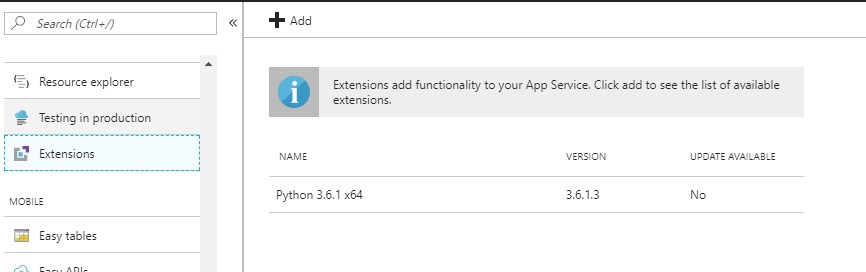
步骤1:在门户上添加扩展(这里是Python3.6.1 x64)
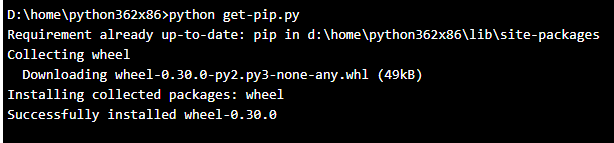
步骤2:切换到Kudu并命令cd Python364x64和touch get-pip.py,并通过编辑按钮将url https://bootstrap.pypa.io/get-pip.py的内容复制到get-pip.py中,然后运行python get-pip.py来安装pip工具。
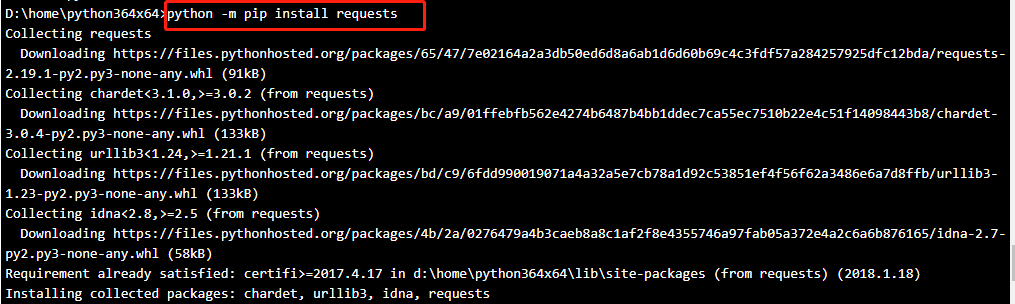
步骤3:通过python -m pip install requests安装所需的任何软件包
然后,您需要修改代码的python配置:
var express = require('express');
var pythonShell = require('python-shell');
var router = express.Router();

var options = {
  pythonPath: 'D:/home/python364x64/python',
  scriptPath: 'D:/home/site/wwwroot'
  // args:
  // [
  //     req.query.term,
  //     req.params.id,
  //     req.session.user.searchName,
  //     req.session.user.searchKey
  // ]
};

var resultsByRel;

pythonShell.run('TestRequests.py', options, function (err, data) {
  if (err) throw err;
  // results is an array consisting of messages collected during execution
  var values = JSON.parse(data[0]);
  resultsByRel = values;
  console.log('results: %j', resultsByRel);
});

router.get('/', function(req, res, next) {
  res.send(resultsByRel);
  // res.render('executePython', resultsByRel );
});

module.exports = router;
我的简单python脚本:
import requests

r= requests.get("https://www.bing.com")
print (r.status_code)
希望它能帮到你。如果有任何问题,请告诉我。
https://stackoverflow.com/questions/51845170
复制相似问题
腾讯云开发者

Copyright © 2013 - 2026 Tencent Cloud. All Rights Reserved. 腾讯云 版权所有
深圳市腾讯计算机系统有限公司 ICP备案/许可证号:粤B2-20090059  粤公网安备44030502008569号
腾讯云计算(北京)有限责任公司 京ICP证150476号 | 京ICP备11018762号