
GatsbyJS博客在"npm更新“之后不再编译了?
如果这是盖茨比,webpack或npm的问题,我还不明白。
我在终端中执行了这些命令,它们似乎启动了这个问题,试图修复一个有“无法找到模块”错误的资料-ui "Popper“模块。
npm install react-popper@next --save
npm install avj
npm install --save-dev webpack
npm install & npm update
航站楼:
错误--加载本地develop命令时出现问题。不可能安装盖茨比。也许你需要运行"npm安装“?
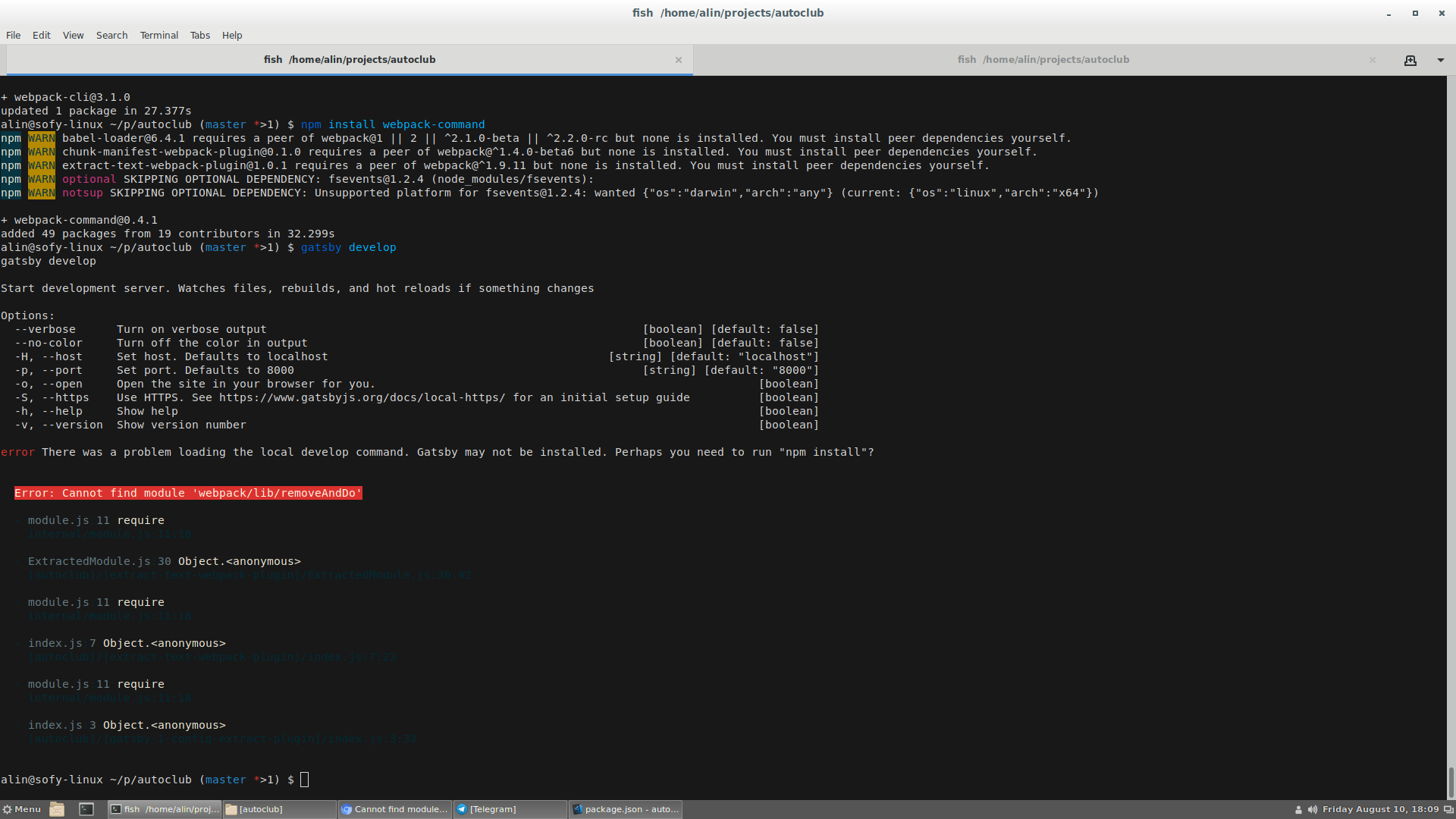
Error: Cannot find module 'webpack/lib/removeAndDo'package.json
{
  "name": "auto-club-reviews",
  "description": "Auto Club Reviews Blog",
  "version": "1.0.0",
  "author": "Sofianu Alin",
  "dependencies": {
    "@material-ui/core": "^1.4.3",
    "@material-ui/icons": "^1.1.0",
    "gatsby": "^1.9.277",
    "gatsby-link": "^1.6.46",
    "gatsby-plugin-feed": "^1.3.25",
    "gatsby-plugin-google-analytics": "^1.0.31",
    "gatsby-plugin-offline": "^1.0.18",
    "gatsby-plugin-react-helmet": "^2.0.11",
    "gatsby-plugin-react-next": "^1.0.11",
    "gatsby-plugin-sharp": "^1.6.48",
    "gatsby-plugin-typography": "^1.7.19",
    "gatsby-remark-copy-linked-files": "^1.5.37",
    "gatsby-remark-images": "^1.5.67",
    "gatsby-remark-responsive-iframe": "^1.4.20",
    "gatsby-remark-smartypants": "^1.4.12",
    "gatsby-source-contentful": "^1.3.54",
    "gatsby-source-filesystem": "^1.5.39",
    "gatsby-transformer-remark": "^1.7.44",
    "gatsby-transformer-sharp": "^1.6.27",
    "lodash": "^4.17.10",
    "react": "^16.4.2",
    "react-dom": "^16.4.2",
    "react-helmet": "^5.2.0",
    "react-hover": "^1.3.2",
    "react-popper": "^1.0.2",
    "typeface-roboto": "0.0.54"
  },
  "devDependencies": {
    "eslint": "^5.3.0",
    "eslint-plugin-react": "^7.10.0",
    "gh-pages": "^1.2.0",
    "html-webpack-plugin": "^3.2.0",
    "prettier": "^1.14.2",
    "webpack": "^4.16.5",
    "webpack-command": "^0.4.1",
    "webpack-dev-middleware": "^3.1.3",
    "webpack-dev-server": "^3.1.5"
  },
  "homepage": "https://github.com/gatsbyjs/gatsby-starter-blog#readme",
  "keywords": [
    "gatsby"
  ],
  "license": "MIT",
  "main": "n/a",
  "repository": {
    "type": "git",
    "url": "git+https://github.com/gatsbyjs/gatsby-starter-blog.git"
  },
  "scripts": {
    "dev": "gatsby develop",
    "lint": "./node_modules/.bin/eslint --ext .js,.jsx --ignore-pattern public .",
    "test": "echo \"Error: no test specified\" && exit 1",
    "format": "prettier --trailing-comma es5 --no-semi --single-quote --write 'src/**/*.js' 'src/**/*.md'",
    "develop": "gatsby develop",
    "build": "gatsby build",
    "deploy": "gatsby build --prefix-paths && gh-pages -d public",
    "fix-semi": "eslint --quiet --ignore-pattern node_modules --ignore-pattern public --parser babel-eslint --no-eslintrc --rule '{\"semi\": [2, \"never\"], \"no-extra-semi\": [2]}' --fix gatsby-node.js"
  }
}
还试图:
删除node_modules,然后安装npm;
卸载"webpack-cli":"^3.1.0“并安装webpack-指挥官;
卸载摘录-文本-webpack插件,似乎是在终端抱怨;
同志们有什么想法吗?
回答 2
Stack Overflow用户
发布于 2018-08-11 16:30:32
你用盖茨比v2做实验了吗?您的package.json显示了React v16,它是盖茨比v2的peerDependency,而不是Gatsby v1。在盖茨比v1 (这是您在package.json中所拥有的)中,您不应该直接安装React,它是作为Gatsby的依赖项安装的。
Webpack ( v1和v2)也是盖茨比的附庸。我认为您不应该将它作为顶级依赖项在package.json中使用。
我建议从一个干净的盖茨比入门开始,然后将您的gatsby-node.js、gatsby-config.js、组件、内容等复制到该项目中。保留package.json文件。然后,对显式npm install --save或require的每个包运行import。希望这能让你回到工作地点。
就我个人而言,我也推荐yarn而不是npm。
Stack Overflow用户
发布于 2021-09-22 11:46:54
Gatsby干净缓存
然后删除节点模块
然后
纱线启动/npm安装
https://stackoverflow.com/questions/51792889
复制相似问题
腾讯云开发者

Copyright © 2013 - 2026 Tencent Cloud. All Rights Reserved. 腾讯云 版权所有
深圳市腾讯计算机系统有限公司 ICP备案/许可证号:粤B2-20090059  粤公网安备44030502008569号
腾讯云计算(北京)有限责任公司 京ICP证150476号 | 京ICP备11018762号