
高聚网格的OpenGL三维射线刻划
如何在包含高多边形网格模型的3d场景中实现三维射线打印?
遍历所有三角形来执行三角线交集测试需要花费太多的时间。我知道有像八叉树之类的方法,在场景中应该可以使用这些方法,但是我不知道我应该如何在网格级别使用这些概念。但是,如果在网格级别使用八叉树,我们应该如何解决多边形的问题,这些问题超出了八叉树卷的边界?
你有什么建议,哪一种方法是适合或推荐的三维射线交叉与高聚模型的实时OpenGl应用?
回答 2
Stack Overflow用户
发布于 2018-08-09 10:00:53
对于光线选择呈现的对象(比如鼠标),最好的选择是使用已经呈现的缓冲区,因为与复杂场景中的射线交叉测试相比,读取它们的成本非常低。这样做的目的是渲染每个可选择的呈现对象,以便根据您需要的每个信息分离缓冲区,例如:
- 深度缓冲 这将为您提供与对象的光线交集的3D位置。
- 模版缓冲器 如果呈现给模板的每个对象都带有其ID (或其在对象列表中的索引),那么您可以直接获得选中的对象。
- 任何其他 也有第二颜色附件和FBO的存在。所以你可以添加任何其他东西,比如法线向量,或者任何你需要的东西。
如果编码正确,所有这些都只会略微降低性能(甚至根本不需要),因为您不需要计算任何内容,每个缓冲区只需编写一个片段。
拾取本身很容易,您只需从所有需要的缓冲区中读取相应的像素,并将其转换为所需格式。
这里简单的C++/VCL示例使用固定管道(没有着色器).
//---------------------------------------------------------------------------
#include <vcl.h>
#include <math.h>
#pragma hdrstop
#include "Unit1.h"
#include "gl_simple.h"
//---------------------------------------------------------------------------
#pragma package(smart_init)
#pragma resource "*.dfm"
TForm1 *Form1;
//---------------------------------------------------------------------------
void matrix_mul_vector(double *c,double *a,double *b,double w=1.0)
    {
    double q[3];
    q[0]=(a[ 0]*b[0])+(a[ 4]*b[1])+(a[ 8]*b[2])+(a[12]*w);
    q[1]=(a[ 1]*b[0])+(a[ 5]*b[1])+(a[ 9]*b[2])+(a[13]*w);
    q[2]=(a[ 2]*b[0])+(a[ 6]*b[1])+(a[10]*b[2])+(a[14]*w);
    for(int i=0;i<3;i++) c[i]=q[i];
    }
//---------------------------------------------------------------------------
class glMouse
    {
public:
    int sx,sy;      // framebuffer position [pixels]
    double pos[3];  // [GCS] ray end coordinate (or z_far)
    double beg[3];  // [GCS] ray start (z_near)
    double dir[3];  // [GCS] ray direction
    double depth;   // [GCS] perpendicular distance to camera
    WORD id;        // selected object id
    double x0,y0,xs,ys,zFar,zNear;  // viewport and projection
    double *eye;    // camera direct matrix pointer
    double fx,fy;   // perspective scales

    glMouse(){ eye=NULL; for (int i=0;i<3;i++) { pos[i]=0.0; beg[i]=0.0; dir[i]=0.0; } id=0; x0=0.0; y0=0.0; xs=0.0; ys=0.0; fx=0.0; fy=0.0; depth=0.0; }
    glMouse(glMouse& a){ *this=a; };
    ~glMouse(){};
    glMouse* operator = (const glMouse *a) { *this=*a; return this; };
//  glMouse* operator = (const glMouse &a) { ...copy... return this; };

    void resize(double _x0,double _y0,double _xs,double _ys,double *_eye)
        {
        double per[16];
        x0=_x0; y0=_y0; xs=_xs; ys=_ys; eye=_eye;
        glGetDoublev(GL_PROJECTION_MATRIX,per);
        zFar =0.5*per[14]*(1.0-((per[10]-1.0)/(per[10]+1.0)));
        zNear=zFar*(per[10]+1.0)/(per[10]-1.0);
        fx=per[0];
        fy=per[5];
        }

    void pick(double x,double y)    // test screen x,y [pixels] position
        {
        int i;
        double l;
        GLfloat _z;
        GLint _id;
        sx=x; sy=ys-1.0-y;
        // read depth z and linearize
        glReadPixels(sx,sy,1,1,GL_DEPTH_COMPONENT,GL_FLOAT,&_z);    // read depth value
        depth=_z;                                               // logarithmic
        depth=(2.0*depth)-1.0;                                  // logarithmic NDC
        depth=(2.0*zNear)/(zFar+zNear-(depth*(zFar-zNear)));    // linear <0,1>
        depth=zNear + depth*(zFar-zNear);                       // linear <zNear,zFar>
        // read object ID
        glReadPixels(sx,sy,1,1,GL_STENCIL_INDEX,GL_INT,&_id);   // read stencil value
        id=_id;
        // win [pixel] -> GL NDC <-1,+1>
        x=    (2.0*(x-x0)/xs)-1.0;
        y=1.0-(2.0*(y-y0)/ys);
        // ray start GL camera [LCS]
        beg[2]=-zNear;
        beg[1]=(-beg[2]/fy)*y;
        beg[0]=(-beg[2]/fx)*x;
        // ray direction GL camera [LCS]
        for (l=0.0,i=0;i<3;i++) l+=beg[i]*beg[i]; l=1.0/sqrt(l);
        for (i=0;i<3;i++) dir[0]=beg[0]*l;
        // ray end GL camera [LCS]
        pos[2]=-depth;
        pos[1]=(-pos[2]/fy)*y;
        pos[0]=(-pos[2]/fx)*x;
        // convert to [GCS]
        matrix_mul_vector(beg,eye,beg);
        matrix_mul_vector(pos,eye,pos);
        matrix_mul_vector(dir,eye,dir,0.0);
        }
    };
//---------------------------------------------------------------------------
// camera & mouse
double eye[16],ieye[16];    // direct view,inverse view and perspective matrices
glMouse mouse;
// objects
struct object
    {
    WORD id;                // unique non zero ID
    double m[16];           // direct model matrix
    object(){}; object(object& a){ *this=a; }; ~object(){}; object* operator = (const object *a) { *this=*a; return this; }; /*object* operator = (const object &a) { ...copy... return this; };*/
    };
const int objs=7;
object obj[objs];
// textures
GLuint txr=-1;
//---------------------------------------------------------------------------
void  matrix_inv(double *a,double *b) // a[16] = Inverse(b[16])
    {
    double x,y,z;
    // transpose of rotation matrix
    a[ 0]=b[ 0];
    a[ 5]=b[ 5];
    a[10]=b[10];
    x=b[1]; a[1]=b[4]; a[4]=x;
    x=b[2]; a[2]=b[8]; a[8]=x;
    x=b[6]; a[6]=b[9]; a[9]=x;
    // copy projection part
    a[ 3]=b[ 3];
    a[ 7]=b[ 7];
    a[11]=b[11];
    a[15]=b[15];
    // convert origin: new_pos = - new_rotation_matrix * old_pos
    x=(a[ 0]*b[12])+(a[ 4]*b[13])+(a[ 8]*b[14]);
    y=(a[ 1]*b[12])+(a[ 5]*b[13])+(a[ 9]*b[14]);
    z=(a[ 2]*b[12])+(a[ 6]*b[13])+(a[10]*b[14]);
    a[12]=-x;
    a[13]=-y;
    a[14]=-z;
    }
//---------------------------------------------------------------------------
void gl_draw()
    {
    int i; object *o;
    double a;

    glClear(GL_COLOR_BUFFER_BIT | GL_DEPTH_BUFFER_BIT | GL_STENCIL_BUFFER_BIT );
    glEnable(GL_CULL_FACE);
    glEnable(GL_DEPTH_TEST);

    glEnable(GL_STENCIL_TEST);
    glStencilOp(GL_KEEP, GL_KEEP, GL_REPLACE);
    glStencilMask(0xFFFF); // Write to stencil buffer
    glStencilFunc(GL_ALWAYS,0,0xFFFF);  // Set any stencil to 0

    for (o=obj,i=0;i<objs;i++,o++)
        {
        glMatrixMode(GL_MODELVIEW);
        glLoadMatrixd(ieye);
        glMultMatrixd(o->m);
        glStencilFunc(GL_ALWAYS,o->id,0xFFFF); // Set any stencil to object ID
        vao_draw();
        }
    glStencilFunc(GL_ALWAYS,0,0xFFFF);  // Set any stencil to 0
    glDisable(GL_STENCIL_TEST);         // no need fot testing

    // render mouse
    glMatrixMode(GL_MODELVIEW);
    glLoadMatrixd(ieye);

    a=0.1*mouse.depth;
    glColor3f(0.0,1.0,0.0);
    glBegin(GL_LINES);
    glVertex3d(mouse.pos[0]+a,mouse.pos[1],mouse.pos[2]);
    glVertex3d(mouse.pos[0]-a,mouse.pos[1],mouse.pos[2]);
    glVertex3d(mouse.pos[0],mouse.pos[1]+a,mouse.pos[2]);
    glVertex3d(mouse.pos[0],mouse.pos[1]-a,mouse.pos[2]);
    glVertex3d(mouse.pos[0],mouse.pos[1],mouse.pos[2]+a);
    glVertex3d(mouse.pos[0],mouse.pos[1],mouse.pos[2]-a);
    glEnd();

    Form1->Caption=AnsiString().sprintf("%.3lf , %.3lf , %.3lf : %u",mouse.pos[0],mouse.pos[1],mouse.pos[2],mouse.id);

    // debug buffer views
    if ((Form1->ck_depth->Checked)||(Form1->ck_stencil->Checked))
        {
        glDisable(GL_DEPTH_TEST);
        glMatrixMode(GL_PROJECTION);
        glPushMatrix();
        glLoadIdentity();
        glMatrixMode(GL_MODELVIEW);
        glLoadIdentity();
        glEnable(GL_TEXTURE_2D);
        glBindTexture(GL_TEXTURE_2D,txr);
        GLfloat *f=new GLfloat[xs*ys],z;
        if (Form1->ck_depth  ->Checked)
            {
            glReadPixels(0,0,xs,ys,GL_DEPTH_COMPONENT,GL_FLOAT,f);
            for (i=0;i<xs*ys;i++) f[i]=1.0-(2.0*mouse.zNear)/(mouse.zFar+mouse.zNear-(((2.0*f[i])-1.0)*(mouse.zFar-mouse.zNear)));
            glTexImage2D(GL_TEXTURE_2D, 0, GL_RGB, xs, ys, 0, GL_RED, GL_FLOAT, f);
            }
        if (Form1->ck_stencil->Checked)
            {
            glReadPixels(0,0,xs,ys,GL_STENCIL_INDEX,GL_FLOAT,f);
            for (i=0;i<xs*ys;i++) f[i]/=float(objs);
            glTexImage2D(GL_TEXTURE_2D, 0, GL_RGB, xs, ys, 0, GL_GREEN, GL_FLOAT, f);
            }
        delete[] f;
        glColor3f(1.0,1.0,1.0);
        glBegin(GL_QUADS);
        glTexCoord2f(1.0,0.0); glVertex2f(+1.0,-1.0);
        glTexCoord2f(1.0,1.0); glVertex2f(+1.0,+1.0);
        glTexCoord2f(0.0,1.0); glVertex2f(-1.0,+1.0);
        glTexCoord2f(0.0,0.0); glVertex2f(-1.0,-1.0);
        glEnd();
        glMatrixMode(GL_PROJECTION);
        glPopMatrix();
        glDisable(GL_TEXTURE_2D);
        glEnable(GL_DEPTH_TEST);
        }
    glFlush();
    SwapBuffers(hdc);
    }
//---------------------------------------------------------------------------
__fastcall TForm1::TForm1(TComponent* Owner):TForm(Owner)
    {
    int i;
    object *o;

    gl_init(Handle);
    vao_init();

    // init textures
    glGenTextures(1,&txr);
    glEnable(GL_TEXTURE_2D);
    glBindTexture(GL_TEXTURE_2D,txr);
    glPixelStorei(GL_UNPACK_ALIGNMENT, 4);
    glTexParameteri(GL_TEXTURE_2D, GL_TEXTURE_WRAP_S,GL_CLAMP_TO_EDGE);
    glTexParameteri(GL_TEXTURE_2D, GL_TEXTURE_WRAP_T,GL_CLAMP_TO_EDGE);
    glTexParameteri(GL_TEXTURE_2D, GL_TEXTURE_MAG_FILTER,GL_NEAREST);
    glTexParameteri(GL_TEXTURE_2D, GL_TEXTURE_MIN_FILTER,GL_NEAREST);
    glTexEnvf(GL_TEXTURE_ENV, GL_TEXTURE_ENV_MODE,GL_COPY);
    glDisable(GL_TEXTURE_2D);

    // init objects
    glMatrixMode(GL_MODELVIEW);
    glLoadIdentity();
    glTranslatef(-1.5,4.7,-8.0);
    for (o=obj,i=0;i<objs;i++,o++)
        {
        o->id=i+1;  // unique non zero ID
        glGetDoublev(GL_MODELVIEW_MATRIX,o->m);
        glRotatef(360.0/float(objs),0.0,0.0,1.0);
        glTranslatef(-3.0,0.0,0.0);
        }
    for (o=obj,i=0;i<objs;i++,o++)
        {
        glLoadMatrixd(o->m);
        glRotatef(180.0*Random(),Random(),Random(),Random());
        glGetDoublev(GL_MODELVIEW_MATRIX,o->m);
        }
    }
//---------------------------------------------------------------------------
void __fastcall TForm1::FormDestroy(TObject *Sender)
    {
    glDeleteTextures(1,&txr);
    gl_exit();
    vao_exit();
    }
//---------------------------------------------------------------------------
void __fastcall TForm1::FormResize(TObject *Sender)
    {
    gl_resize(ClientWidth,ClientHeight);
    // obtain/init matrices
    glMatrixMode(GL_MODELVIEW);
    glLoadIdentity();
    glTranslatef(0,0,-15.0);
    glGetDoublev(GL_MODELVIEW_MATRIX,ieye);
    matrix_inv(eye,ieye);
    mouse.resize(0,0,xs,ys,eye);
    }
//---------------------------------------------------------------------------
void __fastcall TForm1::FormPaint(TObject *Sender)
    {
    gl_draw();
    }
//---------------------------------------------------------------------------
void __fastcall TForm1::Timer1Timer(TObject *Sender)
    {
    gl_draw();
    }
//---------------------------------------------------------------------------
void __fastcall TForm1::FormMouseWheel(TObject *Sender, TShiftState Shift, int WheelDelta, TPoint &MousePos, bool &Handled)
    {
    GLfloat dz=2.0;
    if (WheelDelta<0) dz=-dz;
    glMatrixMode(GL_MODELVIEW);
    glLoadMatrixd(ieye);
    glTranslatef(0,0,dz);
    glGetDoublev(GL_MODELVIEW_MATRIX,ieye);
    matrix_inv(eye,ieye);
    gl_draw();
    }
//---------------------------------------------------------------------------
void __fastcall TForm1::FormMouseMove(TObject *Sender, TShiftState Shift, int X, int Y)
    {
    mouse.pick(X,Y);
    }
//---------------------------------------------------------------------------
void __fastcall TForm1::ck_depthClick(TObject *Sender)
    {
    gl_draw();
    }
//---------------------------------------------------------------------------
这里预览从左RGB,深度,模板:

在这里捕获了GIF:
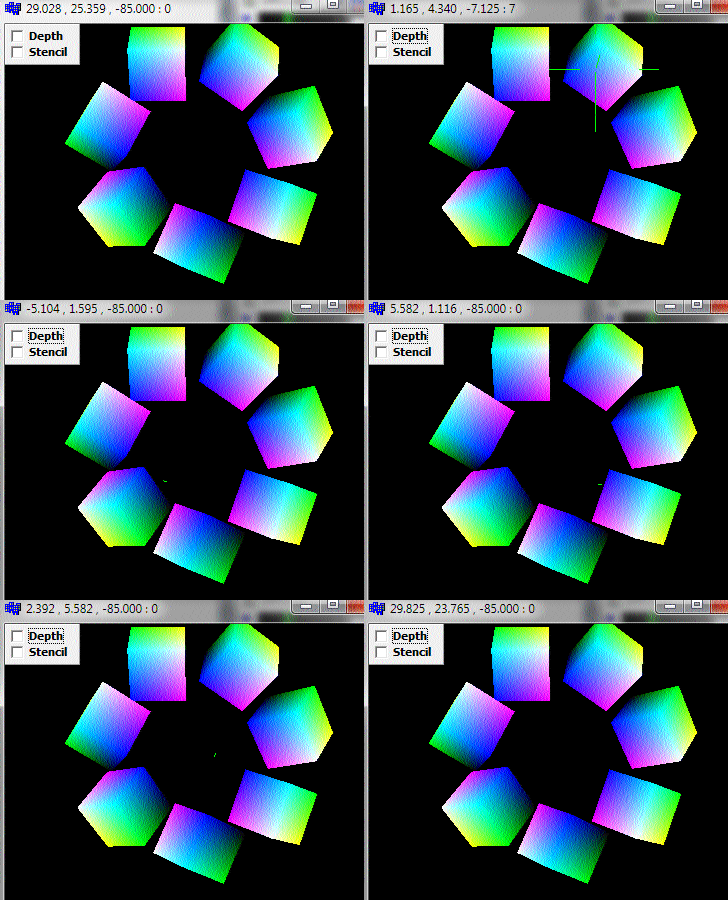
前3个数字是被选中像素在中的三维位置,标题中的最后一个数字是选中的ID,0意味着没有对象。
这里的示例是使用gl_simple,h:
您可以忽略VCL内容,因为它并不重要,只需将事件移植到您的环境中.
那么该怎么做呢:
- 渲染
您需要将模板缓冲区添加到GL窗口像素格式中,因此在我的示例中,我只需添加:
pfd.cStencilBits = 16;
从
gl_init()函数转换为gl_simple.h函数。还将其位添加到glClear中,并将每个对象模板设置为其ID,就像我在gl_draw()中所做的那样。 - 拾取
我编写了一个小的
glMouse类来完成所有的繁重工作。对于透视图、视图或视图端口的每次更改,都调用其glMouse::resize函数。这将为以后的计算准备所有所需的常量。小心它需要直接的摄像机/视图矩阵! 现在,在每一次鼠标移动(或单击或其他任何操作)上,调用glMouse::pick函数,然后使用像id这样的结果返回ID、选中的对象或pos,后者是射线对象交集的全局世界坐标([GCS])中的3D坐标。 该函数只读取深度和模板缓冲区。将深度线性化如下:
- [depth buffer got by glReadPixels is always 1](https://stackoverflow.com/a/51130948/2521214)计算射线beg,dir,pos,depth在[GCS]中。
- 正规 您有两个选项,要么将您的正常呈现为另一个缓冲区,这是最简单和最精确的。或者读取附近两个或更多相邻像素的深度,计算它们的三维位置。由此,使用交叉乘积计算您的正常(S)和平均数(如果需要)。但这会导致边缘的人工制品。
正如注释中提到的那样,为了提高精度,您应该使用线性深度缓冲区,而不是像下面这样的线性化对数:
顺便说一句,我在这里使用了同样的技术(在基于GDI的SW等距渲染中):
Edit1 8位模板缓冲区
这些天来,可靠的模板位宽度只有8位,这将is的数量限制在255。在大多数情况下,这还不够。解决办法是将索引呈现为颜色,然后将帧存储到CPU内存中,然后呈现正常颜色。然后在需要时使用存储的框架进行拾取。渲染到纹理或颜色附件也是一种可能性。
Edit2几个相关链接
Stack Overflow用户
发布于 2018-08-08 05:47:30
用八叉树。确保它适合你的整个网眼。
而且,听起来好像您要将每个多边形分配给一个叶子/桶,这是不对的。为所有出现在其中的叶片/桶分配多个策略。
https://stackoverflow.com/questions/51736402
复制相似问题
腾讯云开发者

Copyright © 2013 - 2026 Tencent Cloud. All Rights Reserved. 腾讯云 版权所有
深圳市腾讯计算机系统有限公司 ICP备案/许可证号:粤B2-20090059  粤公网安备44030502008569号
腾讯云计算(北京)有限责任公司 京ICP证150476号 | 京ICP备11018762号