
执行存储过程NJS-012时节点-oracledb错误
我运行Node 8.9.4、Hapi 17.4和Oracledb 2.2。
当试图调用存储过程时,我得到错误"NJS-012:在参数2中遇到无效的绑定数据类型“。我做的任何事似乎都解决不了这个问题。调用该过程的代码是:
async function getSavedViews(req, h, server) {
    let connection = await server.app.db.getConnection();

    let bindVars = {
        P_USER_NAME:   req.payload.user_name,
        P_CONTENT_TYPE: req.payload.content_type,
        P_PROJECT_NUMBER: req.payload.project_number,
        OP_GRID_TAB_TYP: { dir: server.app.db.BIND_OUT, type: server.app.db.ARRAY }
    }

    let res = server.methods.response();

    try {
        res.error = false;
        res.msg = "Retrieved saved views.";
        res.data = await connection.execute(
            `BEGIN APPS.XXETA_GRID_USER_CONTEXT_PKG.EXTRACT_GRID_DETAILS(:P_USER_NAME, :P_CONTENT_TYPE, :P_PROJECT_NUMBER, :OP_GRID_TAB_TYP); END;`,
            bindVars
        );
    } catch (err) {
        server.app.logger.error(err.message);
        res.error = true;
        res.msg = err.message,
        res.data = [];
    }

    return res;
}
存储过程描述为:
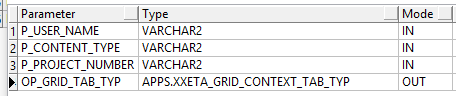
我从记录器得到的错误是: 2018-08-06 15:02:20错误NJS-012:在参数2中遇到无效的绑定数据类型。
任何帮助都将不胜感激。
更新:
绑定变量的复杂类型如下所示.
CREATE OR REPLACE TYPE XXETA_GRID_CONTEXT_REC_TYP AS OBJECT
   (
        GRID_VIEW_ID NUMBER (15),
        GRID_VIEW_NAME VARCHAR2 (240),
        USER_NAME VARCHAR2 (30),
        PROJECT_NUMBER  VARCHAR2 (5)
)回答 1
Stack Overflow用户
发布于 2018-08-06 20:05:27
更新2019/08/28:
Node-oracledb在v4中增加了对SQL对象类型和PL/SQL记录类型的支持(发布于2019/07/25)。有关详细信息,请参阅文档的以下部分:https://oracle.github.io/node-oracledb/doc/api.html#objects
给定与前面列出的对象完全相同的对象,下面的JavaScript现在可以用比以前少得多的代码行来完成任务:
const oracledb = require('oracledb');
const config = require('./db-config.js');

async function runTest() {
  let conn;

  try {
    const sql =
     `call xxeta_grid_user_context_pkg.extract_grid_details(
        p_user_name      => :P_USER_NAME,
        p_content_type   => :P_CONTENT_TYPE,
        p_project_number => :P_PROJECT_NUMBER,
        op_grid_tab_typ  => :OP_GRID_TAB_TYP
      )`;

    const binds = {
      P_USER_NAME: 'Jane Doe',
      P_CONTENT_TYPE: 'Some Content Type',
      P_PROJECT_NUMBER: '123',
      OP_GRID_TAB_TYP: {
        dir: oracledb.BIND_OUT,
        type: 'HR.XXETA_GRID_CONTEXT_TAB_TYP'
      }
    }

    conn = await oracledb.getConnection(config);

    const result = await conn.execute(
      sql,
      binds
    );

    const gridContexts = [];

    for (let x = 0; x < result.outBinds.OP_GRID_TAB_TYP.length; x += 1) {
      gridContexts.push({
        gridViewId: result.outBinds.OP_GRID_TAB_TYP[x].GRID_VIEW_ID,
        gridViewName: result.outBinds.OP_GRID_TAB_TYP[x].GRID_VIEW_NAME,
        userName: result.outBinds.OP_GRID_TAB_TYP[x].USER_NAME,
        projectNumber: result.outBinds.OP_GRID_TAB_TYP[x].PROJECT_NUMBER
      });
    }

    console.log(gridContexts);
  } catch (err) {
    console.error(err);
  } finally {
    if (conn) {
      try {
        await conn.close();
      } catch (err) {
        console.error(err);
      }
    }
  }
}

runTest();
先前的回答:
当前不支持复杂类型。您指定的out绑定属于此类别。在这些类型被直接支持之前,您需要添加一些包装代码来将复杂类型分解为一个或多个简单类型。我在这里展示了一个例子:https://jsao.io/2017/01/plsql-record-types-and-the-node-js-driver/
该帖子的目标是调用接受自定义记录类型数组的存储过程。要调用它,我首先必须声明一些要绑定到的简单数组类型。然后,我可以使用这些数组来创建更复杂的数组并调用过程。
在你的例子中,你需要做相反的事情。在PL/SQL块中,声明一个APPS.XXETA_GRID_CONTEXT_TAB_TYP类型的局部变量。然后,在调用该过程之后,遍历该数组并使用它填充一些简单数组(VARCHAR2、NUMBER或DATE),并将这些数组用作out绑定。
更新:
如果您有以下对象:
create or replace type xxeta_grid_context_rec_typ as object (
  grid_view_id   number(15),
  grid_view_name varchar2(240),
  user_name      varchar2(30),
  project_number varchar2(5)
)
/

create or replace type xxeta_grid_context_tab_typ as table of xxeta_grid_context_rec_typ
/

create or replace package xxeta_grid_user_context_pkg
as

procedure extract_grid_details(
  p_user_name      in varchar2,
  p_content_type   in varchar2,
  p_project_number in varchar2,
  op_grid_tab_typ  out xxeta_grid_context_tab_typ
);

end;
/

create or replace package body xxeta_grid_user_context_pkg
as

procedure extract_grid_details(
  p_user_name      in varchar2,
  p_content_type   in varchar2,
  p_project_number in varchar2,
  op_grid_tab_typ  out xxeta_grid_context_tab_typ
)

is

  l_xxeta_grid_context_rec xxeta_grid_context_rec_typ;

begin

  op_grid_tab_typ := xxeta_grid_context_tab_typ();

  for x in 1 .. 3
  loop
    l_xxeta_grid_context_rec := xxeta_grid_context_rec_typ(
      grid_view_id   => x,
      grid_view_name => 'Some Grid View',
      user_name      => p_user_name,
      project_number => p_project_number
    );

    op_grid_tab_typ.extend();

    op_grid_tab_typ(x) := l_xxeta_grid_context_rec;
  end loop;

end;

end;
/
下面的Node.js代码可以调用存储过程并从复杂的out参数中获取值。
const oracledb = require('oracledb');
const config = require('./dbConfig.js');

async function runTest() {
  let conn;

  try {
    const userName = 'Jane Doe';
    const contentType = 'Some Content Type';
    const projectNumber = '123';

    // This is what we want to populate with records/objects that come out
    // of the procedure.
    const gridContexts = [];

    // We start by declaring some other arrays, one for each field in the
    // xxeta_grid_context_rec_typ type.
    const gridViewIds = [];
    const gridViewNames = [];
    const userNames = [];
    const projectNumbers = [];

    conn = await oracledb.getConnection(config);

    // Then we execute the procedure with a little wrapper code to populate
    // the individual arrays.
    let result = await conn.execute(
     `declare

        -- This is a local variable that you'll use to get the out data from
        -- the procedure.
        l_xxeta_grid_context_tab xxeta_grid_context_tab_typ;

      begin

        xxeta_grid_user_context_pkg.extract_grid_details(
          p_user_name      => :user_name,
          p_content_type   => :content_type,
          p_project_number => :project_number,
          op_grid_tab_typ  => l_xxeta_grid_context_tab
        );

        -- Now that the local variable is populated, iterate over it to
        -- populate the individual out binds.
        for x in 1 .. l_xxeta_grid_context_tab.count
        loop
          :grid_view_ids(x) := l_xxeta_grid_context_tab(x).grid_view_id;
          :grid_view_names(x) := l_xxeta_grid_context_tab(x).grid_view_name;
          :user_names(x) := l_xxeta_grid_context_tab(x).user_name;
          :project_numbers(x) := l_xxeta_grid_context_tab(x).project_number;
        end loop;

      end;`,
      {
        user_name: userName,
        content_type: contentType,
        project_number: projectNumber,
        grid_view_ids: {
          dir: oracledb.BIND_OUT,
          type: oracledb.NUMBER,
          maxArraySize: 200
        },
        grid_view_names: {
          dir: oracledb.BIND_OUT,
          type: oracledb.STRING,
          maxArraySize: 200
        },
        user_names: {
          dir: oracledb.BIND_OUT,
          type: oracledb.STRING,
          maxArraySize: 200
        },
        project_numbers: {
          dir: oracledb.BIND_OUT,
          type: oracledb.STRING,
          maxArraySize: 200
        }
      }
    );

    // At this point you can access the individual arrays to populate the
    // original target array with objects. This is optional, you can work
    // with the individual arrays directly as well.
    for (let x = 0; x < result.outBinds.grid_view_ids.length; x += 1) {
      gridContexts.push({
        gridViewId: result.outBinds.grid_view_ids[x],
        gridViewName: result.outBinds.grid_view_names[x],
        userName: result.outBinds.user_names[x],
        projectNumber: result.outBinds.project_numbers[x]
      });
    }

    console.log(gridContexts);
  } catch (err) {
    console.error(err);
  } finally {
    if (conn) {
      try {
        await conn.close();
      } catch (err) {
        console.error(err);
      }
    }
  }
}

runTest();
我希望这能帮上忙!对复杂类型的直接支持出现在增强的列表中,只是不能说它什么时候会出现。
https://stackoverflow.com/questions/51714223
复制相似问题
腾讯云开发者

Copyright © 2013 - 2026 Tencent Cloud. All Rights Reserved. 腾讯云 版权所有
深圳市腾讯计算机系统有限公司 ICP备案/许可证号:粤B2-20090059  粤公网安备44030502008569号
腾讯云计算(北京)有限责任公司 京ICP证150476号 | 京ICP备11018762号