
VSCode扩展-开始使用ksonnet
VSCode扩展-开始使用ksonnet
提问于 2018-08-06 16:59:42
我真的很想尝试一下带有VSCode扩展的ksonnet,但是似乎无法正确地完成设置,我已经阅读了安装说明。
我做了以下工作:
brew install ksbrew install jsonnetks init traefikgit clone https://github.com/ksonnet/ksonnet-lib.git- 编辑vscode设置并将
ksonnet-lib添加到设置中:"jsonnet.libPaths": ["/Users/kross/projects/gke/ksonnet-lib"], - 在新的vscode窗口中打开生成的
traefik文件夹(不可取,但想知道根路径的分辨率)
以下是我所看到的错误:
RUNTIME ERROR: couldn't open import "base.libsonnet": no match locally or in the Jsonnet library paths.
Can't find path 'base.libsonnet'. If the file is not in the current directory, it may be necessary to add it to the 'jsonnet.libPaths'. If you are in vscode, you can press 'cmd/ctrl-,' and add the path this library is located at to the 'jsonnet.libPaths' array
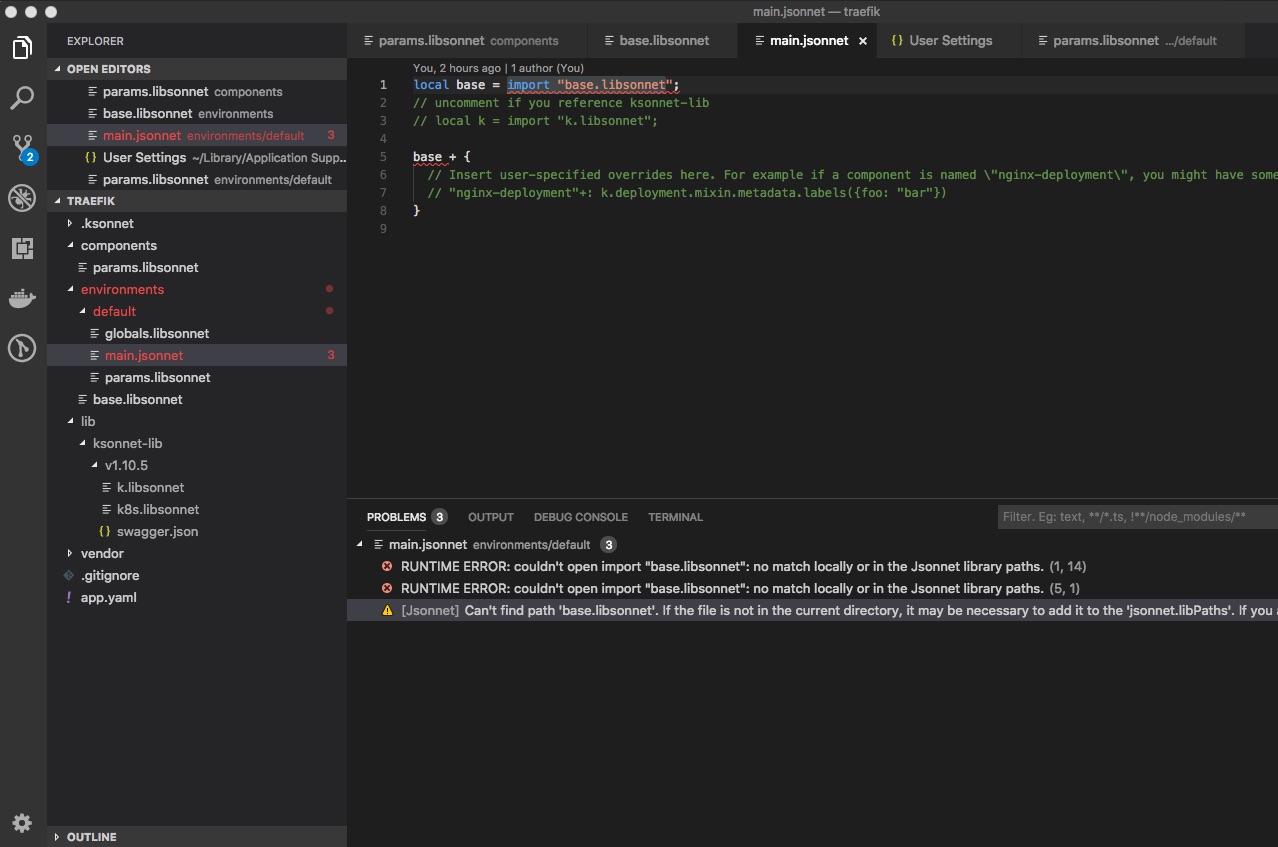
注意:预览窗格适用于ks generate deployed-service文件,但预览窗格不适用于教程 redis实例(但ks show default工作):
Command failed: jsonnet -J /Users/kross/projects/gke/ksonnet-lib  --ext-code-file "__ksonnet/params"=/Users/kross/projects/gke/traefik/components/params.libsonnet --ext-code-file "__ksonnet/environments"=/Users/kross/projects/gke/traefik/environments/default/params.libsonnet /Users/kross/projects/gke/traefik/components/redis.jsonnet
RUNTIME ERROR: couldn't open import "k.libsonnet": no match locally or in the Jsonnet library paths.
/Users/kross/projects/gke/traefik/components/redis.jsonnet:4:11-31  thunk
/Users/kross/projects/gke/traefik/components/redis.jsonnet:18:11    thunk
std.jsonnet:1239:24
std.jsonnet:1239:15-26  thunk
std.jsonnet:1240:8  thunk
std.jsonnet:1240:8-20   function
std.jsonnet:1240:8-20   function
/Users/kross/projects/gke/traefik/components/redis.jsonnet:(18:1)-(22:4)
我一定是错过了一些非常基本的东西-这是什么?
回答 1
Stack Overflow用户
发布于 2018-08-08 18:48:14
在使用VScode JSONNET扩展时,我也犯了类似的错误。见此处:https://github.com/heptio/vscode-jsonnet/issues/57
我能够通过修改User settings中的扩展设置来修复这个问题:
"jsonnet.libPaths": [
    "<my-home-dir-full-path>/go/src/github.com/ksonnet/ksonnet-lib/ksonnet.beta.3"
],
另外,请注意,目前官方的ksonnet VSCode扩展正在由ksonnet团队开发。
页面原文内容由Stack Overflow提供。腾讯云小微IT领域专用引擎提供翻译支持
原文链接:
https://stackoverflow.com/questions/51712443
复制相关文章
相似问题
腾讯云开发者

Copyright © 2013 - 2026 Tencent Cloud. All Rights Reserved. 腾讯云 版权所有
深圳市腾讯计算机系统有限公司 ICP备案/许可证号:粤B2-20090059  粤公网安备44030502008569号
腾讯云计算(北京)有限责任公司 京ICP证150476号 | 京ICP备11018762号