
Tkinter:如何构建几种不同屏幕分辨率的应用程序?
Tkinter:如何构建几种不同屏幕分辨率的应用程序?
提问于 2018-08-05 21:55:18
因此,我正在用Python开发一个应用程序,将Tkinter作为GUI框架。第一张是我同事电脑的截图,第二张是我电脑的截图。如何使小部件(按钮、标签、条目等)能够适应任何屏幕分辨率?
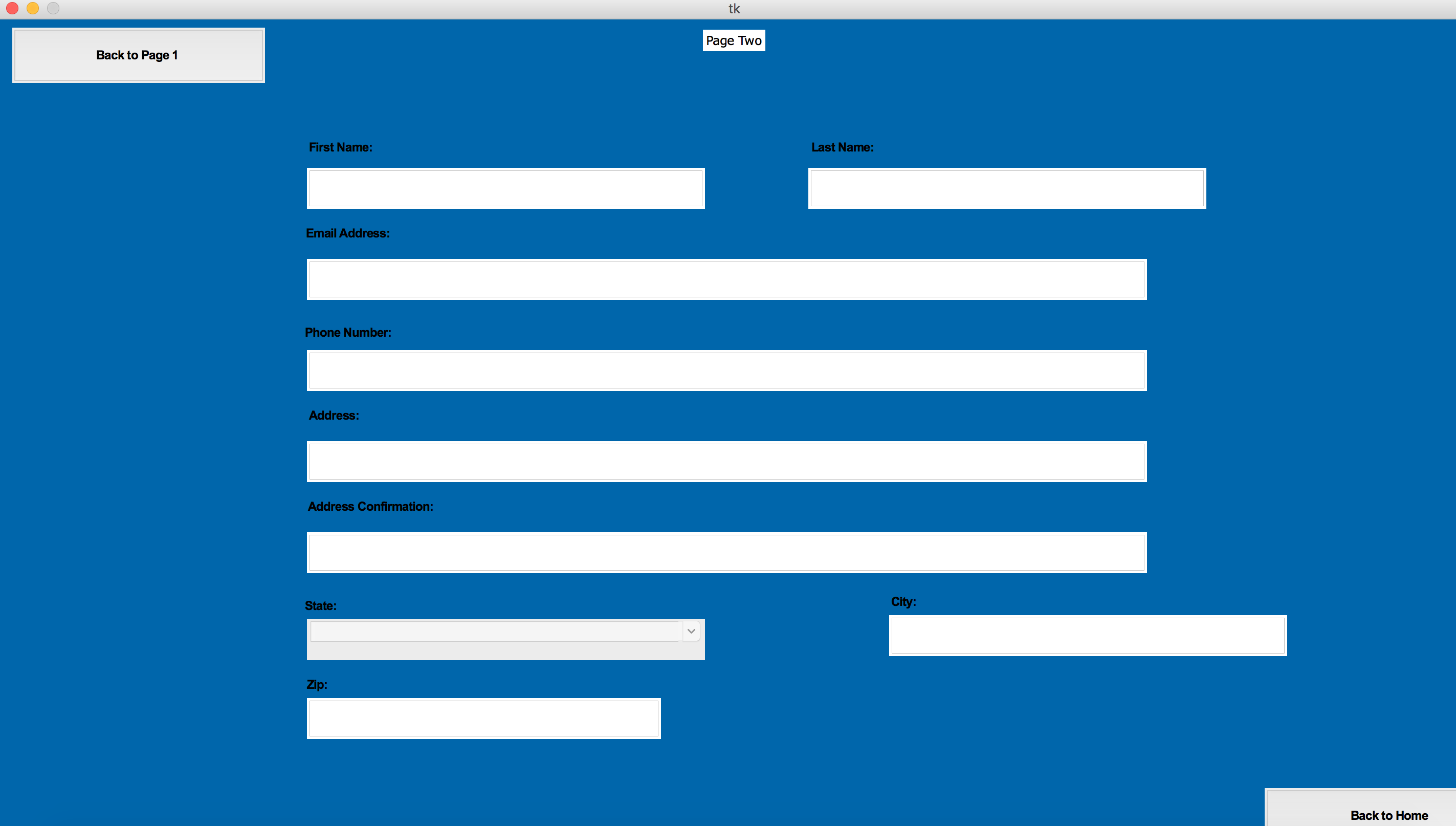
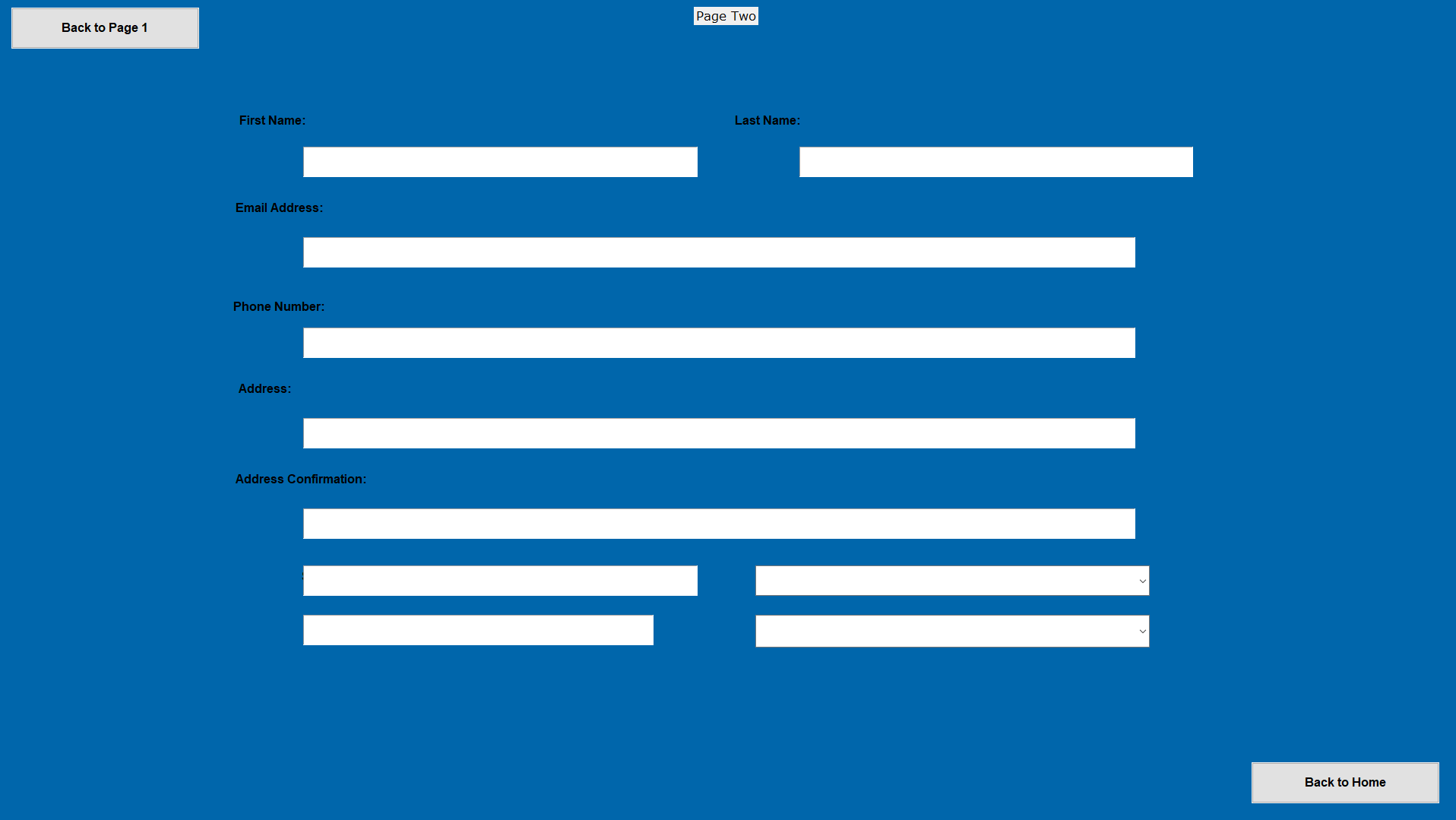
我的代码示例
self.e_fname = Entry(self)
    self.e_fname.place(relx=0.21, rely=0.18, height=40, relwidth=0.27)
    self.l_fname = Label(self, text='''First Name:''', font=font9,bg='#0066AB')
    self.l_fname.place(relx=0.055, rely=0.13, height=40, width=514)
    # last name
    self.e_lname = Entry(self)
    self.e_lname.place(relx=0.55, rely=0.18, height=40, relwidth=0.27)
    self.l_lname = Label(self, text='''Last Name:''', font=font9,bg='#0066AB')
    self.l_lname.place(relx=0.395, rely=0.13, height=40, width=514)
    # email
    self.e_mail = Entry(self)
    self.e_mail.place(relx=0.21, rely=0.29,height=40, relwidth=0.57)
    self.l_mail = Label(self, text='''Email Address:''', font=font9, bg='#0066AB')
    self.l_mail.place(relx=0.06, rely=0.24, height=31, width=514)
    # phone number
    self.e_phone = Entry(self)
    self.e_phone.place(relx=0.21, rely=0.40, height=40, relwidth=0.57)
    self.l_phone = Label(self, text= '''Phone Number:''', font=font9, bg='#0066AB')
    self.l_phone.place(relx=0.06, rely=0.36, height=31, width=514)
    # Address
    self.e_saddress = Entry(self)
    self.e_saddress.place(relx=0.21, rely=0.51, height=40, relwidth=0.57)
    self.adress = Label(self, text='''Address:''', font=font9, bg='#0066AB')
    self.adress.place(relx=0.05, rely=0.46, height=31, width=514)
    # Address Line 2
    self.e_saddress2 = Entry(self)
    self.e_saddress2.place(relx=0.21, rely=0.62, height=40, relwidth=0.57)
    self.adress2 = Label(self, text='''Address Confirmation:''', font=font9, bg='#0066AB')
    self.adress2.place(relx=0.075, rely=0.57, height=31, width=514)
    # State
self.state = Label(self, text='''State:''', font=font9, bg='#0066AB')回答 1
Stack Overflow用户
回答已采纳
发布于 2018-08-06 04:29:49
使UI保持在不同分辨率和不同字体大小的系统上的最佳方法是使用grid和pack而不是place。place只适用于非常特定类型的问题,而响应性不是很强的套件。
在您的具体情况下,使用grid似乎是个好主意,因为您的小部件似乎是排列在行和列中的。在使用grid时,要注意利用所有选项,特别是sticky属性。另外,请确保您利用了rowconfigure和columnconfigure方法,为部分或全部行和列分配了非零权重,以便为它们分配额外的空间。
页面原文内容由Stack Overflow提供。腾讯云小微IT领域专用引擎提供翻译支持
原文链接:
https://stackoverflow.com/questions/51698528
复制相关文章
相似问题
腾讯云开发者

Copyright © 2013 - 2026 Tencent Cloud. All Rights Reserved. 腾讯云 版权所有
深圳市腾讯计算机系统有限公司 ICP备案/许可证号:粤B2-20090059  粤公网安备44030502008569号
腾讯云计算(北京)有限责任公司 京ICP证150476号 | 京ICP备11018762号