
ngFor创建新元素,但在浏览器刷新之前不会显示新的POSTed数据。
ngFor创建新元素,但在浏览器刷新之前不会显示新的POSTed数据。
提问于 2018-08-02 15:48:50
我对棱角很陌生,并且从我的*ngFor指令中得到了意想不到的结果。
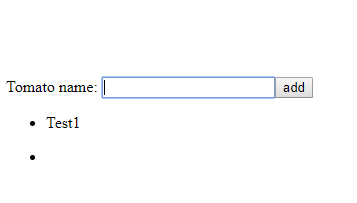
当我单击“add”按钮时,将创建一个新的<li>元素,但在刷新浏览器之前不会显示它的{{ tomato.name }}数据:
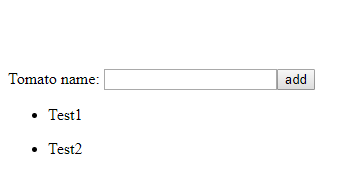
添加“Test2”输入和刷新浏览器后的屏幕截图:
添加了'Test2'
刷新后的
component.html
<div>
  <label>Tomato name:
    <input #tomatoName />
  </label>
  <button (click)="add(tomatoName.value); tomatoName.value='';">
    add
  </button>
</div>
<ul>
  <li *ngFor="let tomato of tomatos">
    <p>{{ tomato.name }}</p>
  </li>
</ul>
component.ts
import { Component, OnInit } from '@angular/core';
import { TomatoService } from '../services/tomato.service';

@Component({
  selector: 'app-tomatos',
  templateUrl: './tomatos.component.html',
  styleUrls: ['./tomatos.component.css']
})
export class TomatosComponent implements OnInit {

  tomatos: Tomato[];

  constructor(private tomatoService: TomatoService) { }

  ngOnInit() {
    this.getTomatos();
  }

  getTomatos(): void {
    this.tomatoService.getTomatos()
      .subscribe(tomatos => this.tomatos = tomatos)
  }

  add(name:string): void {
    if (!name) { return; }
    this.tomatoService.addTomato({name} as Tomato)
    .subscribe(tomato => this.tomatos.push(tomato));
  }

}

export interface Tomato {
  id: number;
  name: string;
  originPostCode: string;
  tastes: string;
}
service.ts
import { Injectable } from '@angular/core';
import { HttpClient, HttpHeaders } from '@angular/common/http';
import { Tomato } from '../tomatos/tomatos.component';
import { Observable, of } from '../../../node_modules/rxjs';

const httpOptions = {
  headers: new HttpHeaders({ 'Content-Type': 'application/json' })
};

@Injectable({
  providedIn: 'root'
})
export class TomatoService {

  private tomatosUrl = 'https://path/tomy/api'

  constructor(private http: HttpClient) { }

  getTomatos(): Observable<Tomato[]> {
    return this.http.get<Tomato[]>(this.tomatosUrl);
  }

  addTomato (tomato: Tomato): Observable<Tomato> {
    return this.http.post<Tomato>(this.tomatosUrl, tomato);
  }

}
提前感谢!
回答 1
Stack Overflow用户
发布于 2018-08-02 16:02:00
从ChangeDetectorRef导入@angular/core并在this.tomatos.push(tomato)之后手动运行更改检测,如下所示:
constructor(private tomatoService: TomatoService, private ref: ChangeDetectorRef) { }

  ngOnInit() {
    this.getTomatos();
  }

  getTomatos(): void {
    this.tomatoService.getTomatos()
      .subscribe(tomatos => {
          this.tomatos = tomatos;
          this.ref.detectChanges();
       })
  }

  add(name:string): void {
    if (!name) { return; }
    this.tomatoService.addTomato({name} as Tomato)
    .subscribe(tomato => this.tomatos.push(tomato));
  }
希望这能帮到你!
页面原文内容由Stack Overflow提供。腾讯云小微IT领域专用引擎提供翻译支持
原文链接:
https://stackoverflow.com/questions/51657661
复制相关文章
相似问题
腾讯云开发者

Copyright © 2013 - 2026 Tencent Cloud. All Rights Reserved. 腾讯云 版权所有
深圳市腾讯计算机系统有限公司 ICP备案/许可证号:粤B2-20090059  粤公网安备44030502008569号
腾讯云计算(北京)有限责任公司 京ICP证150476号 | 京ICP备11018762号