
PrepareForReuse()重置UIView宽度不起作用
PrepareForReuse()重置UIView宽度不起作用
提问于 2018-07-30 21:12:26
我现在被困在这个问题上有一段时间了,虽然我想我知道问题是什么,但我仍然无法解决它。我和tableView一起工作,每个单元都有倒计时条动画。每个单元格都有用户设置的自定义持续时间。然后,条状动画随着时间的推移而滑动。
我使用CADisplayLink来运行这个动画,这段代码是在控制器文件中编写的,而且随着时间的推移,我只是在更改UIView的宽度:
@objc func handleProgressAnimation() {
    let currenttime = Date()
    let elapsed = currenttime.timeIntervalSince(animationStartDate)
    let totalWidth: Double = 400.0
    print(elapsed)
    let arrayLength = durationBar.count
    var i: Int = 0


    for  _ in 0..<arrayLength {
       let indexPath = IndexPath(row: i, section: 0)
       let percentage = (elapsed / Double(durationBar[i].durationTime))
       let newWidth = Double(totalWidth  - (totalWidth * percentage))
        durationBar[i].width = newWidth
        if (percentage < 1)
        {
            if let cell = listTableView.cellForRow(at: indexPath) as! listTableViewCell? {
                cell.timeRemainingView.frame.size.width = CGFloat(durationBar[indexPath.row].width)
            }
        }
        else {
            if let cell = listTableView.cellForRow(at: indexPath) as! listTableViewCell? {
                cell.timeRemainingView.frame.size.width = 400
                cell.timeRemainingView.isHidden = true
            }
        }
        i = i + 1
    }

}
当所有的条形图都在减少时,一切都很好,但是当一个单元格的时间完成时,UIView宽度变为零,然后当用户滚动该单元格时,该单元格将被重用,这将从还有时间的其他单元格中消失进度条。
我使用prepareforsegue()方法将条形图的宽度重置为400(默认值),但这似乎行不通。
这是cellforRow代码:
 func tableView(_ tableView: UITableView, cellForRowAt indexPath: IndexPath) -> UITableViewCell {
    let cell = tableView.dequeueReusableCell(withIdentifier: cellid, for: indexPath) as! listTableViewCell
    cell.testlabel.text = "\(duration[indexPath.row].durationTime)"
    cell.timeRemainingView.frame.size.width = CGFloat(durationBar[indexPath.row].width)

    return cell

}这是PrepareForReuse()
 override func prepareForReuse() {
    super.prepareForReuse()
    self.timeRemainingView.frame.size.width = 400
    self.timeRemainingView.isHidden = false
}
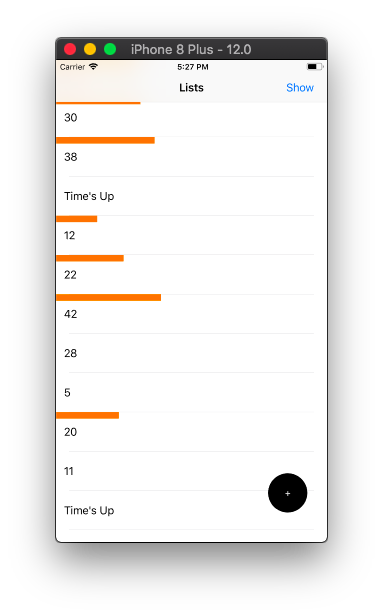
这是截图。你可以在一些细胞中看到时间已经过去,但在另一些细胞中,还有剩余的时间,但是进度条已经消失了。
回答 1
Stack Overflow用户
回答已采纳
发布于 2018-07-31 17:26:21
你得重新设置一下框架。width是一个纯获取属性.
页面原文内容由Stack Overflow提供。腾讯云小微IT领域专用引擎提供翻译支持
原文链接:
https://stackoverflow.com/questions/51602360
复制相关文章
相似问题
腾讯云开发者

Copyright © 2013 - 2026 Tencent Cloud. All Rights Reserved. 腾讯云 版权所有
深圳市腾讯计算机系统有限公司 ICP备案/许可证号:粤B2-20090059  粤公网安备44030502008569号
腾讯云计算(北京)有限责任公司 京ICP证150476号 | 京ICP备11018762号