
WinHttpGetIEProxyConfigForCurrentUser能从WPAD获得代理吗?
我能够获得在我的Windows机器上手动输入到代理设置中的代理数据(选中了Use a proxy server for your LAN选项),但我想知道WinHttpGetIEProxyConfigForCurrentUser是否也会设置字段LPWSTR lpszProxy,以防在此对话框中选中Use automatic configuration script或Automatically detect settings复选框:
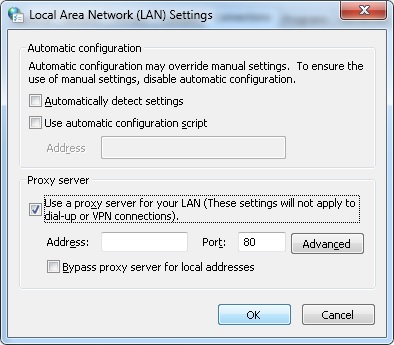
如果没有,如何获取当前使用的代理的地址?
回答 2
Stack Overflow用户
发布于 2018-07-30 20:27:40
您将在lpszAutoConfigUrl中得到这一点。
lpszAutoConfigUrl是结构WINHTTP_CURRENT_USER_IE_PROXY_CONFIG的变量,是WinHttpGetIEProxyConfigForCurrentUser的参数。
文件链接。
用于快速测试的代码:
WINHTTP_CURRENT_USER_IE_PROXY_CONFIG pProxyConfig;
pProxyConfig.fAutoDetect = TRUE;
WinHttpGetIEProxyConfigForCurrentUser(&pProxyConfig);Stack Overflow用户
发布于 2018-10-22 12:36:51
可以使用WinHttpGetIEProxyConfigForCurrentUser()来确定两者是否都是:
- 启用“自动检测设置”( WINHTTP_CURRENT_USER_IE_PROXY_CONFIG结构的成员‘WINHTTP_CURRENT_USER_IE_PROXY_CONFIG’)和
- 设置“自动配置脚本”( WINHTTP_CURRENT_USER_IE_PROXY_CONFIG结构的成员‘WINHTTP_CURRENT_USER_IE_PROXY_CONFIG’)
但是,要获得特定端点的代理地址本身,应该使用WinHttpGetProxyForUrl()。如果您已经拥有从IE Internet选项读取的“自动配置脚本”,您可以这样使用它:
WINHTTP_AUTOPROXY_OPTIONS autoProxyOptions= {0};
WINHTTP_PROXY_INFO proxyInfo= {0};

PCWSTR endpointUrl = <URL, that you need proxy for>;
autoProxyOptions.lpszAutoConfigUrl = <auto config address obtain from WINHTTP_CURRENT_USER_IE_PROXY_CONFIG>;
.
.    //set suitable autoProxyOptions flags
.

if (!WinHttpGetProxyForUrl(hSession, endpointUrl, &autoProxyOptions, &proxyInfo))
{
    GetLastError();
}https://stackoverflow.com/questions/51598159
复制相似问题
腾讯云开发者

Copyright © 2013 - 2026 Tencent Cloud. All Rights Reserved. 腾讯云 版权所有
深圳市腾讯计算机系统有限公司 ICP备案/许可证号:粤B2-20090059  粤公网安备44030502008569号
腾讯云计算(北京)有限责任公司 京ICP证150476号 | 京ICP备11018762号