
无法理解"Rstudio编织失败与‘环境阴影未定义’错误“
我正在使用rticles包创建一个报告,在编写包含代码块的rticles文件时,我会得到以下错误:
输出文件: rticles_IEEE.knit.md!LaTeX错误:环境阴影未定义。
我试着理解了如何解决这个问题,并玩了一下这个问题/回答。但是,我不知道如何将补丁放在编织创建的文件中(例如,mydoc.tex、IEEE_trans.cls)。
下面是我的最小示例:
---
title: Cool IEEE ArticleS
author:
  - name: Ray

abstract: |
   The abstract of my first IEEE paper with rmarkdown
output: rticles::ieee_article
---
Introduction
=============
This is the introduction. And here comes a cool code chunk.
```{r}
X <- seq(-3,3,0.1)
Y <- x^3
地块(x,y)
Notes
回答 2
Stack Overflow用户
发布于 2018-08-01 10:16:37
总体问题是,在IEEE文件中显示代码块会抛出一个错误,指向未定义的阴影环境。
如果将以下内容添加到基础的旧的邮政工作 template.tex中,则在LaTeX中给出解决方案。我的问题是,我试图在工作目录中编辑tex或cls模板。尤里卡时刻来临时,我偶然发现了下面(相关的) 堆栈过流问题。
对于rticles包,template.tex不在您处理文章R文件的目录中。相反,它们存储在包库文件夹中(即.libPaths()使用的文件夹)。可以在rmarkdown/templates/中找到该文件,并搜索您正在使用的rticles文件夹(在我的示例中是:ieee_article)。在resources子文件夹中,您将找到目标template.tex。复制一份,以供回收之用。
打开template.tex并在\begin{document}命令行之前插入以下内容(注意:也就是该template.tex文件的前导)。例如,我在\begin{document}行之前插入了它:
% code to insert to fix environment Shaded undefined issue with
% showing code chunks in rticle IEEE template.
$if(highlighting-macros)$
$highlighting-macros$
$endif$

\begin{document}
保存更改并返回到R/RStudio和您的IEEE纸张RStudio文件,并按下针织按钮。现在将显示r代码块(如果需要的话)。
我还没有对它进行彻底的测试,但是这个菜谱应该适用于所有缺少环境定义以显示r代码块的rticle模板(即environment{Shaded})。
Stack Overflow用户
发布于 2018-08-02 08:50:08
您可以将允许突出显示的所需代码放在单独的header.tex文件中,而不是重复模板。当您在模板中包含此内容时,这实质上是替代$highlighting-macros$的:
header.tex
\usepackage{color}
\usepackage{fancyvrb}
\newcommand{\VerbBar}{|}
\newcommand{\VERB}{\Verb[commandchars=\\\{\}]}
\DefineVerbatimEnvironment{Highlighting}{Verbatim}{commandchars=\\\{\}}
% Add ',fontsize=\small' for more characters per line
\usepackage{framed}
\definecolor{shadecolor}{RGB}{248,248,248}
\newenvironment{Shaded}{\begin{snugshade}}{\end{snugshade}}
\newcommand{\KeywordTok}[1]{\textcolor[rgb]{0.13,0.29,0.53}{\textbf{#1}}}
\newcommand{\DataTypeTok}[1]{\textcolor[rgb]{0.13,0.29,0.53}{#1}}
\newcommand{\DecValTok}[1]{\textcolor[rgb]{0.00,0.00,0.81}{#1}}
\newcommand{\BaseNTok}[1]{\textcolor[rgb]{0.00,0.00,0.81}{#1}}
\newcommand{\FloatTok}[1]{\textcolor[rgb]{0.00,0.00,0.81}{#1}}
\newcommand{\ConstantTok}[1]{\textcolor[rgb]{0.00,0.00,0.00}{#1}}
\newcommand{\CharTok}[1]{\textcolor[rgb]{0.31,0.60,0.02}{#1}}
\newcommand{\SpecialCharTok}[1]{\textcolor[rgb]{0.00,0.00,0.00}{#1}}
\newcommand{\StringTok}[1]{\textcolor[rgb]{0.31,0.60,0.02}{#1}}
\newcommand{\VerbatimStringTok}[1]{\textcolor[rgb]{0.31,0.60,0.02}{#1}}
\newcommand{\SpecialStringTok}[1]{\textcolor[rgb]{0.31,0.60,0.02}{#1}}
\newcommand{\ImportTok}[1]{#1}
\newcommand{\CommentTok}[1]{\textcolor[rgb]{0.56,0.35,0.01}{\textit{#1}}}
\newcommand{\DocumentationTok}[1]{\textcolor[rgb]{0.56,0.35,0.01}{\textbf{\textit{#1}}}}
\newcommand{\AnnotationTok}[1]{\textcolor[rgb]{0.56,0.35,0.01}{\textbf{\textit{#1}}}}
\newcommand{\CommentVarTok}[1]{\textcolor[rgb]{0.56,0.35,0.01}{\textbf{\textit{#1}}}}
\newcommand{\OtherTok}[1]{\textcolor[rgb]{0.56,0.35,0.01}{#1}}
\newcommand{\FunctionTok}[1]{\textcolor[rgb]{0.00,0.00,0.00}{#1}}
\newcommand{\VariableTok}[1]{\textcolor[rgb]{0.00,0.00,0.00}{#1}}
\newcommand{\ControlFlowTok}[1]{\textcolor[rgb]{0.13,0.29,0.53}{\textbf{#1}}}
\newcommand{\OperatorTok}[1]{\textcolor[rgb]{0.81,0.36,0.00}{\textbf{#1}}}
\newcommand{\BuiltInTok}[1]{#1}
\newcommand{\ExtensionTok}[1]{#1}
\newcommand{\PreprocessorTok}[1]{\textcolor[rgb]{0.56,0.35,0.01}{\textit{#1}}}
\newcommand{\AttributeTok}[1]{\textcolor[rgb]{0.77,0.63,0.00}{#1}}
\newcommand{\RegionMarkerTok}[1]{#1}
\newcommand{\InformationTok}[1]{\textcolor[rgb]{0.56,0.35,0.01}{\textbf{\textit{#1}}}}
\newcommand{\WarningTok}[1]{\textcolor[rgb]{0.56,0.35,0.01}{\textbf{\textit{#1}}}}
\newcommand{\AlertTok}[1]{\textcolor[rgb]{0.94,0.16,0.16}{#1}}
\newcommand{\ErrorTok}[1]{\textcolor[rgb]{0.64,0.00,0.00}{\textbf{#1}}}
\newcommand{\NormalTok}[1]{#1}
在目录中复制此文件,然后在YAML中引用此标头:
---
title: Short Paper
output:
  rticles::ieee_article:
    includes:
      in_header: header.tex
---

# Introduction

This is the introduction. And here comes a cool code chunk.
```{r}
X <- seq(-3,3,0.1)
Y <- x^3
地块(x,y)
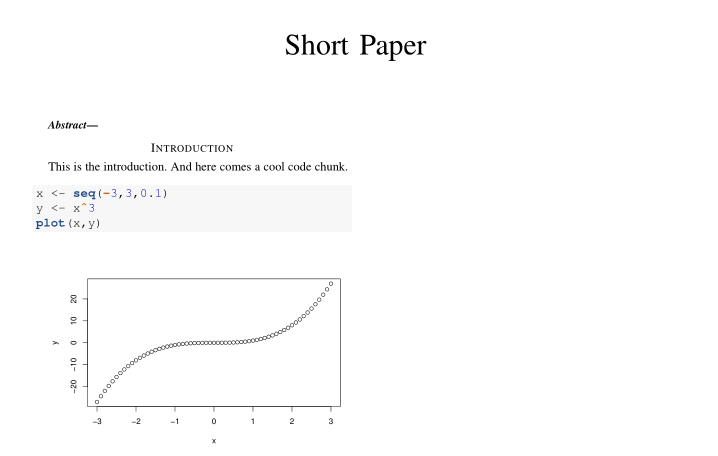
这种方法应该适用于包含
$header-includes$ tag in thetemplate.tex`的任何模板。
https://stackoverflow.com/questions/51594999
复制相似问题
腾讯云开发者

Copyright © 2013 - 2026 Tencent Cloud. All Rights Reserved. 腾讯云 版权所有
深圳市腾讯计算机系统有限公司 ICP备案/许可证号:粤B2-20090059  粤公网安备44030502008569号
腾讯云计算(北京)有限责任公司 京ICP证150476号 | 京ICP备11018762号