
VSTS轰炸NPM安装?
VSTS轰炸NPM安装?
提问于 2018-07-28 20:12:13
我有一个VSTS批处理脚本如下所示:
cd (my UI dir)
echo npm install...
npm install
echo ng build --output-path %1\ui
ng build --output-path %1\ui
echo npm run ng build --output-path %1\ui
npm run ng build --output-path %1\ui
echo All done.
然而,令人费解的是,我似乎无法越过npm的安装线。我的输出类似于这样:
2018-07-28T20:03:12.8414522Z ##[section]Starting: Run script BuildUi.bat
2018-07-28T20:03:12.8705378Z ==============================================================================
2018-07-28T20:03:12.8705624Z Task         : Batch Script
2018-07-28T20:03:12.8705839Z Description  : Run a windows cmd or bat script and optionally allow it to change the environment
2018-07-28T20:03:12.8706039Z Version      : 1.1.3
2018-07-28T20:03:12.8706207Z Author       : Microsoft Corporation
2018-07-28T20:03:12.8706405Z Help         : [More Information](https://go.microsoft.com/fwlink/?LinkID=613733)
2018-07-28T20:03:12.8706654Z ==============================================================================
2018-07-28T20:03:12.8810206Z ##[command]D:\Projects\vsts-agent-win-x64-2.136.1\_work\1\s\BuildUi.bat D:\Projects\vsts-agent-win-x64-2.136.1\_work\1\a
2018-07-28T20:03:12.9157783Z
2018-07-28T20:03:12.9158312Z D:\Projects\vsts-agent-win-x64-2.136.1\_work\1\s>cd myuiproject
2018-07-28T20:03:12.9158475Z
2018-07-28T20:03:12.9158666Z D:\Projects\vsts-agent-win-x64-2.136.1\_work\1\s\myuiproject>echo npm install...
2018-07-28T20:03:12.9158918Z npm install...
2018-07-28T20:03:12.9159011Z
2018-07-28T20:03:12.9159198Z D:\Projects\vsts-agent-win-x64-2.136.1\_work\1\s\myuiproject>npm install
2018-07-28T20:03:38.6909464Z npm WARN optional SKIPPING OPTIONAL DEPENDENCY: fsevents@^1.2.2 (node_modules\@angular-devkit\core\node_modules\chokidar\node_modules\fsevents):
2018-07-28T20:03:38.6911145Z npm WARN notsup SKIPPING OPTIONAL DEPENDENCY: Unsupported platform for fsevents@1.2.4: wanted {"os":"darwin","arch":"any"} (current: {"os":"win32","arch":"x64"})
2018-07-28T20:03:38.6912865Z npm WARN optional SKIPPING OPTIONAL DEPENDENCY: fsevents@^1.2.2 (node_modules\watchpack\node_modules\chokidar\node_modules\fsevents):
2018-07-28T20:03:38.6913360Z npm WARN notsup SKIPPING OPTIONAL DEPENDENCY: Unsupported platform for fsevents@1.2.4: wanted {"os":"darwin","arch":"any"} (current: {"os":"win32","arch":"x64"})
2018-07-28T20:03:38.6914230Z npm WARN optional SKIPPING OPTIONAL DEPENDENCY: fsevents@^1.2.2 (node_modules\webpack-dev-server\node_modules\chokidar\node_modules\fsevents):
2018-07-28T20:03:38.6914844Z npm WARN notsup SKIPPING OPTIONAL DEPENDENCY: Unsupported platform for fsevents@1.2.4: wanted {"os":"darwin","arch":"any"} (current: {"os":"win32","arch":"x64"})
2018-07-28T20:03:38.6915700Z npm WARN optional SKIPPING OPTIONAL DEPENDENCY: fsevents@^1.0.0 (node_modules\chokidar\node_modules\fsevents):
2018-07-28T20:03:38.6916232Z npm WARN notsup SKIPPING OPTIONAL DEPENDENCY: Unsupported platform for fsevents@1.2.4: wanted {"os":"darwin","arch":"any"} (current: {"os":"win32","arch":"x64"})
2018-07-28T20:03:38.6917088Z npm WARN optional SKIPPING OPTIONAL DEPENDENCY: fsevents@^1.2.2 (node_modules\karma\node_modules\chokidar\node_modules\fsevents):
2018-07-28T20:03:38.6917734Z npm WARN notsup SKIPPING OPTIONAL DEPENDENCY: Unsupported platform for fsevents@1.2.4: wanted {"os":"darwin","arch":"any"} (current: {"os":"win32","arch":"x64"})
2018-07-28T20:03:38.6919280Z npm WARN @angular/flex-layout@2.0.0-beta.12 requires a peer of @angular/core@~5.1.0 but none was installed.
2018-07-28T20:03:38.6919744Z npm WARN @angular/flex-layout@2.0.0-beta.12 requires a peer of @angular/common@~5.1.0 but none was installed.
2018-07-28T20:03:38.7159772Z ##[section]Finishing: Run script BuildUi.bat
这里有一些我很乐意忽略的警告,但是批处理文件被认为是“成功执行”并继续.sans我构建的UI项目(这是一个很重要的部分!)
有人能向我解释一下这里发生了什么,以及我如何从VSTS CI任务构建UI项目吗?我不知道这是一个VSTS,NPM,或角CLI的问题,但这个愚蠢的简单事情是完全阻止我设置我的CI构建。
溶液
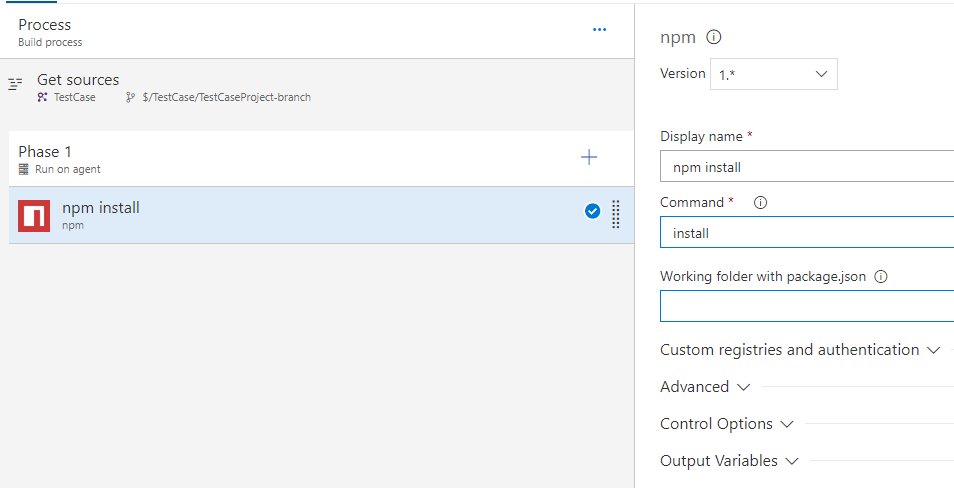
正如@Cece栋建议的那样,我使用了错误的任务来实现这一点。
- 首先,我需要确保安装了正确版本的Node.js (对于Range6CLI,即v8.9+)。方便地,有一项任务,以确保正确版本的节点安装。
- 其次,我需要调用
npm项目目录中的npm install逗号来运行npm install。 - 最后,我需要在我的角项目目录中运行一个命令行任务:
npm run ng build。它不接受常规的ng build命令。一旦我完成了这些步骤,它就会像我所期望的那样运作。
回答 1
Stack Overflow用户
回答已采纳
发布于 2018-07-30 09:41:54
页面原文内容由Stack Overflow提供。腾讯云小微IT领域专用引擎提供翻译支持
原文链接:
https://stackoverflow.com/questions/51574917
复制相关文章
相似问题
腾讯云开发者

Copyright © 2013 - 2026 Tencent Cloud. All Rights Reserved. 腾讯云 版权所有
深圳市腾讯计算机系统有限公司 ICP备案/许可证号:粤B2-20090059  粤公网安备44030502008569号
腾讯云计算(北京)有限责任公司 京ICP证150476号 | 京ICP备11018762号