
使用SectionList响应本地搜索
使用SectionList响应本地搜索
提问于 2018-07-24 08:22:40
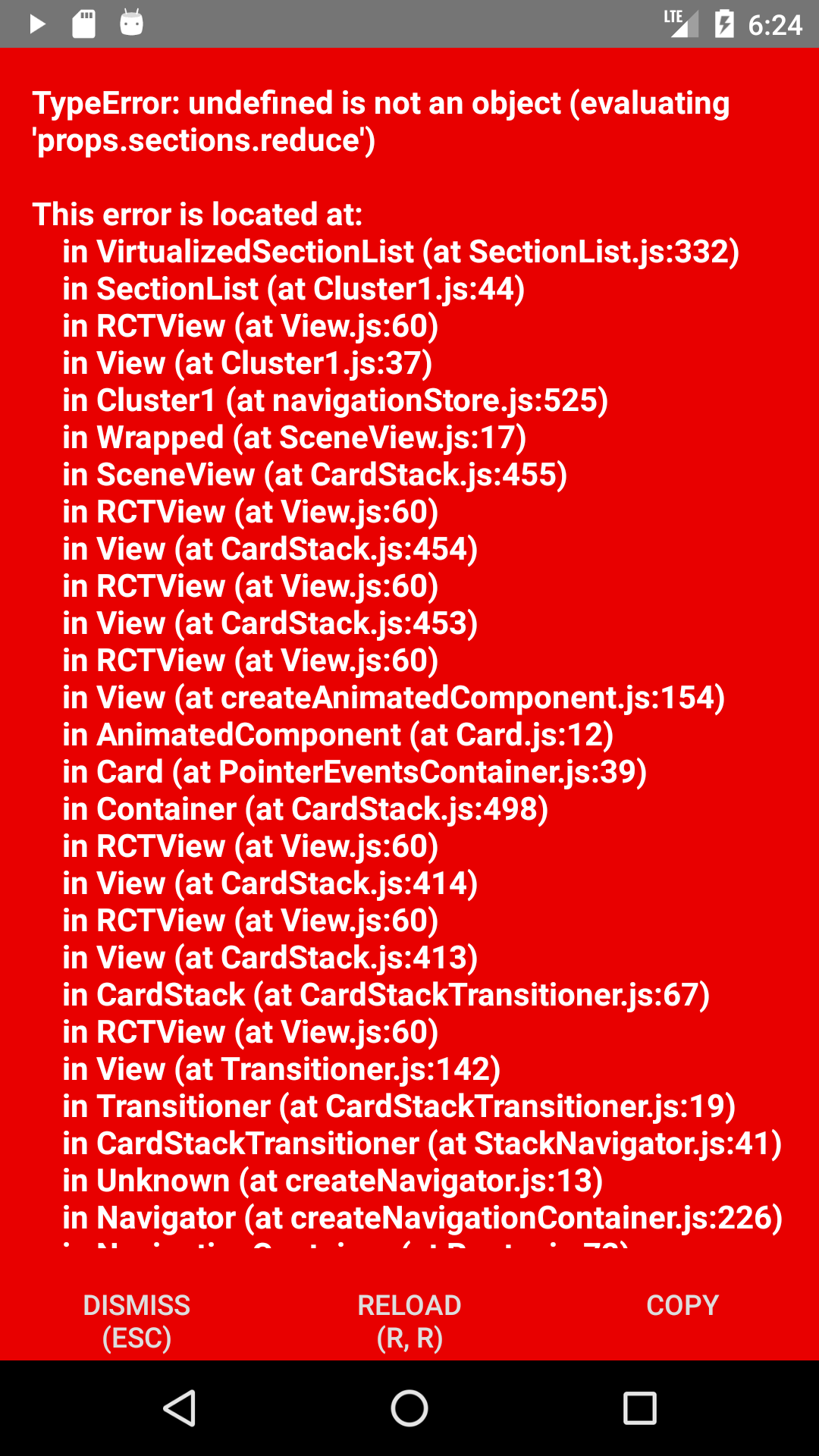
我创建了一个SectionList,并试图为我的SectionList实现一个搜索过滤器。但我的输出出了个错误。我在下面拍了个截图。我不知道怎么回事。
这是我的部件。
export default class Cluster1 extends Component{
 constructor(props){
super(props)
this.state = {
  dataToShow: '',
  search: false
}
}
searchUpdated = (term) => {
let matchedItemsArray = []
if(term === ''){
  this.setState({search: false, dataToShow: ClusterData})
}else{
  this.state.dataToShow.map((item) => {
    if(item.title.includes(term)){
      matchedItemsArray.push(item)
    }
  })
  this.setState({search: true, dataToShow: matchedItemsArray})
}
}
searchUpdated = (input) => {
  let userInput =[]
if(input === ''){
  this.setState({search: false})
  userInput = ''
}else{
  this.setState({search: true})
}
}
render(){
 return(
     <View style={styles.container}>
    <TextInput
      onChangeText={(term) => { this.searchUpdated(text) }}
      style={styles.searchInput}
      placeholder="Type a mood to search"
      />
      <SectionList
          renderItem = {({item, index}) =>
           <SectionListItem item = {item} index = {index}/>}
          renderSectionHeader = {({section}) =>
         <SectionHeader

            sections={this.searchUpdated()}
           keyExtractor = {(item) => item.name}/>}>
          </SectionList>     </View>
 );
 }}

class SectionHeader extends Component {
 render() {
     return (
         <View style={styles.header}>
             <Text style={styles.headertext}>
             {this.props.section.title}
             </Text>
             <TouchableOpacity onPress={ () => Actions.SongList({ section: this.props.section}) }>
               <Text style ={styles.Play}> Play
               </Text>
               </TouchableOpacity>

         </View>
     );  }
  }
class SectionListItem extends Component{
 render(){
     return(
         <View>
         <Text style={styles.moodname}>{this.props.item.name}</Text>
         </View>
     );
 }}
这是我的资料
const ClusterData = [
{ title: 'Cluster1',
data:
[
{name: 'passionate'},{name: 'rousing'},{name: 'confident'},
{name: 'boisterous'},{name: 'rowdy'}],
},
{
 title: 'Cluster2',
 data:
[
 {name: 'rollicking'},{name: 'cheerful'{name: 'fun'},{name: 'sweet'},
{name: 'amiable'},{name: 'natured'}],
回答 1
Stack Overflow用户
回答已采纳
发布于 2018-07-24 09:01:42
下面是一个简单的搜索过滤器:
我添加了一个search状态,以帮助确定用户当前是否正在搜索。
  constructor(props){
    super(props)
    this.state = {
      dataToShow: '',
      search: false
    }
  }
然后,创建搜索函数。
  searchUpdated = (term) => {
    let matchedItemsArray = []
    if(term === ''){
      this.setState({search: false, dataToShow: ClusterData})
    }else{
      this.state.dataToShow.map((item) => {
        if(item.title.includes(term)){
          matchedItemsArray.push(item)
        }
      })
      this.setState({search: true, dataToShow: matchedItemsArray})
    }
  }
当输入为“”时,搜索状态为false。否则,该函数将通过dataToShow数组映射,以查找是否有任何节标题包括用户的输入。
或者,为了简单起见,我喜欢使用目录过滤器。首先,我们声明一个名为userInput的常量:
let userInput
然后,我们创建一个函数来确定userInput是否为空,以设置search状态。(记住要保留我们最初创建的this.state.search )
  searchUpdated = (input) => {
    if(input === ''){
      this.setState({search: false})
      userInput = ''
    }else{
      this.setState({search: true})
    }
  }
最后,在我们的SectionList中,我们使用存档过滤器来帮助筛选正确的部分标题名称:
<SectionList
  renderItem = {({item, index}) =>
    <SectionListItem item = {item} index = {index}/>}
  renderSectionHeader = {({section}) =>
    <SectionHeader
      section = {section}
      sections = {
        this.state.search ?
        _.filter(this.state.dataToShow, function(item){
          return item.title.includes(userInput)})
        : this.state.dataToShow}
      keyExtractor = {(item) => item.name}/>}>
</SectionList>
整个组件
import React from 'react'
import { View, Text, SectionList, TouchableOpacity, TextInput } from 'react-native'

const ClusterData = [
  {title: 'Cluster1', data: [{name: 'passionate'},{name: 'rousing'},{name: 'confident'},{name: 'boisterous'},{name: 'rowdy'}]},
  {title: 'Cluster2', data: [{name: 'rollicking'},{name: 'cheerful'},{name: 'fun'},{name: 'sweet'},{name: 'amiable'},{name: 'natured'}]}
]

let userInput = ''

export default class TempScreen extends React.Component {
  constructor(props){
    super(props)
    this.state = {
      search: false,
      dataToShow: []
    }
  }

  componentWillMount(){
    this.setState({dataToShow: ClusterData})
  }

  searchUpdated = (term) => {
    let matchedItemsArray = []
    if(term === ''){
      this.setState({search: false, dataToShow: ClusterData})
    }else{
      this.setState({search:true, dataToShow: ClusterData}, function(){
        this.state.dataToShow.map((item) => {
          if(item.title.includes(term)){
            matchedItemsArray.push(item)
          }
        })
        this.setState({dataToShow:matchedItemsArray})
      })
    }
  }

  render () {
    return (
      <View>
        <TextInput
          onChangeText={(term) => {this.searchUpdated(term)}}
          style={styles.searchInput}
          placeholder="Type a mood to search"/>
        <SectionList
          renderItem={({item}) => <SectionListItem itemName = {item.name}/>}
          renderSectionHeader={({section}) => <SectionHeader sectionTitle = {section.title}/>}
          sections={this.state.dataToShow}
        />
      </View>
    )
  }
}

class SectionHeader extends React.Component{
    render(){
      return(
        <View>
          <Text>{this.props.sectionTitle}</Text>
          <TouchableOpacity>
            <Text>Play</Text>
          </TouchableOpacity>
        </View>
      )
    }
  }

class SectionListItem extends React.Component{
  render(){
    return(
      <View>
        <Text>{this.props.itemName}</Text>
      </View>
    )
  }
}
页面原文内容由Stack Overflow提供。腾讯云小微IT领域专用引擎提供翻译支持
原文链接:
https://stackoverflow.com/questions/51493854
复制相关文章
相似问题
腾讯云开发者

Copyright © 2013 - 2026 Tencent Cloud. All Rights Reserved. 腾讯云 版权所有
深圳市腾讯计算机系统有限公司 ICP备案/许可证号:粤B2-20090059  粤公网安备44030502008569号
腾讯云计算(北京)有限责任公司 京ICP证150476号 | 京ICP备11018762号