
无法使用PowerPoint (PPTX)选择UIDocumentPickerViewController文档
先清理几个简单的项目:
- 我不想打开和/或预览文档,因为我看到了一个常见的答案,即用户需要依赖于这样做。
- 我不想选择任何其他文件类型。我的应用程序特别希望获取一个powerpoint文档,然后将它传递给API调用。
尽管如此,我一直无法让我的采摘者允许我打开一个PPTX,如下所示:
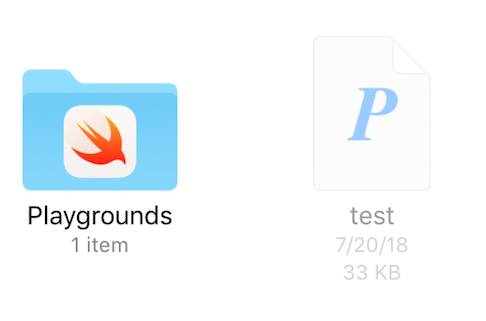
我已采取下列行动设法解决这一问题:
我对文件运行mdls -name kMDItemContentTypeTree test.pptx以获得其内容类型。
kMDItemContentTypeTree = (
    "org.openxmlformats.presentationml.presentation",
    "public.data",
    "public.composite-content",
    "public.archive",
    "public.item",
    "org.openxmlformats.presentationml.presentation",
    "org.openxmlformats.openxml",
    "public.zip-archive",
    "public.presentation",
    "public.content",
    "com.pkware.zip-archive" )
然后,我将其添加到我的info.plist文件中,如下所示:
<dict>
    <key>LSItemContentTypes</key>
    <array>
        <string>org.openxmlformats.presentationml.presentation</string>
        <string>public.data</string>
        <string>public.composite-content</string>
        <string>public.archive</string>
        <string>public.item</string>
        <string>org.openxmlformats.presentationml.presentation</string>
        <string>org.openxmlformats.openxml</string>
        <string>public.zip-archive</string>
        <string>public.presentation</string>
        <string>public.content</string>
        <string>com.pkware.zip-archive</string>
    </array>
    <key>CFBundleTypeName</key>
    <string>PPTX</string>
    <key>LSHandlerRank</key>
    <string>Alternate</string>
</dict>然后,我引用这个苹果网站来获取powerpoint的UTI。
com.microsoft.powerpoint.ppt
最后,我这样设置了我的电话:
let powerpointType = "com.microsoft.powerpoint.ppt"
let documentPicker = UIDocumentPickerViewController(documentTypes: [powerpointType],
in: .import)但是,正如在最初的图像中所看到的,这不允许我选择文件。因此,我希望找到丢失的部分,以便只选择powerpoint文件。
** UPDATE **基于matt的评论,我确实为我的plist添加了值,但仍然无法选择该文件。

此外,我还在plist & UIDocumentPickerViewController调用中使用UIDocumentPickerViewController扩展进行了测试,但也没有成功。
回答 1
Stack Overflow用户
发布于 2018-07-24 09:01:03
org.openxmlformats.presentationml.presentation是由iOS定义的,因此您不需要将它包含在导入的类型中。该定义已经由iOS导入。
- 如果您需要在共享pptx文件时使应用程序在共享表中可用,则只需添加一个CFBundleDocumentTypes条目即可。但是,由于您说您只能处理这些文件,而不能打开它们,这可能不合适。也许您想要做的是编写一个共享扩展。
- 如果您只想在
UIDocumentPickerViewController中选择pptx文件,则不需要在plist文件中添加任何内容!!只需在您的选择与documentTypes:["org.openxmlformats.presentationml.presentation"]
最后,一些评论:
com.microsoft.powerpoint.ppt是二进制PowerPoint文件(.ppt)的UTI。对于pptx,您需要one格式之一。- 您不需要声称支持、定义或添加允许的任何其他类型的UTI列表。内容类型树Spotlight属性中列出的其他类型是pptx的父类型。例如,如果将public.presentation添加到列表中,还可以打开主题文件。这可能不是你想要的。
https://stackoverflow.com/questions/51485348
复制相似问题
腾讯云开发者

Copyright © 2013 - 2026 Tencent Cloud. All Rights Reserved. 腾讯云 版权所有
深圳市腾讯计算机系统有限公司 ICP备案/许可证号:粤B2-20090059  粤公网安备44030502008569号
腾讯云计算(北京)有限责任公司 京ICP证150476号 | 京ICP备11018762号