
颤振中嵌套PageViews
我想将PageViews嵌套在颤栗中,PageView在Scaffold中嵌入PageView。在外部PageView,我将有标志和联系信息,以及安全的信息。作为孩子,我将有一个带有内部PageView和BottomNavigationBar作为主要用户交互屏幕的支架。下面是我到目前为止掌握的代码:
import 'package:flutter/material.dart';

void main() => runApp(new MyApp());

class MyApp extends StatefulWidget{

    @override
    State<StatefulWidget> createState() {
        return _MyAppState();
  }

}

class _MyAppState extends State<MyApp>{
    int index = 0;
    final PageController pageController = PageController();
    final Curve _curve = Curves.ease;
    final Duration _duration = Duration(milliseconds: 300);

    _navigateToPage(value){
        pageController.animateToPage(
            value,
            duration: _duration,
            curve: _curve
        );
        setState((){
            index = value;
        });
    }

    @override
    Widget build(BuildContext context) {

        return MaterialApp(
            title: 'PageViewCeption',
            home: PageView(
                children: <Widget>[
                    Container(
                        color: Colors.blue,
                    ),
                    Scaffold(
                        body: PageView(
                            controller: pageController,
                            onPageChanged: (page){
                                setState(() {
                                  index = page;
                                });
                            },
                            children: <Widget>[
                                Container(
                                    child: Center(
                                        child: Text('1', style: TextStyle(color: Colors.white))
                                    )
                                ),
                                Container(
                                    child: Center(
                                        child: Text('2', style: TextStyle(color: Colors.white))
                                    )
                                ),
                                Container(
                                    child: Center(
                                        child: Text('3', style: TextStyle(color: Colors.white))
                                    )
                                ),
                            ],
                        ),
                        backgroundColor: Colors.green,
                        bottomNavigationBar: BottomNavigationBar(
                            type: BottomNavigationBarType.fixed,
                            onTap: (value) =>_navigateToPage(value),
                            currentIndex: index,
                            items: [
                                BottomNavigationBarItem(
                                    icon: Icon(Icons.cake),
                                    title: Text('1')
                                ),
                                BottomNavigationBarItem(
                                    icon: Icon(Icons.cake),
                                    title: Text('2')
                                ),
                                BottomNavigationBarItem(
                                    icon: Icon(Icons.cake),
                                    title: Text('3')
                                )
                            ],
                        ),
                    ),
                    Container(
                        color: Colors.blue
                    )
                ],
            ),
        );
    }
}
结果如下:

问题是:当我在内部PageView中,我无法摆脱它的外部一个滚动左在第一页,或滚动的权利在内部PageView的最后一页。返回到外部PageView的唯一方法是在BottomNavigationBar上滚动(滑动)。在涡旋物理类的医生们中,我们在描述中发现了这一点:
例如,确定当用户达到最大滚动范围或用户停止滚动时可滚动的行为。
但我还没能想出解决办法。有什么想法吗?
更新1
我在使用CustomScrollPhysics类方面取得了进展:
class CustomScrollPhysics extends ScrollPhysics{

     final PageController _controller;

     const CustomScrollPhysics(this._controller, {ScrollPhysics parent }) : super(parent: parent);

     @override
     CustomScrollPhysics applyTo(ScrollPhysics ancestor) {
       return CustomScrollPhysics(_controller, parent: buildParent(ancestor));
     }

     @override
     double applyBoundaryConditions(ScrollMetrics position, double value) {
       assert(() {
         if (value == position.pixels) {
           throw new FlutterError(
             '$runtimeType.applyBoundaryConditions() was called redundantly.\n'
             'The proposed new position, $value, is exactly equal to the current position of the '
             'given ${position.runtimeType}, ${position.pixels}.\n'
             'The applyBoundaryConditions method should only be called when the value is '
             'going to actually change the pixels, otherwise it is redundant.\n'
             'The physics object in question was:\n'
             '  $this\n'
             'The position object in question was:\n'
             '  $position\n'
           );
         }
         return true;
       }());
       if (value < position.pixels && position.pixels <= position.minScrollExtent){ // underscroll
         _controller.jumpTo(position.viewportDimension + value);
         return 0.0;
       }
       if (position.maxScrollExtent <= position.pixels && position.pixels < value) {// overscroll
         _controller.jumpTo(position.viewportDimension + (value - position.viewportDimension*2));
         return 0.0;
       }
       if (value < position.minScrollExtent && position.minScrollExtent < position.pixels) // hit top edge
         return value - position.minScrollExtent;
       if (position.pixels < position.maxScrollExtent && position.maxScrollExtent < value) // hit bottom edge
         return value - position.maxScrollExtent;
       return 0.0;
     }
}
这是对ClampingScrollPhysics applyBoundaryConditions的修改。它有点工作,但由于pageSnapping,它是真正的but。它的发生,因为根据医生们
任何活动动画都会被取消。如果用户当前正在滚动,则该操作将被取消。
当该操作被取消时,如果用户停止在屏幕上拖放,PageView就开始快速返回到Scafold页面,这会使事情变得一团糟。在这种情况下,对于如何避免页面抓取,或者如何更好地实现这个问题,有什么想法吗?
回答 1
Stack Overflow用户
发布于 2020-09-25 17:15:20
我能够在嵌套的PageView上复制这个问题。内部PageView似乎覆盖了检测到的手势。这解释了为什么我们不能导航到外部PageView的其他页面,但是BottomNavigationBar可以。有关此行为的更多详细信息,将在此线程中解释。
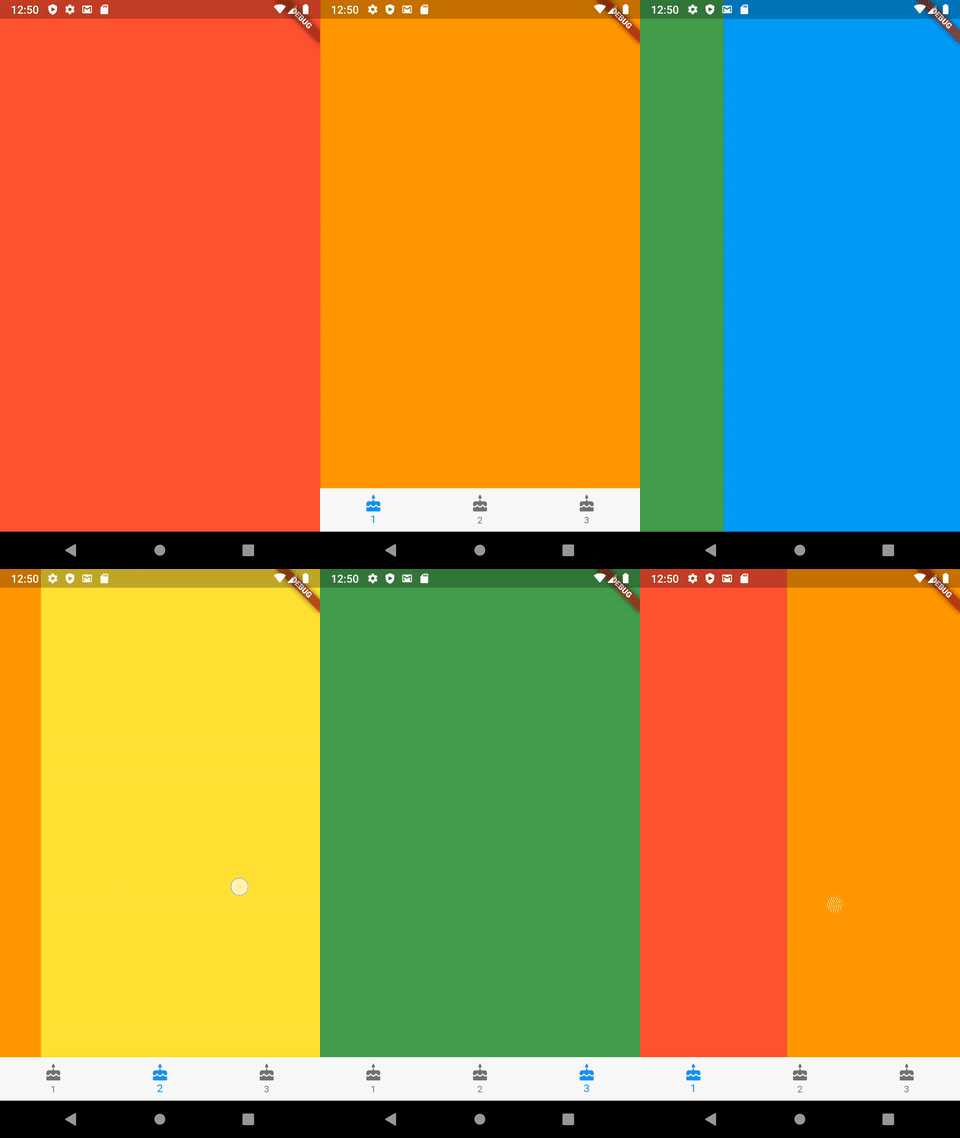
作为解决办法,您可以使用单个PageView,只需将BottomNavigationBar隐藏在外部页面上。我修改了你的代码。
import 'package:flutter/material.dart';

void main() => runApp(new MyApp());

class MyApp extends StatefulWidget {
  @override
  State<StatefulWidget> createState() {
    return _MyAppState();
  }
}

class _MyAppState extends State<MyApp> {
  var index = 0;
  final PageController pageController = PageController();
  final Curve _curve = Curves.ease;
  final Duration _duration = Duration(milliseconds: 300);
  var isBottomBarVisible = false;

  _navigateToPage(value) {
    // When BottomNavigationBar button is clicked, navigate to assigned page
    switch (value) {
      case 0:
        value = 1;
        break;
      case 1:
        value = 2;
        break;
      case 2:
        value = 3;
        break;
    }
    pageController.animateToPage(value, duration: _duration, curve: _curve);
    setState(() {
      index = value;
    });
  }

  // Set BottomNavigationBar indicator only on pages allowed
  _getNavBarIndex(index) {
    if (index <= 1)
      return 0;
    else if (index == 2)
      return 1;
    else if (index >= 3)
      return 2;
    else
      return 0;
  }

  @override
  Widget build(BuildContext context) {
    return MaterialApp(
      title: 'PageViewCeption',
      home: Scaffold(
        body: Container(
          child: PageView(
            controller: pageController,
            onPageChanged: (page) {
              setState(() {
                // BottomNavigationBar only appears on page 1 to 3
                isBottomBarVisible = page > 0 && page < 4;
                print('page: $page bottom bar: $isBottomBarVisible');
                index = page;
              });
            },
            children: <Widget>[
              Container(
                color: Colors.red,
              ),
              Container(
                color: Colors.orange,
              ),
              Container(
                color: Colors.yellow,
              ),
              Container(
                color: Colors.green,
              ),
              Container(color: Colors.lightBlue)
            ],
          ),
        ),
        bottomNavigationBar: isBottomBarVisible // if true, generate BottomNavigationBar
            ? new BottomNavigationBar(
                type: BottomNavigationBarType.fixed,
                onTap: (value) => _navigateToPage(value),
                currentIndex: _getNavBarIndex(index),
                items: [
                  BottomNavigationBarItem(icon: Icon(Icons.cake), label: '1'),
                  BottomNavigationBarItem(icon: Icon(Icons.cake), label: '2'),
                  BottomNavigationBarItem(icon: Icon(Icons.cake), label: '3')
                ],
              )
        //else, create an empty container to hide the BottomNavigationBar
            : Container(
                height: 0,
              ),
      ),
    );
  }
}
https://stackoverflow.com/questions/51368505
复制相似问题
腾讯云开发者

Copyright © 2013 - 2026 Tencent Cloud. All Rights Reserved. 腾讯云 版权所有
深圳市腾讯计算机系统有限公司 ICP备案/许可证号:粤B2-20090059  粤公网安备44030502008569号
腾讯云计算(北京)有限责任公司 京ICP证150476号 | 京ICP备11018762号