
用UWP和C++/WinRT应用程序处理从ListView到ListView的拖放事件
我正在开发一个在Windows 10下用C++/WinRT编写的简单的UWP应用程序,其中包含两个ListView控件。此应用程序的目标是学习如何从一个ListView控件中选择一个项,将其拖到另一个ListView控件,并删除该项,以便将其从源ListView控件复制到目标ListView控件。
到目前为止,我发现的所有示例都使用C#,很少使用C++/CX,而不是使用C++ /C++和本机C++,但是,我成功地完成了从源ListView中选择项目的基本机制,就像拖放到目标ListView一样。但是,当试图从drop事件获取信息以更新目标ListView时,我将得到一个异常。
问题:需要做哪些更改,以便可以将源ListView控件中的选定文本拖放到目标ListView控件上,然后将文本添加到目标ListView控件中?
Visual 2017的“输出”窗口显示了以下文本,我将其解释为“错误地址异常”:
Unhandled exception at 0x0259DC3C (Windows.UI.Xaml.dll) in TouchExperiment_01.exe: 0xC000027B: An application-internal exception has occurred (parameters: 0x05F5E3D8, 0x00000005).

Unhandled exception at 0x74ECE61D (combase.dll) in TouchExperiment_01.exe: 0xC0000602:  A fail fast exception occurred. Exception handlers will not be invoked and the process will be terminated immediately.

Unhandled exception at 0x74F9D7D9 (combase.dll) in TouchExperiment_01.exe: Stack cookie instrumentation code detected a stack-based buffer overrun.

Unhandled exception at 0x74F9D7D9 (combase.dll) in TouchExperiment_01.exe: Stack cookie instrumentation code detected a stack-based buffer overrun.当执行函数void MainPage::OnListViewDrop()中的以下源代码行(这是MainPage.cpp源文件中的最后一个函数)时,会引发异常:
auto x = e.DataView().GetTextAsync();附加信息A:使用调试器,我发现与异常相关的错误消息,这意味着方法OnListViewDragItemsStarting()提供的数据中存在错误。异常错误消息的文本为:
{m_handle={m_value=0x05550330 L"DataPackage does not contain the specified format. Verify its presence using DataPackageView.Contains or DataPackageView.AvailableFormats." } }我还在Visual首次抛出和捕获异常的站点上发现,它停止了base.h中的应用程序(来自C++/ 0x8004006a : Invalid clipboard format模板的源代码),这是一个错误的0x8004006a : Invalid clipboard format文本,表明我对拖动开始创建的数据的格式和拖放试图使用的数据格式缺乏一致意见。
源代码概述
我在MainPage.xml、MainPage.cpp、MainPage.h和pch.h区域修改了标准的C++/WinRT应用程序模板。我还为一个新类DataSource添加了类文件,它使用std::vector<>来包含一些测试数据。这个内存驻留数据是用App构造函数中的一些虚拟数据初始化的:
App::App()
{
    InitializeComponent();
    DataSource::InitializeDataBase();
    Suspending({ this, &App::OnSuspending });
    //  … other code
首先,我必须向pch.h文件中添加一行,以提供拖放模板:
#include "winrt/Windows.ApplicationModel.DataTransfer.h" // ADD_TO: need to add to allow use of drag and drop in MainPage.cppXAML源文件包含两个ListView控件的源以及一个TextBlock控件,该控件显示源ListView中选择的项的完整描述。
 <Page
    x:Class="TouchExperiment_01.MainPage"
    xmlns="http://schemas.microsoft.com/winfx/2006/xaml/presentation"
    xmlns:x="http://schemas.microsoft.com/winfx/2006/xaml"
    xmlns:local="using:TouchExperiment_01"
    xmlns:d="http://schemas.microsoft.com/expression/blend/2008"
    xmlns:mc="http://schemas.openxmlformats.org/markup-compatibility/2006"
    mc:Ignorable="d">

    <StackPanel Orientation="Horizontal" HorizontalAlignment="Center" VerticalAlignment="Center" Width="1130" Margin="0,0,0,0">
        <ListView x:Name="myList" HorizontalAlignment="Left" Height="100" VerticalAlignment="Top" Width="300" SelectionChanged="OnSelectionChanged"
                  CanDragItems="True" DragItemsStarting="OnListViewDragItemsStarting" BorderBrush="AliceBlue" BorderThickness="3">
        </ListView>
        <TextBlock x:Name="myTextBlock" Height="200" Width="200" Text="this is temp text to replace." TextWrapping="WrapWholeWords" Margin="5"/>
        <ListView x:Name="myList2" HorizontalAlignment="Right" Height="100" VerticalAlignment="Top" Width="300" SelectionChanged="OnSelectionChanged" AllowDrop="True"
                  DragOver="OnListViewDragOver" Drop="OnListViewDrop"  BorderBrush="DarkGreen" BorderThickness="5">
        </ListView>
    </StackPanel>
</Page>DataSource的类声明很简单。类的定义如下:
#pragma once
class DataSource
{
public:
    DataSource();
    ~DataSource();

    static int InitializeDataBase();

    struct DataSourceType
    {
        std::wstring  name;
        std::wstring  description;
    };

    static std::vector<DataSourceType> myDataBase;

}

;vector的初始化是在应用程序启动时App构造时完成的:
int DataSource::InitializeDataBase()
{
    myDataBase.clear();

    for (int i = 0; i < 50; i++) {
        DataSourceType x;
        wchar_t  buffer[256] = { 0 };

        swprintf_s(buffer, 255, L"Name for %d Item", i);
        x.name = buffer;
        swprintf_s(buffer, 255, L"Description %d. Lorem ipsum dolor sit amet, consectetur adipiscing elit, sed do eiusmod tempor incididunt ut labore et dolore magna aliqua. Ut enim ad minim veniam.", i);
        x.description = buffer;
        myDataBase.push_back(x);
    }

    return 0;
}
XAML页面后面的MainPage.cpp源代码是:
#include "pch.h"
#include "MainPage.h"
#include "DataSource.h"

using namespace winrt;
using namespace Windows::UI::Xaml;


namespace winrt::TouchExperiment_01::implementation
{
    MainPage::MainPage()
    {
        InitializeComponent();

        // load up the source ListView with the name field from out
        // in memory database.
        auto p = myList().Items();
        for (auto a : DataSource::myDataBase) {
            p.Append(box_value(a.name));
        }

        // add a single ListViewItem to the destination ListView so that we
        // know where it is.
        p = myList2().Items();
        p.Append(box_value(L"list"));
    }

    int32_t MainPage::MyProperty()
    {
        throw hresult_not_implemented();
    }

    void MainPage::MyProperty(int32_t /* value */)
    {
        throw hresult_not_implemented();
    }

    void MainPage::OnSelectionChanged(Windows::Foundation::IInspectable const & target, Windows::UI::Xaml::RoutedEventArgs const & )
    {
        // the user has selected a different item in the source ListView so we want to display
        // the associated description information for the selected ListViewItem.
        winrt::Windows::UI::Xaml::Controls::ListView p = target.try_as<winrt::Windows::UI::Xaml::Controls::ListView>();
        if (p) {
            int iIndex = p.SelectedIndex();
            myTextBlock().Text(DataSource::myDataBase[iIndex].description);
        }
    }

    void MainPage::OnListViewDragItemsStarting(Windows::Foundation::IInspectable const & target, Windows::UI::Xaml::Controls::DragItemsStartingEventArgs  const & e)
    {
        // provide the data that we have in the ListView which the user has selected
        // to drag to the other ListView. this is the data that will be copied from
        // the source ListView to the destination ListView.
        auto p = target.try_as<winrt::Windows::UI::Xaml::Controls::ListView>();
        if (p) {
            int iIndex = p.SelectedIndex();
            e.Items().SetAt(0, box_value(iIndex));
        }
    }

    void MainPage::OnListViewDragOver(Windows::Foundation::IInspectable const & target, Windows::UI::Xaml::DragEventArgs  const & e)
    {
        // indicate that we are Copy of data from one ListView to another rather than one of the other
        // operations such as Move. This provides the operation type informative user indicator when the
        // user is doing the drag operation.
        e.AcceptedOperation(Windows::ApplicationModel::DataTransfer::DataPackageOperation::Copy);
    }

    void MainPage::OnListViewDrop(Windows::Foundation::IInspectable const & target, Windows::UI::Xaml::DragEventArgs const & e)
    {
        // update the destination ListView with the data that was dragged from the
        // source ListView.
        auto p = target.try_as<winrt::Windows::UI::Xaml::Controls::ListView>();

        auto x = e.DataView().GetTextAsync();  // ** this line triggers exception on drop.
    }

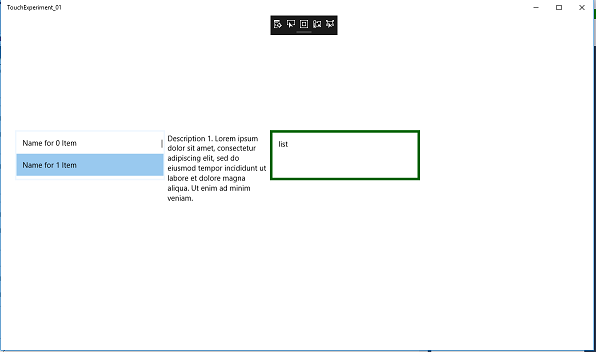
}在开始拖动之前,在源ListView中选择一个项的应用程序屏幕截图如下所示。源ListView控件位于左侧,目标ListView控件位于右侧。
增编:参考资料和文档
Microsoft Windows.ApplicationModel.DataTransfer名称空间
Microsoft DragItemsStartingEventArgs类,它包含一个指向这个示例项目的链接,该链接看起来使用的是C++/CX 在GitHub上拖放样本,其中包含有一个有用示例的ListView.xaml.cpp。
回答 1
Stack Overflow用户
发布于 2018-07-15 21:26:42
出现异常的原因是滥用了GetTextAsync()方法,这是一种异步方法,需要使用线程、任务、协同器或其他并发功能。
我找到了源代码ListView.xaml.cpp的示例,它提供了关于我做错了什么的提示。也请参阅https://github.com/Microsoft/cppwinrt/blob/master/Docs/Using%20Standard%20C%2B%2B%20types%20with%20C%2B%2B%20WinRT.md上的文章
    // We need to take a Deferral as we won't be able to confirm the end
    // of the operation synchronously
    auto def = e->GetDeferral();
    create_task(e->DataView->GetTextAsync()).then([def, this, e](String^ s)
    {
        // Parse the string to add items corresponding to each line
        auto wsText = s->Data();
        while (wsText) {
            auto wsNext = wcschr(wsText, L'\n');
            if (wsNext == nullptr)
            {
                // No more separator
                _selection->Append(ref new String(wsText));
                wsText = wsNext;
            }
            else
            {
                _selection->Append(ref new String(wsText, wsNext - wsText));
                wsText = wsNext + 1;
            }
        }

        e->AcceptedOperation = DataPackageOperation::Copy;
        def->Complete();
});为纠正问题所做的更改概述
由于我使用的是VisualStudio2017 Community的最新版本,所以我决定在GetTextAsync()中使用coroutines。要做到这一点,需要对方法返回类型(从void到winrt::Windows::Foundation::IAsyncAction )进行一些更改,同时对解决方案属性进行一些更改,并添加一些包含文件,以使协同值的更改能够正确编译和运行。
请参阅关于几种不同的并发方法的答案和说明,以及VisualStudio2017解决方案属性的更改,以便在C++11线程更新MFC应用程序窗口。需要SendMessage(),PostMessage()吗?上使用协同和C++11线程更新MFC应用程序窗口。需要SendMessage(),PostMessage()吗?操作符
在MainPage.cpp顶部,我添加了以下两个包含指令:
#include <experimental\resumable>
#include <pplawait.h>我修改了OnListViewDragItemsStarting()方法如下:
void MainPage::OnListViewDragItemsStarting(Windows::Foundation::IInspectable const & target, Windows::UI::Xaml::Controls::DragItemsStartingEventArgs  const & e)
{
    // provide the data that we have in the ListView which the user has selected
    // to drag to the other ListView. this is the data that will be copied from
    // the source ListView to the destination ListView.
    auto p = target.try_as<winrt::Windows::UI::Xaml::Controls::ListView>();
    unsigned int n = e.Items().Size();
    if (p) {
        int iIndex = p.SelectedIndex();
        e.Data().Properties().Title(hstring (L"my Title"));
        e.Data().SetText(DataSource::myDataBase[iIndex].name.c_str());
        e.Data().RequestedOperation(winrt::Windows::ApplicationModel::DataTransfer::DataPackageOperation::Copy);
    }
}最后,我重写了方法OnListViewDrop(),如下所示(还要求更改类声明中声明的返回类型,以与新的返回类型保持一致):
winrt::Windows::Foundation::IAsyncAction MainPage::OnListViewDrop(Windows::Foundation::IInspectable const & target, Windows::UI::Xaml::DragEventArgs const & e)
{
    // update the destination ListView with the data that was dragged from the
    // source ListView. the method GetTextAsync() is an asynch method so
    // we are using coroutines to get the result of the operation.

    // we need to capture the target ListView before doing the co_await
    // in a local variable so that we will know which ListView we are to update.
    auto p = target.try_as<winrt::Windows::UI::Xaml::Controls::ListView>();

    // do the GetTextAsync() and get the result by using coroutines.
    auto ss = co_await e.DataView().GetTextAsync();

    // update the ListView control that originally triggered this handler.
    p.Items().Append(box_value(ss));
}https://stackoverflow.com/questions/51349479
复制相似问题
腾讯云开发者

Copyright © 2013 - 2026 Tencent Cloud. All Rights Reserved. 腾讯云 版权所有
深圳市腾讯计算机系统有限公司 ICP备案/许可证号:粤B2-20090059  粤公网安备44030502008569号
腾讯云计算(北京)有限责任公司 京ICP证150476号 | 京ICP备11018762号