
如何只提交一次请求?
如何只提交一次请求?
提问于 2018-07-15 13:49:57
我正在使用jquery请求检查WordPress中的最终订单。
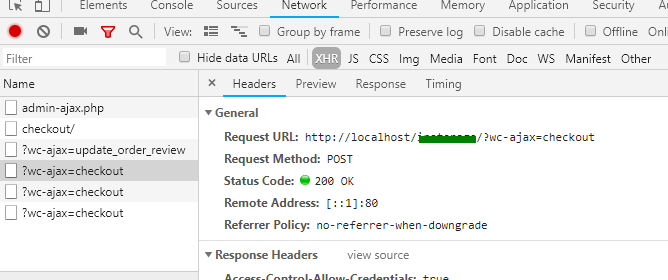
我的“添加到购物车”和“签出订单”具有相同的代码,但签出订单代码提交请求3次。
var j = jQuery.noConflict();
j('.wc-checkout').on('submit', function(e) {
    e.preventDefault();

    var billing_customer_type = j("#billing_customer_type").val();
    // .. and so on...

    j.ajax({
        type: 'POST',
        url: 'http://localhost/mywebsite/?wc-ajax=checkout',
        cache: false,
        data: {
            'billing_customer_type': billing_customer_type,
            // and so on..
        },
        success: function(result) {
            console.log('Order Checked Out');
        },
        error: function(xhr, status, error) {
            console.log(error);
        },
        complete: function() {}
    });
});


<form class="wc-checkout" method="post" enctype="multipart/form-data"
    novalidate="novalidate">
    <div class="form-control">
        <label>Lorem Ipsum: <abbr class="required" title="required">*</abbr></label>
        <select name="billing_customer_type" id="billing_customer_type"
            class="select thwcfd-enhanced-select select2-hidden-accessible enhanced"
            data-placeholder="" tabindex="-1" aria-hidden="true">
            <option value="A" selected="selected">A</option>
            <option value="B">B</option>
            <option value="C">C</option>
        </select>
    </div>

    <div class="form-control">
        <!-- _wpnonce help protect URLs and forms from certain types of misuse -->
        '.wp_nonce_field("ajax_checkout").'
        <input type="submit" value="Order Now" class="epo-proceed-checkout-btn">
    </div>

</form>
你知道怎样才能让.on只提交一次吗?任何想法都会受到赞赏。谢谢
回答 2
Stack Overflow用户
回答已采纳
发布于 2018-07-16 05:12:50
我通过添加stopImmediatePropagation();和return false;解决了这个问题
更新代码:
  j('.wc-checkout').on('submit', function(evt) {
    evt.preventDefault();

    var billing_customer_type = j("#billing_customer_type").val();
    // and so on...

    j.ajax({
      type: 'POST',
      url: 'http://localhost/mywebsite/?wc-ajax=checkout',
      cache: false,
      data: {
        'billing_customer_type':billing_customer_type,
        // and so on...
      },
      success: function (result) {
        console.log('Order Checked Out');
      },
      error: function(xhr,status,error) {
        console.log(error);
      },
      complete:function(){
      }
    });
    evt.stopImmediatePropagation(); // to prevent more than once submission
    return false;


}); Stack Overflow用户
发布于 2018-07-15 14:01:25
检查它,但您需要在您的环境中测试它。
var isPost = 0;
$(document).ready(function() {
  $("button").click(function() {
    if (isPost == 0) {
      $.get("https://stackoverflow.com", function() {
        console.log('post');
      });
      isPost = 1;
    }
  });
});<!DOCTYPE html>
<html>
<head>
<script src="https://ajax.googleapis.com/ajax/libs/jquery/3.3.1/jquery.min.js"></script>
<script>
</script>
</head>
<body>
<button>Send an HTTP GET request to a page and get the result back</button>
</body>
</html>
页面原文内容由Stack Overflow提供。腾讯云小微IT领域专用引擎提供翻译支持
原文链接:
https://stackoverflow.com/questions/51349042
复制相关文章
相似问题
腾讯云开发者

Copyright © 2013 - 2026 Tencent Cloud. All Rights Reserved. 腾讯云 版权所有
深圳市腾讯计算机系统有限公司 ICP备案/许可证号:粤B2-20090059  粤公网安备44030502008569号
腾讯云计算(北京)有限责任公司 京ICP证150476号 | 京ICP备11018762号