
使用Python或graphviz的鱼骨图
我试图用Python生成鱼骨图(因果图或石川图)。有没有办法让它更像标准鱼骨图?
from graphviz import Digraph

A=[('HW', 'Root'), ('SW', 'Root'),
  ('Electric', 'HW'), ('ink', 'HW'), ('windows', 'SW'), ('Drivers', 'SW'),
  ('Yellow', 'ink'), ('blue', 'ink'), ('pink', 'ink'),
  ('FE', 'Drivers'), ('BE', 'Drivers')]
e = Digraph()
e.attr(rankdir='LR')
for a in A:
    e.node(a[0])
    e.edge(a[0], a[1])
e.view()
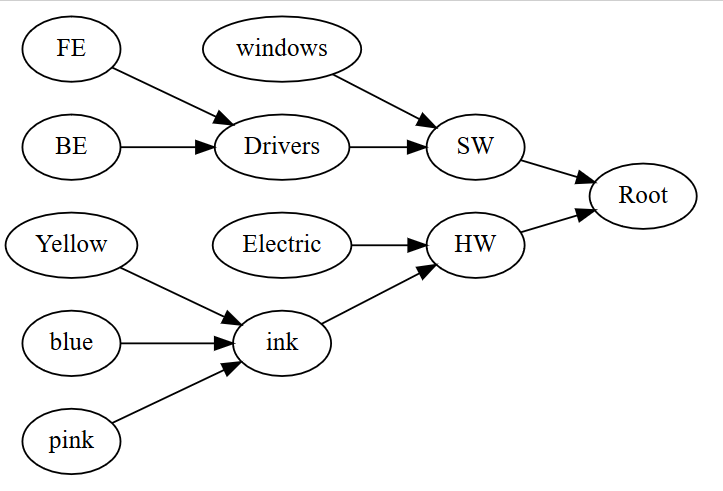

回答 2
Stack Overflow用户
发布于 2022-05-09 19:31:16
用graphviz做这样的事情真的很困难,因为graphviz对于如何安排事情确实有自己的想法。你考虑过用matplotlib来解决这个问题吗?matplotlib中有一个创建时间线的示例,您可以使用它作为基础,并根据需要进行修改。
Stack Overflow用户
发布于 2022-05-11 17:51:42
如上所述,Fishbone图超出了Graphviz的规范。下面是示例图的“相当不错”(旁观者的眼睛)版本。如果您发现它可用,我将附加输入文件&解释发生了什么。如果无法使用,请解释您需要什么。
问题:
- 线路交叉口很马虎
- 结果需要三个步骤
dot -Tdot运行- 使用GVPR (一个Graphviz程序)进行后处理以创建wishbone "rake“
- 创建可视文件的
neato -n运行
- 这不处理输入文件的次/三级关系(断骨):
// non-directed graph, though directed would also work
graph W {
  // no splines
  graph [splines=line]
  // use underline-shape
  node [shape=underline]
  // first, we define the nodes & edges that make the centerline edge
  // note using standard ranking (top-to-bottom)
  // centerline is set on one rank
  // added a centerline attribute to make adding rak easier
  // dot ignores unknown attributes
  // gvpr program will use
  {
    rank=same
    node [shape=rect style=invis centerline=true]  // mark centerline
    edge [headclip=false tailclip=false]
    p1 [group=g1]
    p2 [group=g2]
    p3 [group=g3]
    pstart:c -- p1:c --  p2:c --  p3:c
    pend [label=" Defect XXX" shape=plain style=solid]
    p3:c -- pend:w [dir=forward arrowhead=normal]
  }
  // define labels on top (min) rank
  // plain, not underlined
  {
    rank=min
    node [shape=plain]
    measurements  materials personnel
  }
  // define leftmost "fishbone"
  // group attribte helps keep nodes aligned vertically
  {
  node [group=g1]
  measurements:se -- calibration:e -- microscopes:e -- inspectors:e
  // send this edge to the middle of the centerlin point
  inspectors:e -- p1:c  [headclip=false]
  }
  // define next "fishbone" to right
  {
  node [group=g2]
  materials:s--alloys:e--Lubricants:e--Suppliers:e
  Suppliers:e -- p2:c [headclip=false]
  }
  // define rightmost "fishbone"
  {
  node [group=g3]
  personnel:s--shifts:e--training:e--operators:e--"another thing":e -- p3:c [headclip=false]
  }
  ////////////////////////////////////////////////////////////////
  // from here on, we are drawing edges out from centerline
  ////////////////////////////////////////////////////////////////
  // define labels on bottom (max) rank
  {
    rank=max
    node [shape=plaintext]
    Environment Methods Machines
  }
  {
  node [group=g1]
  p1 -- Humidity:e [tailclip=false]
  Humidity:e -- temperature:e -- Environment:n
  }
  {
  node [group=g2]
  p2 -- Angle:e  [tailclip=false]
  Angle:e --Engager:e-- Brake:e-- Methods:n
  }
  {
  node [group=g3]
  p3 -- "blade wear":e  [tailclip=false]
  "blade wear":e -- speed:e -- Machines:n
  }
}
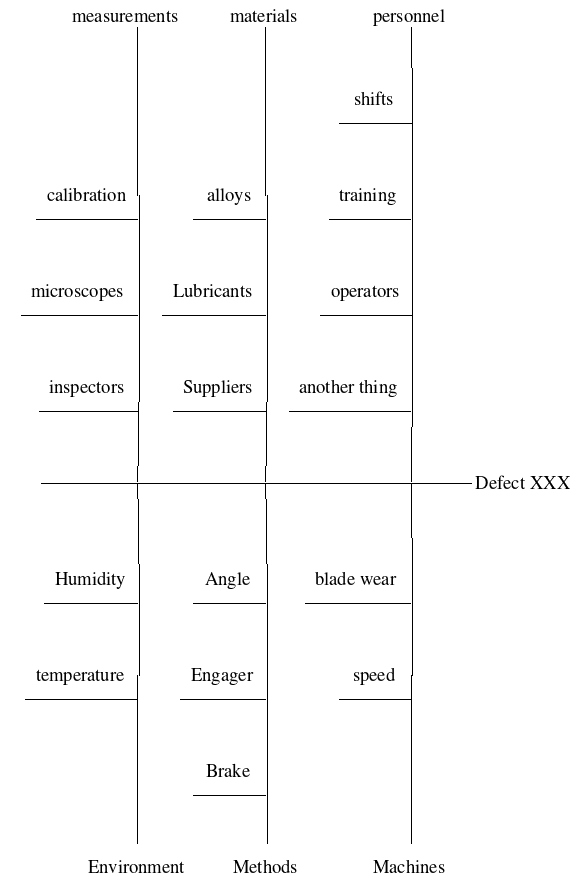
运行上面的贯穿点,你会得到这个-不远,但不是鱼骨图:
现在,wishbone.gvpr --添加鱼骨耙的gvpr (https://www.graphviz.org/pdf/gvpr.1.pdf)程序:
BEGIN{
  int nIndx=0;
  float centerY=-999.9, dY, angleAdj, minY=9999, maxY=-9999;
  node_t Node[];
  graph_t theRoot, subG;
  void doErrs(string eString){
     printf(2, "Error:: %s\n", eString);
     print("// Error:: %s\n", eString); // temporary, for debugging
  }
}
///////////////////////////////////////////////////////////////////////////
N{
   Node[++nIndx]=$;
   if ((hasAttr($, "centerline")) && ($.centerline!="")){
      centerY=$.Y;
   }
   if ($.Y >maxY)
     maxY=$.Y;
   if ($.Y < minY)
     minY=$.Y;
}
////////////////////////////////////////////////////////////////////////////
END_G{
  if (centerY==-999.9){
      estr="\"centerline\" attribute is missing"; doErrs(estr);;
      exit(9);
  }
  $G.bb="";
  for (Node[nIndx]){
    print("//  pos before: ",Node[nIndx].pos);
    dY=Node[nIndx].Y-centerY;
    print("//  dY (1) : ", dY);
    // get absolute value
    if (dY<0){
      dY=-dY;
    }
    print("//  dY (2) : ", dY);
    Node[nIndx].pos=(string)(Node[nIndx].X - .25*dY) + "," + (string)Node[nIndx].Y;
    print("//  pos after: ", Node[nIndx].pos);
  }
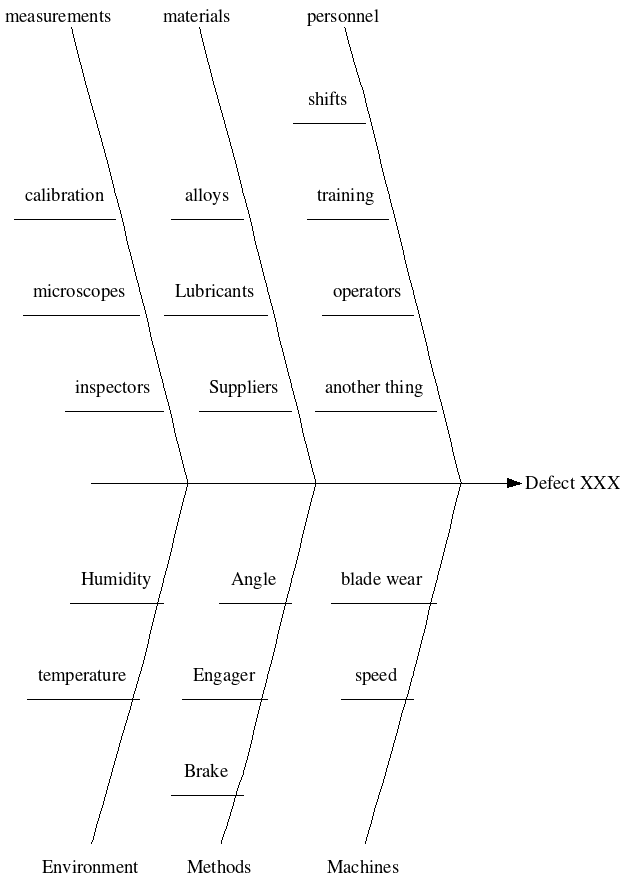
}gvpr程序调整X坐标
然后neato -n (https://graphviz.org/faq/#FaqDotWithNodeCoords)修复边缘。
最后,执行所有操作的命令行(Linux) -(如果Windows不支持管道,只需将中间输出发送到临时文件)
dot -Tdot myfile.gv |
gvpr -c -f wishbone.gvpr  |
neato -n -Tpng >myfile.png
给予:
呼!
https://stackoverflow.com/questions/51348536
复制相似问题
腾讯云开发者

Copyright © 2013 - 2026 Tencent Cloud. All Rights Reserved. 腾讯云 版权所有
深圳市腾讯计算机系统有限公司 ICP备案/许可证号:粤B2-20090059  粤公网安备44030502008569号
腾讯云计算(北京)有限责任公司 京ICP证150476号 | 京ICP备11018762号