
在Grub 2.02源代码中查找倒计时计时器
将Grub的超时更改为1/10或1/100秒间隔
在具有AMD64体系结构的UEFI系统上使用Grub 2.02。我想将grub的超时计数器从1秒间隔更改为1/10秒或1/100秒间隔。究其原因,是为了使gfxmenu循环进度倒计时少些“波折”。下面的引导GIF显示了循环1秒“块”中的5秒计数:
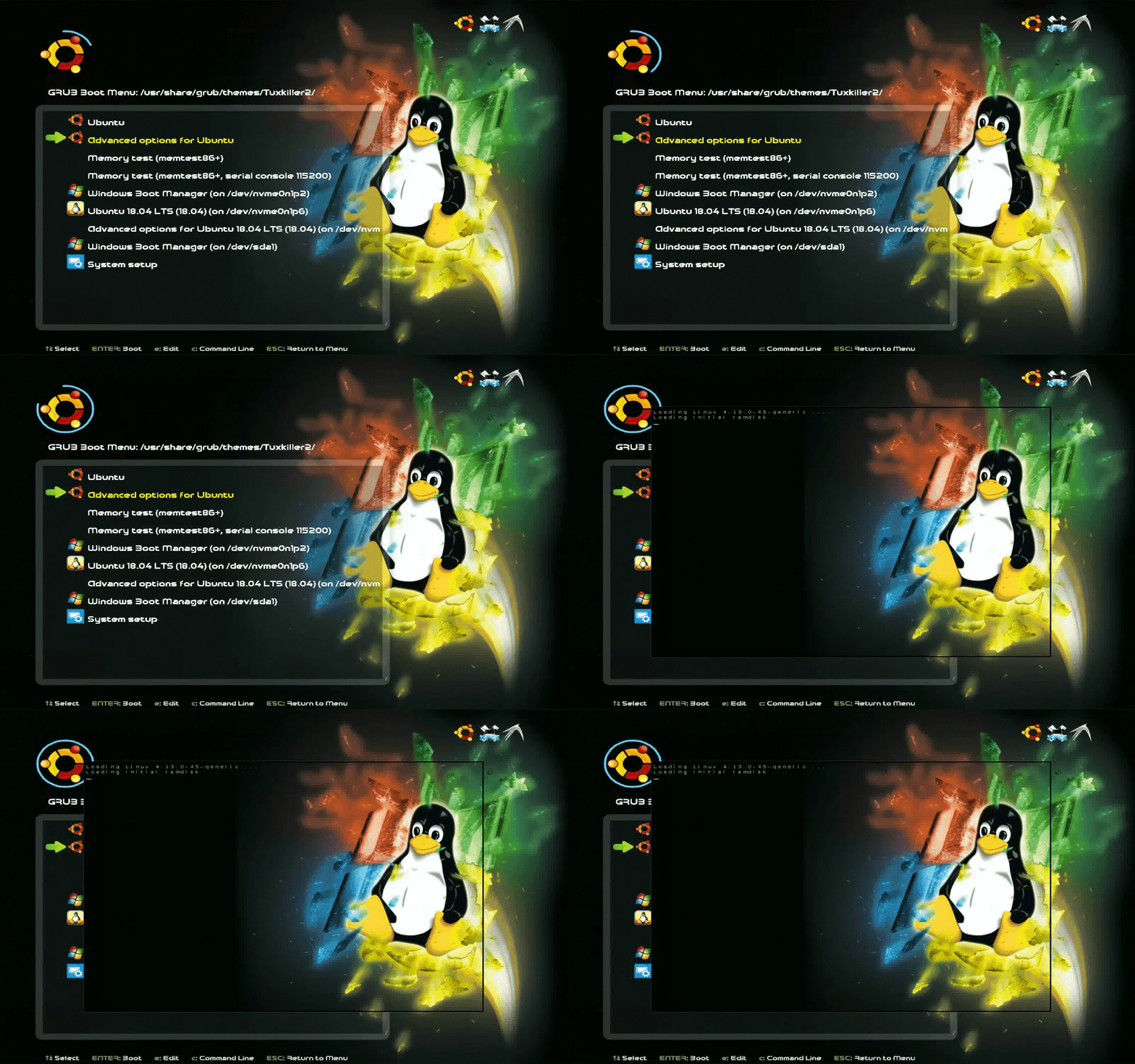
在成功的源代码更改和重新编译之后,/etc/default/grub将被更改如下:
- 如果间隔1/10秒,倒计时2.5秒将是
GRUB_TIMEOUT=25。 - 如果1/100秒间隔,2.5秒倒计时将是
GRUB_TIMEOUT=250。
Grub 2.02源是1/200万行
我已经下载了源代码,如下所述:如何从源代码构建grub2引导程序并使用qemu仿真器进行测试和花时间浏览源文件。然而,有477 K行可搜索:
~/src/grub-2.02$ wc -l **/*

      20 asm-tests/arm.S
      18 asm-tests/i386-pc.S
       4 asm-tests/i386.S
      11 asm-tests/mips.S
       8 asm-tests/powerpc.S
            (... SNIP ...)
     115 util/spkmodem-recv.c
477316 total我在中做过许多bash项目,询问Ubuntu,但是这将是我的第一个C/Assembler项目。作为一个“新手”,我的想法是:
- 哪个文件包含倒计时的源代码?
- 如何将间隔更改为1/10或1/100秒?
- 把源代码放在我的主目录下是一种传统的方法吗?
- 任何关于在Virtualbox中编译和测试的技巧都是有帮助的。
请注意,只有第一个问题是相关的。其他问题是作者选择更详细的答案。
回答 2
Stack Overflow用户
发布于 2018-07-14 18:00:00
变量GRUB_TIMEOUT在util/grub.d/00_header.in中计算。
if [ "x$GRUB_BUTTON_CMOS_ADDRESS" != "x" ]; then
    cat <<EOF
if cmostest $GRUB_BUTTON_CMOS_ADDRESS ; then
EOF
make_timeout "${GRUB_HIDDEN_TIMEOUT_BUTTON}" "${GRUB_TIMEOUT_BUTTON}" "${GRUB_TIMEOUT_STYLE_BUTTON}"
echo else
make_timeout "${GRUB_HIDDEN_TIMEOUT}" "${GRUB_TIMEOUT}" "${GRUB_TIMEOUT_STYLE}"
echo fi
else
make_timeout "${GRUB_HIDDEN_TIMEOUT}" "${GRUB_TIMEOUT}" "${GRUB_TIMEOUT_STYLE}"
fi请注意,这是一个生成脚本的脚本,这就是为什么它看起来非常奇怪的原因。make_timeout看起来如下(同上):
make_timeout ()
{
    if [ "x${3}" != "x" ] ; then
        timeout="${2}"
        style="${3}"
    elif [ "x${1}" != "x" ] && [ "x${1}" != "x0" ] ; then
        # Handle the deprecated GRUB_HIDDEN_TIMEOUT scheme.
        timeout="${1}"
        if [ "x${2}" != "x0" ] ; then
            grub_warn "$(gettext "Setting GRUB_TIMEOUT to a non-zero value when GRUB_HIDDEN_TIMEOUT is set is no longer supported.")"
        fi
        if [ "x${GRUB_HIDDEN_TIMEOUT_QUIET}" = "xtrue" ] ; then
            style="hidden"
            verbose=
        else
            style="countdown"
            verbose=" --verbose"
        fi
    else
        # No hidden timeout, so treat as GRUB_TIMEOUT_STYLE=menu
        timeout="${2}"
        style="menu"
    fi
    cat << EOF
if [ x\$feature_timeout_style = xy ] ; then
  set timeout_style=${style}
  set timeout=${timeout}
EOF
    if [ "x${style}" = "xmenu" ] ; then
        cat << EOF
# Fallback normal timeout code in case the timeout_style feature is
# unavailable.
else
  set timeout=${timeout}
EOF
    else
        cat << EOF
# Fallback hidden-timeout code in case the timeout_style feature is
# unavailable.
elif sleep${verbose} --interruptible ${timeout} ; then
  set timeout=0
EOF
    fi
    cat << EOF
fi
EOF
}正如您所看到的,它只是在最后调用带有一些选项的sleep。这个命令是在grub-core/commands/sleep.c中定义的。虽然sleep命令只能在整秒的增量中休眠,但底层函数grub_millisleep可以做得更好。
应该很容易通过将所有grub_millisleep(1000)调用更改为grub_millisleep(100)来修补这个函数,但请记住,这破坏了sleep的所有使用。一个更干净的选项是在sleep中添加一个新选项,这样就可以根据具体情况选择行为。
Stack Overflow用户
发布于 2018-09-02 16:10:28
在被接受的答案的帮助下,我能够用另一种方法实现目标。在成功修改和重新编译GRUB2.02源代码之后,/etc/default/grub被更改为GRUB_TIMEOUT=35的3.5秒倒计时。
注意循环进度是如何平滑的,没有“块”:

要修改的代码:
/grub-2.02/grub-core/normal/menu.c第546行:
/* Check whether a second has elapsed since the last tick.  If so, adjust
   the timer and return 1; otherwise, return 0.  */
static int
has_second_elapsed (grub_uint64_t *saved_time)
{
  grub_uint64_t current_time;

  current_time = grub_get_time_ms ();
  /* July 14, 2018 Use deciseconds - change 1000 to 100 */
  if (current_time - *saved_time >= 100)
    {
      *saved_time = current_time;
      return 1;
    }
  else
    return 0;
}
更改行文:
if (current_time - *saved_time >= 1000)至:
if (current_time - *saved_time >= 100)Voila!一行代码要更改。另外,还增加了两行评论,以达到良好的效果。
如何编译grub 2.02
在遵循Grub的网站说明之前
sudo apt install bison
sudo apt install flex
然后按照grub的网站说明:
cd grub-2.02
./configure
在Grub的网站上运行下一个命令:
make install在/usr/local/bin中创建文件(惊喜!)以及预期的.../grub-2.02目录。
编译grub的杂项问题
最后,我将源代码克隆到VM (Lubuntu16.04)并在那里重新编译。使用新编译的grub-install会使事情变得一团糟,我不得不使用sudo apt install grub2来获得新的安装。然后手动将新编译的文件复制到/boot/grub/i386-pc
我的终端盒被扭曲了,所以我不得不创建一个新的grub背景图像。在下面的图片中,我更改了3.5秒倒计时的GRUB_TIMEOUT=35。
2018年7月16日
为了获得X86,EFI支持一个参数:
./configure –with-platform=efi

*******************************************************
GRUB2 will be compiled with following components:
Platform: x86_64-efi
With devmapper support: No (need libdevmapper header)
With memory debugging: No
With disk cache statistics: No
With boot time statistics: No
efiemu runtime: No (not available on efi)
grub-mkfont: No (need freetype2 library)
grub-mount: No (need FUSE library)
starfield theme: No (No build-time grub-mkfont)
With libzfs support: No (need zfs library)
Build-time grub-mkfont: No (need freetype2 library)
Without unifont (no build-time grub-mkfont)
Without liblzma (no support for XZ-compressed mips images) (need lzma library)
*******************************************************但是,在make install之后出现了一个错误:
Making install in grub-core
make[2]: Entering directory '/home/rick/src/grub-2.02/grub-core'
gcc -E -DHAVE_CONFIG_H  -Wall -W  -DGRUB_MACHINE_EFI=1 -DGRUB_MACHINE=X86_64_EFI -m64 -nostdinc -isystem /usr/lib/gcc/x86_64-linux-gnu/5/include -I../include -I../include -DGRUB_FILE=\"symlist.h\" -I. -I. -I.. -I.. -I../include -I../include -I../grub-core/lib/libgcrypt-grub/src/   -DGRUB_KERNEL=1 -D_FILE_OFFSET_BITS=64 -DGRUB_SYMBOL_GENERATOR=1 symlist.h > symlist.p || (rm -f symlist.p; exit 1)
symlist.h:25:44: fatal error: ../include/grub/machine/kernel.h: No such file or directory
compilation terminated.
Makefile:42544: recipe for target 'symlist.c' failed
make[2]: *** [symlist.c] Error 1
make[2]: Leaving directory '/home/rick/src/grub-2.02/grub-core'
Makefile:10904: recipe for target 'install-recursive' failed
make[1]: *** [install-recursive] Error 1
make[1]: Leaving directory '/home/rick/src/grub-2.02'
Makefile:11927: recipe for target 'install' failed
make: *** [install] Error 2
我向Grub提交了一份bug报告(2018年7月),但没有收到任何反馈。EFI系统的下一步是使用Ubuntu的存储库(而不是Grub的网站说明)在新安装时下载源代码。
https://stackoverflow.com/questions/51341871
复制相似问题
腾讯云开发者

Copyright © 2013 - 2026 Tencent Cloud. All Rights Reserved. 腾讯云 版权所有
深圳市腾讯计算机系统有限公司 ICP备案/许可证号:粤B2-20090059  粤公网安备44030502008569号
腾讯云计算(北京)有限责任公司 京ICP证150476号 | 京ICP备11018762号