
使用Python中的StyleFrame库在Excel中显示尾随零时发出
使用Python中的StyleFrame库在Excel中显示尾随零时发出
提问于 2018-07-12 14:46:18
在使用StyleFrame库写入excel文件时,如果有尾随零,则无法保留3位小数。
例如,请考虑以下数据:
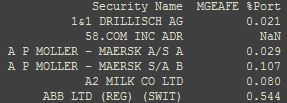
接下来,我将此数据写入StyleFrame对象以进行数据格式化,最后,将StyleFrame对象写入excel文件:
sf = StyleFrame(df)
sf = sf.apply_headers_style(...)
sf = sf.apply_column_style(...)
sf.to_excel(writer, float_format="%.3f")
这是我的输出:
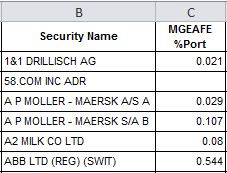
我想要做的是,在to_excel()调用中显示0.08为0.080,正如我的浮点数格式建议的"%.3f“。
有什么建议吗?
回答 1
Stack Overflow用户
回答已采纳
发布于 2018-07-12 15:10:50
因为df.to_excel(writer, float_format='%.3f')没有提供预期的输出,所以sf.to_excel(writer, float_format="%.3f")也不会(StyleFrame.to_excel传递它不认识的kwargs给pandas.DataFrame.to_excel)。
在对列进行样式设计时,可以使用自定义number_format来使其工作。将number_format='0.000' ('0.000'是Excel用来表示小数点3位的单元格格式)传递给Styler对象,用于为MGEAFE %port列设置样式。
from StyleFrame import StyleFrame, Styler


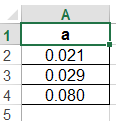
df = pd.DataFrame({'a': [0.021, 0.029, 0.080]})
StyleFrame(df, Styler(number_format='0.000')).to_excel('test.xlsx').save()
页面原文内容由Stack Overflow提供。腾讯云小微IT领域专用引擎提供翻译支持
原文链接:
https://stackoverflow.com/questions/51308619
复制相关文章
相似问题
腾讯云开发者

Copyright © 2013 - 2026 Tencent Cloud. All Rights Reserved. 腾讯云 版权所有
深圳市腾讯计算机系统有限公司 ICP备案/许可证号:粤B2-20090059  粤公网安备44030502008569号
腾讯云计算(北京)有限责任公司 京ICP证150476号 | 京ICP备11018762号