
QTreeWidget自定义选择和悬停背景色行为
我需要设置为无高亮颜色的悬停和选定的项目在QTreeWidget。但我也希望被选中或突出显示的项目与某种边界。
现在我的QTreeWidget是这样的:
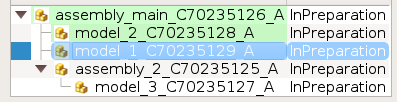
项目"model_1“有绿色的背景颜色,如"model_2”。当我选择或只是悬停时,它变成蓝色,我看不到原来的背景色。我想看到原来的背景颜色(在本例中它是绿色的)。
我试过用样式表来做
QTreeView::item:selected {
    border: black;
    border-radius:5px;
    background-color: rgba(0,128,255,100);
}

QTreeView::item:hover {
    border: black;
    border-radius:1px;
    background-color: rgba(0,128,255,95);

}

QTreeView::item:hover:selected {
    border: black;
    border-radius:1px;
    background-color: rgba(0,128,255,70);

}我试着设置background-color: inherit;,但它不起作用.
就像我看到的这里
注意:所允许的RGB颜色与CSS2.1允许的颜色相同,如列出的这里。
有些关键字如“继承”不受支持。
我需要在Linux和Windows上这样做。
请帮帮忙。
回答 1
Stack Overflow用户
发布于 2018-07-11 07:56:10
我解决了。
- 在应用程序中添加样式表以激活选择和悬停
Self.setStyleSheet(“”QTreeView::item:Selected{}QTreeView::item:悬停{}QTreeView::item:Selected{}“”)
- 为项的自定义样式委托创建以下类。
类MyStyledItemDelegate(QtWidgets.QStyledItemDelegate):‘’用于覆盖选择行为,并在QTreeView和QTreeWidget中悬停,当您将背景色(QtGui.QColor())设置为QTreeWidgetItem时,您还必须设置如下颜色: item.setData(0,QtCore.Qt.BackgroundRole,QtGui.QColor())‘’def油漆(self,P漆子,选项,索引):def draw_my(选项、画家、画笔、文本),图标):如果画笔是空的:画笔= QtGui.QColor(255,255,255,0) #这是原始的背景色。我刚刚将alpha设置为0,这意味着它是透明的x,y=(option.矩形.x(),option.矩形.y()h= option.rect.height() painter.save() painter.setFont(option.font)如果图标:图标= icon.pixmap(h ),Painter.drawPixmap(x,y,h,h),图标) painter.drawText(option.rect.adjusted(h,0,0,0),QtCore.Qt.AlignLeft,text)其他: painter.drawText(option.rect,QtCore.Qt.AlignLeft,painter.setCompositionMode(QtGui.QPainter.CompositionMode_SourceAtop) painter.setPen(QtGui.QPen(QtCore.Qt.NoPen)) painter.fillRect(option.rect,painter.setBackgroundMode(QtCore.Qt.OpaqueMode) painter.setBackground(画笔) painter.drawRect(option.rect) painter.restore() #也应在选中的StyleSheet #中激活悬浮if (option.state & QtWidgets.QStyle.State_Selected)或(option.state & QtWidgets.QStyle.State_MouseOver):option.font.setWeight(QtGui.QFont.Bold)刷子= index.data(QtCore.Qt.BackgroundRole)文本= index.data(QtCore.Qt.DisplayRole)图标= index.data(QtCore.Qt.DecorationRole)draw_my(option=option,painter=painter,brush=brush,text=text,icon=icon)其他:QtWidgets.QStyledItemDelegate.paint(自我,画家,选项,索引)
- 将自定义委托设置为
QTreeWidget对象
tree_widget.setItemDelegate(custom_QStyledItemDelegate) = MyStyledItemDelegate()
- 设置项目的背景色时,还应设置如下数据
item.setBackground(0,QtGui.QBrush(QtGui.QColor(0,255,150,100)) item.setData(0,QtCore.Qt.BackgroundRole,QtGui.QColor(0,255,150,100)) #需要在MyStyledItemDelegate中选择和隐藏数据
- 尽情享受
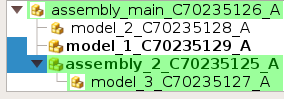
PS:对不起,这个答案的风格太差了,我不知道如何为我的代码片段设置代码样式。它不起作用。
https://stackoverflow.com/questions/51175167
复制相似问题
腾讯云开发者

Copyright © 2013 - 2026 Tencent Cloud. All Rights Reserved. 腾讯云 版权所有
深圳市腾讯计算机系统有限公司 ICP备案/许可证号:粤B2-20090059  粤公网安备44030502008569号
腾讯云计算(北京)有限责任公司 京ICP证150476号 | 京ICP备11018762号