
设置目录和子文件夹的权限
我的c#代码创建一个用户,创建共享文件夹并在该文件夹上设置用户权限,
现在,如果我有这样的文件夹:
A
|_B
|_C
|_D
如果我为文件夹A创建共享,那么它只共享A而不共享B、C、D。
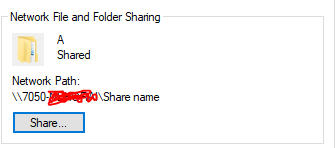
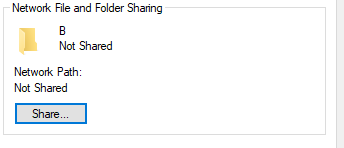
My quetion:如何启用继承?我的意思是让B,C,D也被分享。
我已经找到了this的代码和平,但它什么也做不了。
这是我的完整代码:
string uName = "myusername";
string pass = "Rr1234567#";
string path = @"C:\Users\danielf\Desktop\A";
string shareName = "MyShare";
string description = "some description";


PrincipalContext ctx = new PrincipalContext(ContextType.Machine);
UserPrincipal user = new UserPrincipal(ctx ,uName  ,pass  , true);
user.PasswordNeverExpires = true;
user.Save();


DirectoryInfo dInfo = new DirectoryInfo(path);
WindowsIdentity id = WindowsIdentity.GetCurrent();
DirectorySecurity dSecurity = dInfo.GetAccessControl();
dSecurity.AddAccessRule(new FileSystemAccessRule(uName , FileSystemRights.FullControl , InheritanceFlags.ContainerInherit , PropagationFlags.InheritOnly , AccessControlType.Allow));
        dInfo.SetAccessControl(dSecurity);

        //Gets User SID for share permissions **NotSecurty**
        NTAccount account = new NTAccount(System.Environment.MachineName , uName);
        SecurityIdentifier sid = (SecurityIdentifier)account.Translate(typeof(SecurityIdentifier));
        byte[] sidArray = new byte[sid.BinaryLength];
        sid.GetBinaryForm(sidArray , 0);

        ManagementObject Trustee = new ManagementClass("root\\CIMV2" , "Win32_Trustee" , null);
        Trustee["Domain"] = ".";
        Trustee["Name"] = uName;
        Trustee["SID"] = sidArray;

        ManagementBaseObject AdminACE = new ManagementClass(new ManagementPath("Win32_Ace") , null);

        // Add the input parameters.
        AdminACE["AccessMask"] = 2032127;
        AdminACE["AceFlags"] = 3;
        AdminACE["AceType"] = 0;
        AdminACE["Trustee"] = Trustee;

        //Security Descriptor For Share creation Parameter
        ManagementObject secDescriptor = new ManagementClass(new ManagementPath("Win32_SecurityDescriptor") , null);
        secDescriptor["ControlFlags"] = 4;
        secDescriptor["DACL"] = new object[] { AdminACE };

        ManagementClass classInstance = new ManagementClass("root\\CIMV2" , "Win32_Share" , null);

        // Obtain in-parameters for the method
        ManagementBaseObject inParams = classInstance.GetMethodParameters("Create");

        // Add the input parameters.
        inParams["Name"] = shareName;
        inParams["Path"] = path;
        inParams["Type"] = 0;
        inParams["Description"] = description;
        inParams["Access"] = secDescriptor;
        inParams["MaximumAllowed"] = null;

        // Execute the method and obtain the return values.
ManagementBaseObject outParams = classInstance.InvokeMethod("Create" , inParams , null);回答 2
Stack Overflow用户
发布于 2018-07-02 07:25:29
共享是整个目录树的共享,如果父目录是共享的,那么所有的子目录文件夹都是共享的。
但是共享和文件夹ACL仍然适用。
如果无法通过共享看到A的子级,则检查共享权限和文件夹权限。特别是,用于访问共享的标识需要读取对共享和A的访问,以查看A的内容。
Stack Overflow用户
发布于 2018-07-06 17:54:37
理查德对这个问题的评论是正确的,也是最重要的信息。通常,您不需要单独共享子文件夹(仅在非常特殊的情况下)。
此外,他的回答也适用于“检查共享和文件夹权限”。
代码中有一个问题。共享入口点的NTFS可能设置得不正确,或者至少是非标准的,而且可能不是RTException想要的。
使用InheritanceFlags.ContainerInherit , PropagationFlags.InheritOnly (如原始代码中所示)将导致:
- 不允许用户对条目文件夹进行访问(因为ACL仅继承)
- 只有子目录继承此ACE,而不是文件。
如果删除了通常的" user“/”身份验证用户“权限,则新用户将获得拒绝访问的错误,因为他甚至无法访问条目目录。
使用
InheritanceFlags.ContainerInherit | InheritanceFlags.ObjectInherit, PropagationFlags.None
导致“默认”权限。
这和问题中的链接中提到的完全一样。
Windows /继承是一个非常复杂的主题,也非常容易出错。有些微妙之处会导致意想不到的结果。
https://stackoverflow.com/questions/51130974
复制相似问题
腾讯云开发者

Copyright © 2013 - 2026 Tencent Cloud. All Rights Reserved. 腾讯云 版权所有
深圳市腾讯计算机系统有限公司 ICP备案/许可证号:粤B2-20090059  粤公网安备44030502008569号
腾讯云计算(北京)有限责任公司 京ICP证150476号 | 京ICP备11018762号