
如何动画启动带4卡一个一个?
我需要帮助动画卡在引导4。
我有4个卡片盒,如下图所示,这是一个简单的引导4卡甲板与4个卡盒。
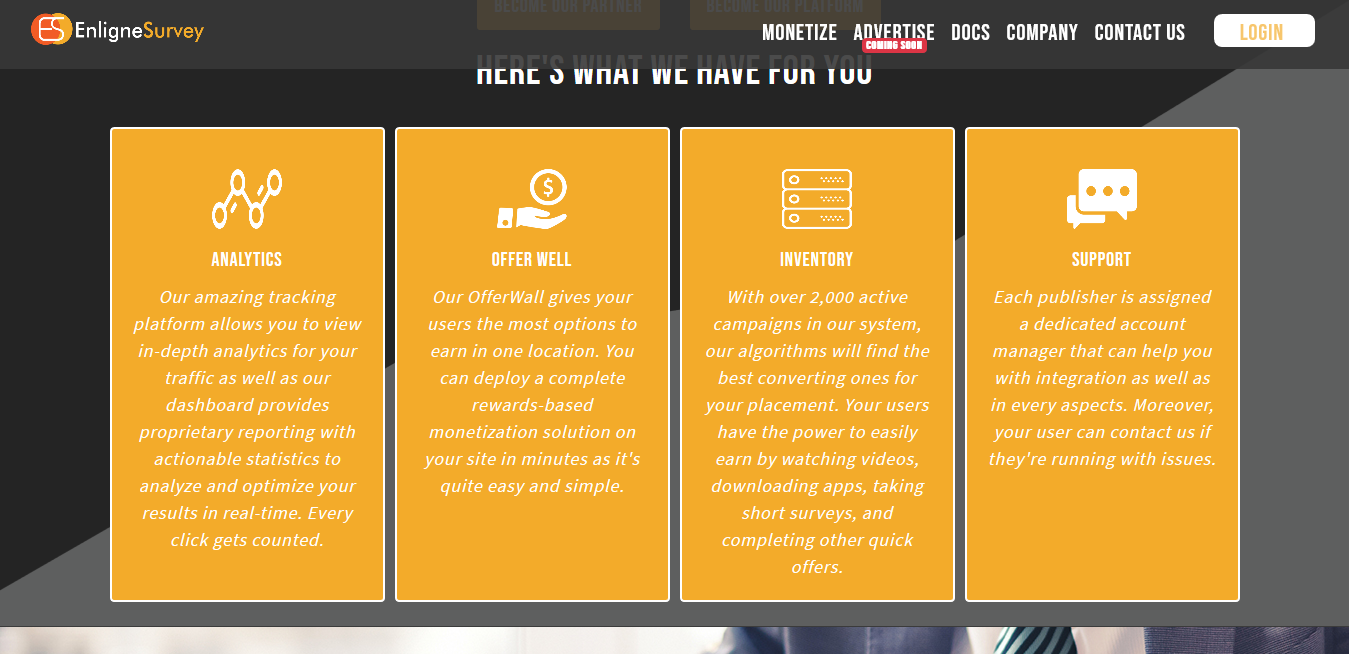
每当用户滚动到这个部分时,我都试着逐个滑动每个框。如何实现这一目标?
我不是想做滑块/旋转木马。
为便于参考,请查看此码页
四个盒子每个需要从右边来。最重要的是,在代码库中,所有的一切都是从左到右的。我需要它从右和一个一个,当用户滚动到该部分。
这里是我使用的引导4卡的代码
       <!-- Card Row starts here -->
   <div class="card-deck ">
      <div class="card card-detail card-text1">
         <img class="card-img-top img-fluid" src="images/Analytics.png" alt="Card image cap">
         <div class="card-body">
            <h5 class="card-title text-center">Analytics</h5>
            <p class="card-text text-center text-justify ">Our amazing tracking platform allows you to view in-depth analytics for your traffic as well as our dashboard provides proprietary reporting with actionable statistics to analyze and optimize your results in real-time. Every click gets counted.</p>
         </div>
      </div>
      <div class="card card-detail card-text1 ">
         <img class="card-img-top img-fluid" src="images/Offer-Well.png" alt="Card image cap">
         <div class="card-body">
            <h5 class="card-title text-center">Offer Well</h5>
            <p class="card-text text-center text-justify">Our OfferWall gives your users the most options to earn in one location. You can deploy a complete rewards-based monetization solution on your site in minutes as it's quite easy and simple.</p>
         </div>
      </div>
      <div class="card card-detail card-text1 ">
         <img class="card-img-top img-fluid" src="images/Inventory.png" alt="Card image cap">
         <div class="card-body">
            <h5 class="card-title text-center">Inventory</h5>
            <p class="card-text text-center text-justify ">With over 2,000 active campaigns in our system, our algorithms will find the best converting ones for your placement. Your users have the power to easily earn by watching videos, downloading apps, taking short surveys, and completing other quick offers. </p>
         </div>
      </div>
      <div class="card card-detail card-text1">
         <img class="card-img-top img-fluid" src="images/Support.png" alt="Card image cap">
         <div class="card-body">
            <h5 class="card-title text-center">Support</h5>
            <p class="card-text text-center text-justify">Each publisher is assigned a dedicated account manager that can help you with integration as well as in every aspects. Moreover, your user can contact us if they're running with issues.</p>
         </div>
      </div>
   </div>
<!-- Card Row Ends here -->回答 2
Stack Overflow用户
发布于 2018-06-29 02:20:44
你试过这个插件奥斯吗?要动画化,只需将特定的元素绑定到有效的aos属性(请参阅下面)
<div data-aos="fade-up"></div>如果您想将其动画化一次,则可以添加数据-aos-一次性属性。
<div data-aos="fade-up" data-aos-once="true"></div>等等,请查看此处的插件http://michalsnik.github.io/aos/
更新:要使每个元素以不同的持续时间显示,可以添加数据-aos-延迟。
<div id="animate1" data-aos="fade-up" data-aos-once="true" data-aos-delay="500"></div>
<div id="animate2" data-aos="fade-up" data-aos-once="true" data-aos-delay="1000"></div>
<div id="animate3" data-aos="fade-up" data-aos-once="true" data-aos-delay="1500"></div>
从上面的样本中可以看出,每个元素都有500 as的延迟。
注意:请确保首先初始化插件。
<script>
    AOS.init();
</script>Stack Overflow用户
发布于 2018-06-29 01:53:00
编辑-问题细节更改后的
正如@Juliver 建议的那样,您可以使用插件aosjs
https://github.com/michalsnik/aos
下面是我正在运行的代码片段
AOS.init({
  duration: 1200,
})* {
box-sizing: border-box;
}
.item {
width: 100px;
height: 200px;
margin: 50px auto;
padding-top: 75px;
background: #ccc;
text-align: center;
color: #FFF;
font-size: 3em;
} <!DOCTYPE html>
<html lang="en" >
<head>
<meta charset="UTF-8">
<title>AOS - animations</title>
<link rel="stylesheet" href="https://cdnjs.cloudflare.com/ajax/libs/normalize/5.0.0/normalize.min.css">
<link rel='stylesheet prefetch' href='https://unpkg.com/aos@2.3.0/dist/aos.css'>
<link rel="stylesheet" href="css/style.css">
</head>
<body>
<div style="width=1200px;">
<div style="float:left;" data-aos-delay="100" class="item" data-aos="fade-left">1</div>
<div style="float:left;" data-aos-delay="1600" class="item" data-aos="fade-left">2</div>
<div style="float:left;" data-aos-delay="2800" class="item" data-aos="fade-left">3</div>
</div>
<script src='https://unpkg.com/aos@2.3.0/dist/aos.js'></script>
</body>
</html>
旧邮政
此功能可作为carousel在引导程序中使用。
样本:旋转木马
关于旋转木马:https://getbootstrap.com/docs/4.0/components/carousel/
https://stackoverflow.com/questions/51093212
复制相似问题
腾讯云开发者

Copyright © 2013 - 2026 Tencent Cloud. All Rights Reserved. 腾讯云 版权所有
深圳市腾讯计算机系统有限公司 ICP备案/许可证号:粤B2-20090059  粤公网安备44030502008569号
腾讯云计算(北京)有限责任公司 京ICP证150476号 | 京ICP备11018762号