
填写问卷
填写问卷
提问于 2018-06-29 01:39:52
我正在创建一个移动应用程序,允许用户在问卷中回答一些问题。当问卷完成后,用户将其保存在LocalStorage中。当他在页面上时,用户会看到上面所有的回答问卷的按钮。我想给大家看一下以前填好的问题,但他不能改变任何答案。
我怎么做(禁用任何修改)?
我用的是离子3。
下面是我如何创建问卷的代码示例。
    <ion-item>
      <ion-label>{{ 'PREVISIT_fever_or_infection' | translate }}</ion-label>
      <ion-select [(ngModel)]="qObj.feverinfectionlastrelapse" interface="popover">
        <ion-option value="yes">Yes</ion-option>
        <ion-option value="no" checked>No</ion-option>
      </ion-select>
    </ion-item>

    <ion-item>
      <ion-label>{{ 'PREVISIT_overheated' | translate }}</ion-label>
      <ion-select [(ngModel)]="qObj.overheatedlastrelapse" interface="popover">
        <ion-option value="yes">Yes</ion-option>
        <ion-option value="no" checked>No</ion-option>
      </ion-select>
    </ion-item>

    <p>{{ 'PREVISIT_symptom_experienced' | translate }}<ion-icon name="add" class="more-icon"></ion-icon> {{ 'PREVISIT_symptom_experienced2' | translate }}</p>

    <!-- Symptom list -->
    <ion-item *ngFor="let symptom of symptoms">
      {{symptom.label | translate}}
      <ion-label>{{symptom.label | translate}} <ion-icon name="add" class="more-icon" [hidden]="!symptom.more"></ion-icon></ion-label>
      <ion-checkbox [(ngModel)]="symptom.value"></ion-checkbox>
    </ion-item>

    <!-- more detailed questions list -->
    <div *ngFor="let symptom of symptoms">
        <h5 *ngIf="symptom.value&&symptom.more" class="more-detailed-questions-spacer">{{symptom.label | translate}}</h5>

        <div *ngIf="symptom.value">
          <ion-item *ngFor="let question of symptom.moreList">
              <ion-label>{{question.name | translate}}</ion-label>
              <ion-select [(ngModel)]="question.value" interface="popover">
                <ion-option *ngFor="let condition of question.conditions" [value]="condition.value">{{condition.txt}}</ion-option>
              </ion-select>
            </ion-item>
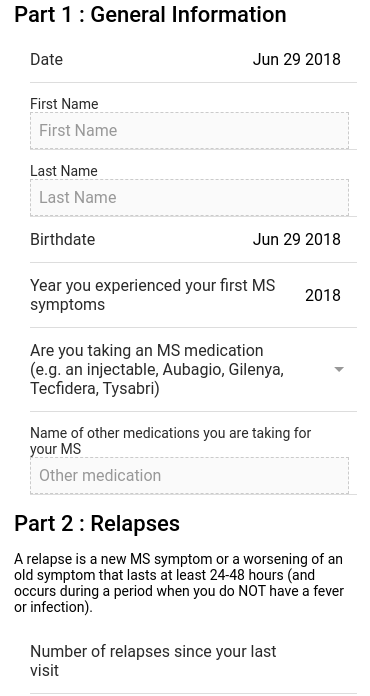
以下是调查问卷的截图。
回答 2
Stack Overflow用户
回答已采纳
发布于 2018-06-29 02:02:00
您可以使用变量类型布尔型的主题,并使用相同的变量检查用户是否已加载详细信息并使用[disabled]="yourBoolean"禁用窗体/元素。
如果你有单一的形式,你不需要去一个主题,你可以只使用一个布尔变量
this.qObj = JSON.parse(localStorage.getItem('qObj'));
this.readOnly = true;
和
<ion-select [disabled] = "readOnly" [(ngModel)]="qObj.feverinfectionlastrelapse" interface="popover">Stack Overflow用户
发布于 2018-06-29 02:05:42
你可以在你的问卷上保持一个只读状态,
this.qObj = JSON.parse(localStorage.getItem('qObj'));
this.isReadOnly = typeof qObj !== 'undefined' && qObj !== null
对于输入控件,可以分配这个变量。
<ion-item>
  <ion-label>{{ 'PREVISIT_fever_or_infection' | translate }}</ion-label>
  <ion-select [disabled] = "isReadOnly" [(ngModel)]="qObj.feverinfectionlastrelapse" interface="popover">
    <ion-option value="yes">Yes</ion-option>
    <ion-option value="no" checked>No</ion-option>
  </ion-select>
</ion-item>

<ion-item *ngFor="let symptom of symptoms">
  {{symptom.label | translate}}
  <ion-label>{{symptom.label | translate}} <ion-icon name="add" class="more-icon" [hidden]="!symptom.more"></ion-icon></ion-label>
  <ion-checkbox [disabled] = "isReadOnly" [(ngModel)]="symptom.value"></ion-checkbox>
</ion-item>

<ion-item>
  <ion-label color="primary">Inline Label</ion-label>
  <ion-input [readonly]="isReadOnly" placeholder="Text Input"></ion-input>
</ion-item>页面原文内容由Stack Overflow提供。腾讯云小微IT领域专用引擎提供翻译支持
原文链接:
https://stackoverflow.com/questions/51093197
复制相关文章
相似问题
腾讯云开发者

Copyright © 2013 - 2026 Tencent Cloud. All Rights Reserved. 腾讯云 版权所有
深圳市腾讯计算机系统有限公司 ICP备案/许可证号:粤B2-20090059  粤公网安备44030502008569号
腾讯云计算(北京)有限责任公司 京ICP证150476号 | 京ICP备11018762号