
如何用Python OpenCV中的立体图像计算一条极线
如何用Python OpenCV中的立体图像计算一条极线
提问于 2018-06-28 19:07:56
我如何从不同的角度拍摄一个物体的两幅图像,并根据另一个角度的点在其中一个上画出极线?
例如,我希望能够使用鼠标在左边的图片上选择一个点,用一个圆标记这个点,然后在与标记点对应的右侧图像上画一条极线。
我有两个XML文件,其中包含一个3x3摄像机矩阵和一个3x4投影矩阵的列表为每幅图片。相机矩阵为K。左边图片的投影矩阵是P_left。右图的投影矩阵是P_right。
我尝试过这样做:
- 选择左侧图像中的像素坐标(x,y) (通过鼠标单击)
- 用
p计算左图像中的点K^-1 * (x,y,1) - 计算伪逆矩阵
P+的P_left(使用np.linalg.pinv) - 计算右图像的极
e':P_right * (0,0,0,1) - 计算
e'_skew的斜对称矩阵e' - 计算基本矩阵
F:e'_skew * P_right * P+ - 计算右侧图像上的极线
l':F * p - 计算右图像中的点
p':P_right * P+ * p - 将
p'和l转换为像素坐标 - 使用
cv2.line通过p'和l绘制一条线
回答 1
Stack Overflow用户
回答已采纳
发布于 2019-03-28 00:22:31
我几天前才这么做的,效果很好。下面是我使用的方法:
- 校准相机以获取相机矩阵和失真矩阵(使用openCV
getCorners和calibrateCamera,您可以找到很多关于这方面的教程,但听起来您已经有了这些信息) - 使用openCV
stereoCalibrate()进行立体声校准。它以所有的相机和畸变矩阵作为参数。您需要这样做来确定这两个视场之间的相关性。你会得到几个矩阵,旋转矩阵R,平移向量T,本质矩阵E和基本矩阵F。 - 然后,您需要使用openCV、
getOptimalNewCameraMatrix和undistort()进行非失真操作。这将消除许多相机像差(它会给你更好的结果)。 - 最后,使用openCV的
computeCorrespondEpilines计算线条并绘制它们。我将在下面包含一些代码,您可以在Python中试用。当我运行它时,我可以得到像这样的图像(彩色点在另一个图像中有相应的尾声)。
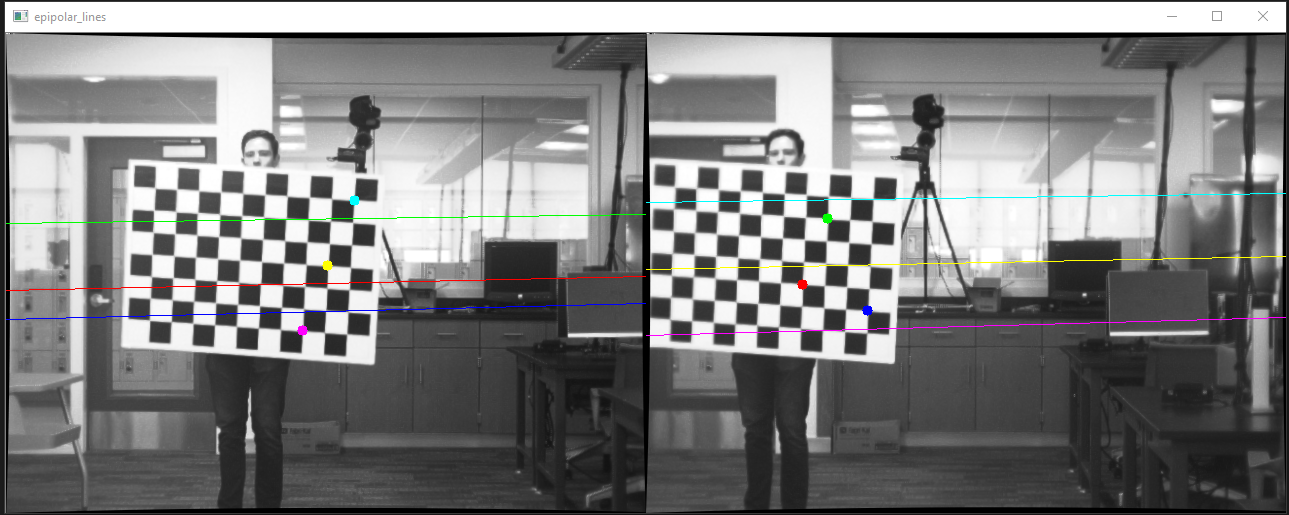
下面是一些代码(Python3.0)。它使用两个静态图像和静态点,但是您可以很容易地用光标选择点。您也可以参考OpenCV文档的校准和立体声校准这里。
import cv2
import numpy as np

# find object corners from chessboard pattern  and create a correlation with image corners
def getCorners(images, chessboard_size, show=True):
    criteria = (cv2.TERM_CRITERIA_EPS + cv2.TERM_CRITERIA_MAX_ITER, 30, 0.001)

    # prepare object points, like (0,0,0), (1,0,0), (2,0,0) ....,(6,5,0)
    objp = np.zeros((chessboard_size[1] * chessboard_size[0], 3), np.float32)
    objp[:, :2] = np.mgrid[0:chessboard_size[0], 0:chessboard_size[1]].T.reshape(-1, 2)*3.88 # multiply by 3.88 for large chessboard squares

    # Arrays to store object points and image points from all the images.
    objpoints = [] # 3d point in real world space
    imgpoints = [] # 2d points in image plane.

    for image in images:
        frame = cv2.imread(image)
        # height, width, channels = frame.shape # get image parameters
        gray = cv2.cvtColor(frame, cv2.COLOR_BGR2GRAY)
        ret, corners = cv2.findChessboardCorners(gray, chessboard_size, None)   # Find the chess board corners
        if ret:                                                                         # if corners were found
            objpoints.append(objp)
            corners2 = cv2.cornerSubPix(gray, corners, (11, 11), (-1, -1), criteria)    # refine corners
            imgpoints.append(corners2)                                                  # add to corner array

            if show:
                # Draw and display the corners
                frame = cv2.drawChessboardCorners(frame, chessboard_size, corners2, ret)
                cv2.imshow('frame', frame)
                cv2.waitKey(100)

    cv2.destroyAllWindows()             # close open windows
    return objpoints, imgpoints, gray.shape[::-1]

# perform undistortion on provided image
def undistort(image, mtx, dist):
    img = cv2.imread(image, cv2.IMREAD_GRAYSCALE)
    image = os.path.splitext(image)[0]
    h, w = img.shape[:2]
    newcameramtx, _ = cv2.getOptimalNewCameraMatrix(mtx, dist, (w, h), 1, (w, h))
    dst = cv2.undistort(img, mtx, dist, None, newcameramtx)
    return dst

# draw the provided points on the image
def drawPoints(img, pts, colors):
    for pt, color in zip(pts, colors):
        cv2.circle(img, tuple(pt[0]), 5, color, -1)

# draw the provided lines on the image
def drawLines(img, lines, colors):
    _, c, _ = img.shape
    for r, color in zip(lines, colors):
        x0, y0 = map(int, [0, -r[2]/r[1]])
        x1, y1 = map(int, [c, -(r[2]+r[0]*c)/r[1]])
        cv2.line(img, (x0, y0), (x1, y1), color, 1)

if __name__ == '__main__':

 # undistort our chosen images using the left and right camera and distortion matricies
    imgL = undistort("2L/2L34.bmp", mtxL, distL)
    imgR = undistort("2R/2R34.bmp", mtxR, distR)
    imgL = cv2.cvtColor(imgL, cv2.COLOR_GRAY2BGR)
    imgR = cv2.cvtColor(imgR, cv2.COLOR_GRAY2BGR)

    # use get corners to get the new image locations of the checcboard corners (undistort will have moved them a little)
    _, imgpointsL, _ = getCorners(["2L34_undistorted.bmp"], chessboard_size, show=False)
    _, imgpointsR, _ = getCorners(["2R34_undistorted.bmp"], chessboard_size, show=False)

    # get 3 image points of interest from each image and draw them
    ptsL = np.asarray([imgpointsL[0][0], imgpointsL[0][10], imgpointsL[0][20]])
    ptsR = np.asarray([imgpointsR[0][5], imgpointsR[0][15], imgpointsR[0][25]])
    drawPoints(imgL, ptsL, colors[3:6])
    drawPoints(imgR, ptsR, colors[0:3])

    # find epilines corresponding to points in right image and draw them on the left image
    epilinesR = cv2.computeCorrespondEpilines(ptsR.reshape(-1, 1, 2), 2, F)
    epilinesR = epilinesR.reshape(-1, 3)
    drawLines(imgL, epilinesR, colors[0:3])

    # find epilines corresponding to points in left image and draw them on the right image
    epilinesL = cv2.computeCorrespondEpilines(ptsL.reshape(-1, 1, 2), 1, F)
    epilinesL = epilinesL.reshape(-1, 3)
    drawLines(imgR, epilinesL, colors[3:6])

    # combine the corresponding images into one and display them
    combineSideBySide(imgL, imgR, "epipolar_lines", save=True)
希望这能帮上忙!
页面原文内容由Stack Overflow提供。腾讯云小微IT领域专用引擎提供翻译支持
原文链接:
https://stackoverflow.com/questions/51089781
复制相关文章
相似问题
腾讯云开发者

Copyright © 2013 - 2026 Tencent Cloud. All Rights Reserved. 腾讯云 版权所有
深圳市腾讯计算机系统有限公司 ICP备案/许可证号:粤B2-20090059  粤公网安备44030502008569号
腾讯云计算(北京)有限责任公司 京ICP证150476号 | 京ICP备11018762号