
如何设置Qframe框架的颜色?
如何设置Qframe框架的颜色?
提问于 2018-06-27 07:33:13
我想设置QFrame在pyside2中提供的帧的颜色。
下面的文档提供了完整的细节,如何创建一个不同风格的框架,如一个盒子,面板,线,等等。
https://doc-snapshots.qt.io/qtforpython/PySide2/QtWidgets/QFrame.html#detailed-description
我的问题是如何设置那个框架的颜色。我尝试使用“背景颜色”和“边框”样式表设置颜色,但没有得到我想要的输出。
下面是我的密码。
class HLine(QFrame):
    def __init__(self, parent=None, color="black"):
        super(HLine, self).__init__(parent)
        self.setFrameShape(QFrame.HLine)
        self.setFrameShadow(QFrame.Plain)
        self.setLineWidth(0)
        self.setMidLineWidth(3)
        self.setContentsMargins(0, 0, 0, 0)
        self.setStyleSheet("border:1px solid %s" % color)

    def setColor(self, color):
        self.setStyleSheet("background-color: %s" % color)
        pass
没有任何样式表。

带边框样式表的输出

带背景颜色样式表

两者都是样式表,提供不必要的输出。
如何在不改变帧的外观的情况下设置颜色?
回答 1
Stack Overflow用户
回答已采纳
发布于 2018-06-27 07:59:19
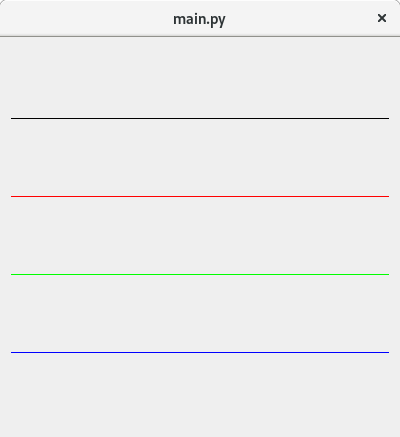
而不是使用Qt样式表,您可以使用QPalette
import sys
from PySide2.QtCore import Qt
from PySide2.QtGui import QColor, QPalette
from PySide2.QtWidgets import QApplication, QFrame, QWidget, QVBoxLayout


class HLine(QFrame):
    def __init__(self, parent=None, color=QColor("black")):
        super(HLine, self).__init__(parent)
        self.setFrameShape(QFrame.HLine)
        self.setFrameShadow(QFrame.Plain)
        self.setLineWidth(0)
        self.setMidLineWidth(3)
        self.setContentsMargins(0, 0, 0, 0)
        self.setColor(color)

    def setColor(self, color):
        pal = self.palette()
        pal.setColor(QPalette.WindowText, color)
        self.setPalette(pal)


if __name__ == '__main__':
    app = QApplication(sys.argv)
    w = QWidget()
    w.resize(400, 400)
    lay = QVBoxLayout(w)
    lay.addWidget(HLine())

    for color in [QColor("red"), QColor(0, 255, 0), QColor(Qt.blue)]:
        h = HLine()
        h.setColor(color)
        lay.addWidget(h)

    w.show()
    sys.exit(app.exec_())
页面原文内容由Stack Overflow提供。腾讯云小微IT领域专用引擎提供翻译支持
原文链接:
https://stackoverflow.com/questions/51056997
复制相关文章
相似问题
腾讯云开发者

Copyright © 2013 - 2026 Tencent Cloud. All Rights Reserved. 腾讯云 版权所有
深圳市腾讯计算机系统有限公司 ICP备案/许可证号:粤B2-20090059  粤公网安备44030502008569号
腾讯云计算(北京)有限责任公司 京ICP证150476号 | 京ICP备11018762号