
如何为响应性的网页设计设计元素样式?
如何为响应性的网页设计设计元素样式?
提问于 2018-06-24 16:00:46
我已经创建了饼图使用chartist.js,我不能创建响应网页设计。当我缩小窗口大小时,即对于小窗口,图例应该放在饼形图之上,对于大窗口大小,图例应该在右边。因此,对于大尺寸,它可以工作,但对于小屏幕大小,图例是重叠的零碎。我怎样才能风格的图例,使小屏幕,它会去上面的饼图,而不是重叠的零碎。
注意:我已经创建了作为一个反应组件的分段。
查特图例文档:https://github.com/CodeYellowBV/chartist-plugin-legend/blob/master/index.html
代码:
React组件,即饼图:
import React, { Component } from 'react';

var options = {
  width:200,
  height:200,
  showLabel:false,
  stackBars:true,
  plugins: [
        Chartist.plugins.legend()
  ]
};

class Pie extends Component {

  constructor(props){
    super(props);
  }
        const data = {
          labels: labels,
          series: dismissals
        };


    this.piechart = new Chartist.Pie('.ct-pie-chart', data, options);

  }

  render(){
    return(
      <div className="row">
          <div className="col-12 col-sm-6 col-lg-8">
                <div className="ct-pie-chart">
                    {this.piechart}
                </div>
          </div>
      </div>
    )}
}

export default Pie ;
CSS文件:
.ct-pie-chart .ct-legend li.inactive:before {
  background: transparent;
}

.piechart-title {
  text-align: center;
}

.ct-pie-chart .ct-legend {
  position: absolute;
  padding-left: 80px;
}

.ct-pie-chart .ct-legend.ct-legend-inside li{
           display: block;
           margin: 0;
}
截图(适用于小屏幕和大屏幕):
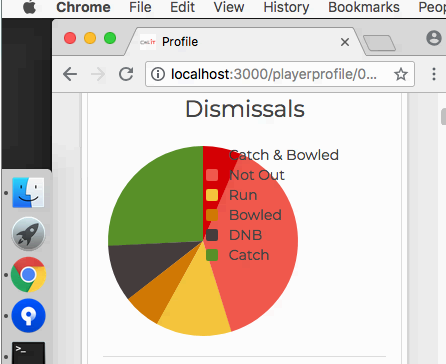
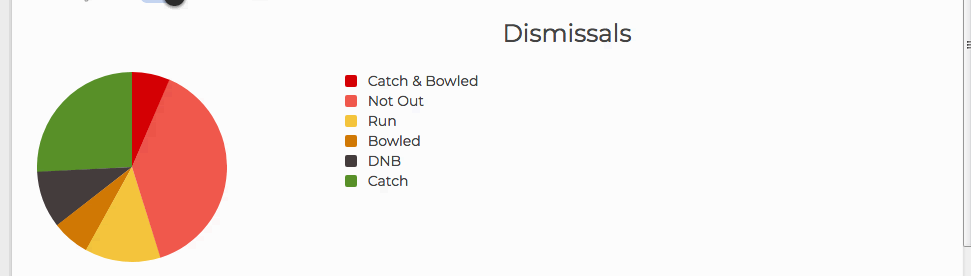
我添加了以下css,但它不起作用:
.ct-pie-chart {
  display: flex;
  align-items: flex-start;
}

.ct-pie-chart .ct-legend {
  position: absolute;
  padding-left: 80px;
}回答 2
Stack Overflow用户
回答已采纳
发布于 2018-06-25 05:19:15
我修改了CSS文件如下:
.ct-pie-chart .ct-legend li.inactive:before {
  background: transparent;
}

.piechart-title {
  text-align: center;
}

.ct-pie-chart .ct-legend.ct-legend-inside li{
  display: inline-block;
}

.ct-pie-chart .ct-legend li {
  margin: 2%;
}

.mychart {
  display: flex;
  align-items: flex-start;
  margin-left: 40%;
}

.ct-pie-chart .ct-legend {
  float: right;
}
在我的反应部分:
父组件:
<div className="mychart">
     <Pie/>
</div>
饼部分:
render(){
    return(
         <div className="ct-pie-chart">
             {this.piechart}
         </div>
    )
}
做出上面的改变是很好的,现在饼图和图例不互相重叠。
页面原文内容由Stack Overflow提供。腾讯云小微IT领域专用引擎提供翻译支持
原文链接:
https://stackoverflow.com/questions/51011612
复制相关文章
相似问题
腾讯云开发者

Copyright © 2013 - 2026 Tencent Cloud. All Rights Reserved. 腾讯云 版权所有
深圳市腾讯计算机系统有限公司 ICP备案/许可证号:粤B2-20090059  粤公网安备44030502008569号
腾讯云计算(北京)有限责任公司 京ICP证150476号 | 京ICP备11018762号