
无法打印随机森林回归树
无法打印随机森林回归树
提问于 2018-06-22 16:15:59
我看了几个例子,并跟随它们,但无法打印树状图。
R_forest = RandomForestRegressor(bootstrap=False,
  max_depth=30,
  max_features ='sqrt',
  min_samples_leaf= 4,
  min_samples_split=2,
  n_estimators = 600)
model=R_forest.fit(X_train,y_train)

from sklearn.datasets import *
from sklearn import tree
from sklearn.tree import export_graphviz
import graphviz
import pydot


tree = R_forest.estimators_[5]
# Export the image to a dot file
export_graphviz(tree, out_file = 'tree.dot', feature_names = X_train.columns,
rounded = True, precision = 1)
# Use dot file to create a graph
(graph, ) = pydot.graph_from_dot_file('tree.dot')
# Write graph to a png file
graph.write_png('tree.png')
我知道这个错误:
FileNotFoundError:在path中找不到WinError 2 "dot.exe“。
我遵循了这个解决方案,但仍然会出现同样的错误。
我系统的截图。
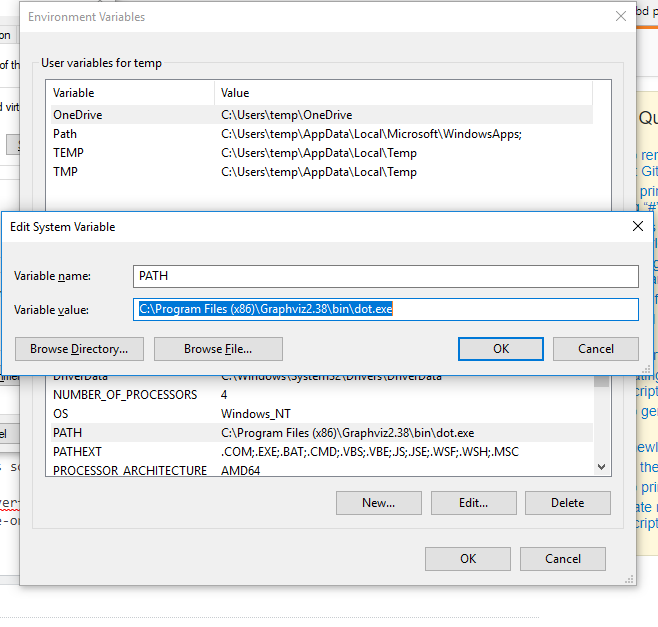
任何帮助或建议
回答 1
Stack Overflow用户
回答已采纳
发布于 2018-06-22 17:19:04
如果您能够生成"tree.dot“文件,那么您可以从命令行(在目录中使用"tree.dot")运行以下命令,以将其转换为png:
dot -Tpng tree.dot -o tree.png
如果这不起作用,您也可以尝试使用dot.exe的完整路径:
path\to\dot.exe -Tpng tree.dot -o tree.png
使用graph.write_png('tree.png')运行Python并不能在我的Windows机器上工作,但是命令行操作可以。
页面原文内容由Stack Overflow提供。腾讯云小微IT领域专用引擎提供翻译支持
原文链接:
https://stackoverflow.com/questions/50991965
复制相关文章
相似问题
腾讯云开发者

Copyright © 2013 - 2026 Tencent Cloud. All Rights Reserved. 腾讯云 版权所有
深圳市腾讯计算机系统有限公司 ICP备案/许可证号:粤B2-20090059  粤公网安备44030502008569号
腾讯云计算(北京)有限责任公司 京ICP证150476号 | 京ICP备11018762号