
Vuejs TypeError:无法读取未定义的属性“占位符”
Vuejs TypeError:无法读取未定义的属性“占位符”
提问于 2018-06-16 21:49:04
我有一个索引模板,它有两个子组件,post-status和status-preview。
我将把两个道具传递给我的post-status模板routes user和locale
<post-status
    :user="user"
    :routes="routes"
    :locale="locale">
</post-status>
post-status.vue
<template>
    <div>
        <div class="bg-blue-lightest p-4">
            <form method="post" @submit.prevent="postStatus">
                <div class="flex">
                    <img :src="user.avatar" class="rounded-full w-8 h-8 items-end mr-3">
                    <textarea v-model="form.post" name="post" rows="5" class="w-full items-center rounded border-2 border-blue-lighter" :placeholder="locale.status.placeholder"></textarea>
                </div>
                <div class="ml-8 flex mt-4">
                    <div class="w-1/2 flex justify-start px-3">
                        <div class="mr-3">
                            <i class="text-blue-light fa fa-picture-o fa-2x"></i>
                        </div>
                        <div class="mr-3">
                            <i class="text-blue-light fa fa-bar-chart fa-2x"></i>
                        </div>
                        <div>
                            <i class="text-blue-light fa fa-map-pin fa-2x"></i>
                        </div>
                    </div>
                    <div class="w-1/2 flex justify-end">
                        <button class="bg-teal hover:bg-teal-dark text-white font-medium py-2 px-4 rounded-full">Tweet</button>
                    </div>
                </div>
            </form>
        </div>
    </div>
</template>

<script>
    export default {
        props: ['user', 'routes', 'locale'],
        data() {
            return {
                form: {
                    'post': '',
                },
            }
        },
        methods: {
            postStatus: function() {
                axios
                    .post(routes.store, this.form)
                    .then(response => {
                        console.log(response)
                    })
            },
        }
    }
</script>

<style scoped>

</style>
这只是一个数据数组,表单的路由,要转换的区域设置,以及包含一些用户信息的用户对象。
不,当我呈现页面时,占位符正常工作:
https://i.imgur.com/GfGTPeP.png

但我收到了两个警告:
https://i.imgur.com/xvb1nLB.png

我的完整索引页:
<template>
    <div>
        <post-status
            :user="user"
            :routes="routes"
            :locale="locale">
        </post-status>

        <status-preview v-for="status in statuses"
            :key="status.id"
            :name="status.owner.name"
            :username="status.owner.username"
            :created="status.created_at"
            :post="status.post">
        </status-preview>
    </div>
</template>


<script>

    import StatusPreview from "./status-preview.vue";
    import PostStatus from "./post-status.vue";

    export default {
        components: {
            'status-preview': StatusPreview,
            'post-status': PostStatus
        },
        data() {
            return {
                routes: [],
                statuses: [],
                locale: [],
                user: [],
                completed : false,
                progress : false,
                page: 1
            }
        },
        methods: {
            getStatuses: function() {
                let url = this.routes.index + '?page=' + this.page
                axios
                    .get(url, {
                        page: this.page
                    })
                    .then(response => {
                        if (response.data.length) {
                            this.statuses = this.statuses.concat(response.data);
                            this.progress = false;
                        } else {
                            this.progress = false;
                            this.completed = true;
                        }
                        this.page += this.page;
                    });
            },
            infiniteScroll: function() {
                if (!this.completed &&  !this.progress) {
                    this.getStatuses()
                }

            },
        },
        mounted() {
            this.routes = routes
            this.locale = locale
            this.user = user
            this.getStatuses()
            window.addEventListener('scroll', this.infiniteScroll);
        }
    }
</script>
所有数据都是:
https://i.imgur.com/ztpEQCr.png https://i.imgur.com/pSStYoK.png


当这个警告看起来很好的时候,是什么导致了这个警告?
回答 1
Stack Overflow用户
回答已采纳
发布于 2018-06-16 22:13:37
看一看Vue实例生命周期图
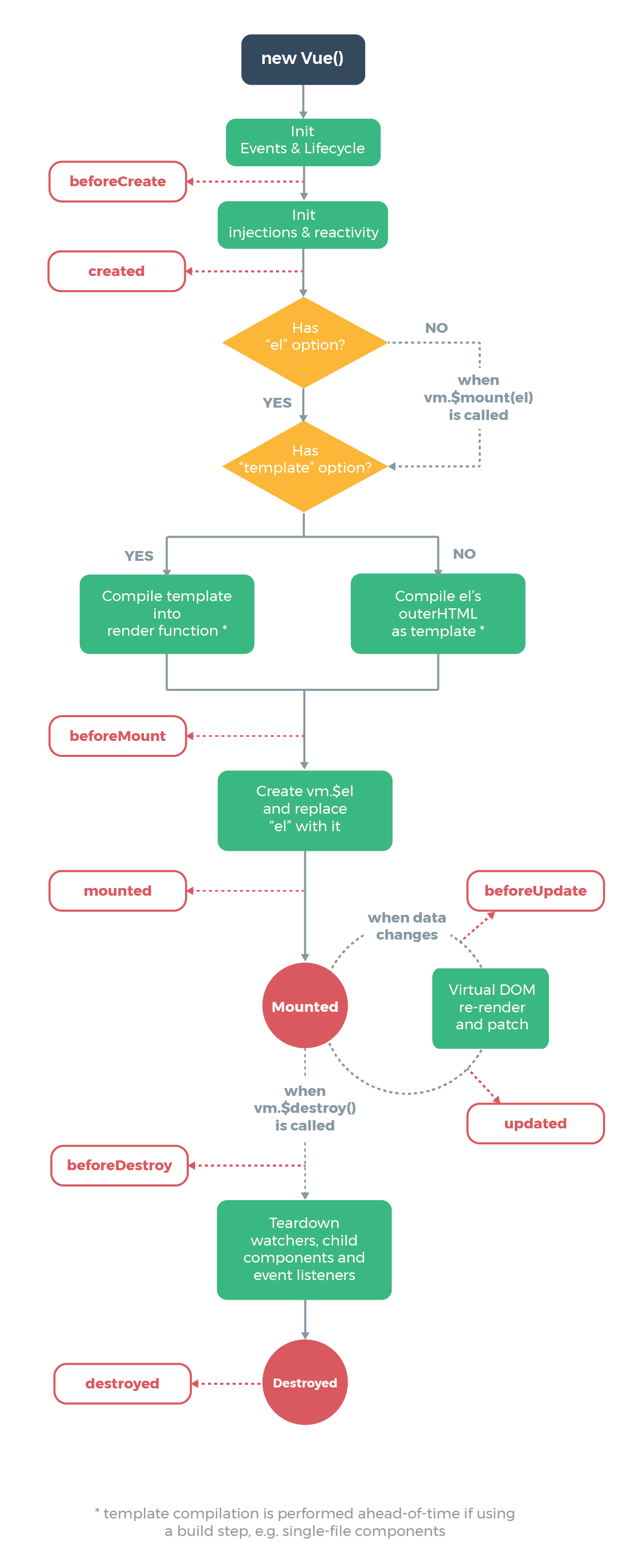
mounted阶段发生在第一个DOM呈现之后。在设置locale之前,您正在等待它。这就是发生的事情:
- Your template is evaluated
- `this.locale` is still equal to your initial `[]`
- You get an error in your console saying `locale.status` is undefined
- The `mounted` event handler is executed, which populates your `locale` prop
- The component re-renders, since its props have changed
- `locale` is now set, your placeholder works与其使用mounted,不如使用created,以确保在第一次呈现之前设置这些道具。
页面原文内容由Stack Overflow提供。腾讯云小微IT领域专用引擎提供翻译支持
原文链接:
https://stackoverflow.com/questions/50892043
复制相关文章
相似问题
腾讯云开发者

Copyright © 2013 - 2026 Tencent Cloud. All Rights Reserved. 腾讯云 版权所有
深圳市腾讯计算机系统有限公司 ICP备案/许可证号:粤B2-20090059  粤公网安备44030502008569号
腾讯云计算(北京)有限责任公司 京ICP证150476号 | 京ICP备11018762号