
调用链码错误:未知标志:
我一直在大致跟踪network.html#troubleshoot来创建我的第一个网络,并执行了一些步骤,包括安装、定位、查询一个链码。但是,在调用链码时,我会得到以下错误。
root@5a0be253ef6e:/opt/gopath/src/github.com/hyperledger/fabric/peer# peer chaincode invoke -o orderer.example.com:7050 --tls true --cafile /opt/gopath/src/github.com/hyperledger/fabric/peer/crypto/ordererOrganizations/example.com/orderers/orderer.example.com/msp/tlscacerts/tlsca.example.com-cert.pem -C testhimani123456 -n mycc --peerAddresses peer0.org1.example.com:7051 --tlsRootCertFiles /opt/gopath/src/github.com/hyperledger/fabric/peer/crypto/peerOrganizations/org1.example.com/peers/peer0.org1.example.com/tls/ca.crt --peerAddresses peer0.org2.example.com:7051 --tlsRootCertFiles /opt/gopath/src/github.com/hyperledger/fabric/peer/crypto/peerOrganizations/org2.example.com/peers/peer0.org2.example.com/tls/ca.crt -c '{"Args":["invoke","a","b","10"]}'
Error: unknown flag: --peerAddresses
Usage:
  peer chaincode invoke [flags]

Flags:
  -C, --channelID string   The channel on which this command should be executed
  -c, --ctor string        Constructor message for the chaincode in JSON format (default "{}")
  -n, --name string        Name of the chaincode

Global Flags:
      --cafile string                       Path to file containing PEM-encoded trusted certificate(s) for the ordering endpoint
      --certfile string                     Path to file containing PEM-encoded X509 public key to use for mutual TLS communication with the orderer endpoint
      --clientauth                          Use mutual TLS when communicating with the orderer endpoint
      --keyfile string                      Path to file containing PEM-encoded private key to use for mutual TLS communication with the orderer endpoint
      --logging-level string                Default logging level and overrides, see core.yaml for full syntax
  -o, --orderer string                      Ordering service endpoint
      --ordererTLSHostnameOverride string   The hostname override to use when validating the TLS connection to the orderer.
      --tls                                 Use TLS when communicating with the orderer endpoint
      --transient string                    Transient map of arguments in JSON encoding
  -v, --version                             Display current version of fabric peer server
我忽略了有关环境变量的部分。
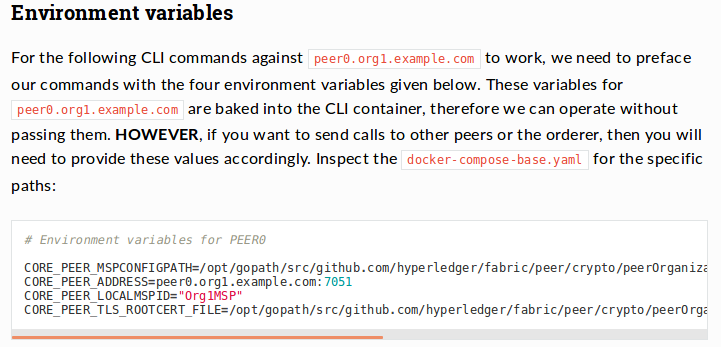
我不知道该把它写在哪里。我尝试添加docker-comp-base.yaml文件中缺少的字段,但是在运行docker exec -it cli bash命令时出现了错误,说明没有cli容器。所以我决定使用原始文件,完全忽略这个步骤。
回答 2
Stack Overflow用户
发布于 2018-06-20 05:00:21
(终于知道怎么用了)多亏了朋友,才真正找到了解决方案。
“对等链代码调用”没有标志"peerAddresses“。Hyperledger教程文档中提供的代码可能已经过时或不正确。
这可以在参考文档中看到:https://hyperledger-fabric.readthedocs.io/en/release-1.1/commands/peerchaincode.html
因此,删除peerAddresses并编写类似的东西可能会解决错误。
peer chaincode invoke -o orderer.example.com:7050 --tls --cafile /opt/gopath/src/github.com/hyperledger/fabric/peer/crypto/ordererOrganizations/example.com/orderers/orderer.example.com/msp/tlscacerts/tlsca.example.com-cert.pem -C $CHANNEL_NAME -n mycc -c '{"Args":["invoke","a","b","10"]}'Stack Overflow用户
发布于 2018-06-13 10:25:03
通过更改“和”到“或”来更改链码实例化解决了问题。由于我跳过了环境变量步骤,默认为peer0.org 1(即org1MSP)。没有为org2MSP设置任何设置。因此,它一开始就无法授予权限。
peer chaincode instantiate -o orderer.example.com:7050 --tls --cafile /opt/gopath/src/github.com/hyperledger/fabric/peer/crypto/ordererOrganizations/example.com/orderers/orderer.example.com/msp/tlscacerts/tlsca.example.com-cert.pem -C $CHANNEL_NAME -n mycc -v 1.0 -c '{"Args":["init","a", "100", "b","200"]}' -P "OR ('Org1MSP.peer','Org2MSP.peer')"https://stackoverflow.com/questions/50829383
复制相似问题
腾讯云开发者

Copyright © 2013 - 2026 Tencent Cloud. All Rights Reserved. 腾讯云 版权所有
深圳市腾讯计算机系统有限公司 ICP备案/许可证号:粤B2-20090059  粤公网安备44030502008569号
腾讯云计算(北京)有限责任公司 京ICP证150476号 | 京ICP备11018762号